

Descripción
The Anti-Spam plugin is trusted by over 200,000 websites and powered by a global spam detection network. CleanTalk “eats” spam before it reaches your website. By using cloud-based, API-driven analysis and shared spam intelligence, it provides more advanced protection than local, standalone plugins that don’t use a cloud API — helping catch spam they may miss.
🛡️ Anti-Spam Protection for your entire WordPress site
- Contact forms — block spam submitted through Contact Form 7, WPForms, Elementor Forms, Gravity Forms, Fluent Forms, Formidable Forms, and many others.
- WordPress comments — automatically detect and block spam comments.
- WooCommerce — stop fake orders, spam registrations, and spam reviews.
- User registrations — prevent spam accounts and automated registrations.
- Subscriptions and bookings — filter unwanted and automated submissions.
✨ More Than Just Anti-Spam
- 🛡️ Spam FireWall — block known spam bots before they reach your forms.
- ✉️ Real-Time Email validation — detects fake, disposable, and suspicious email addresses.
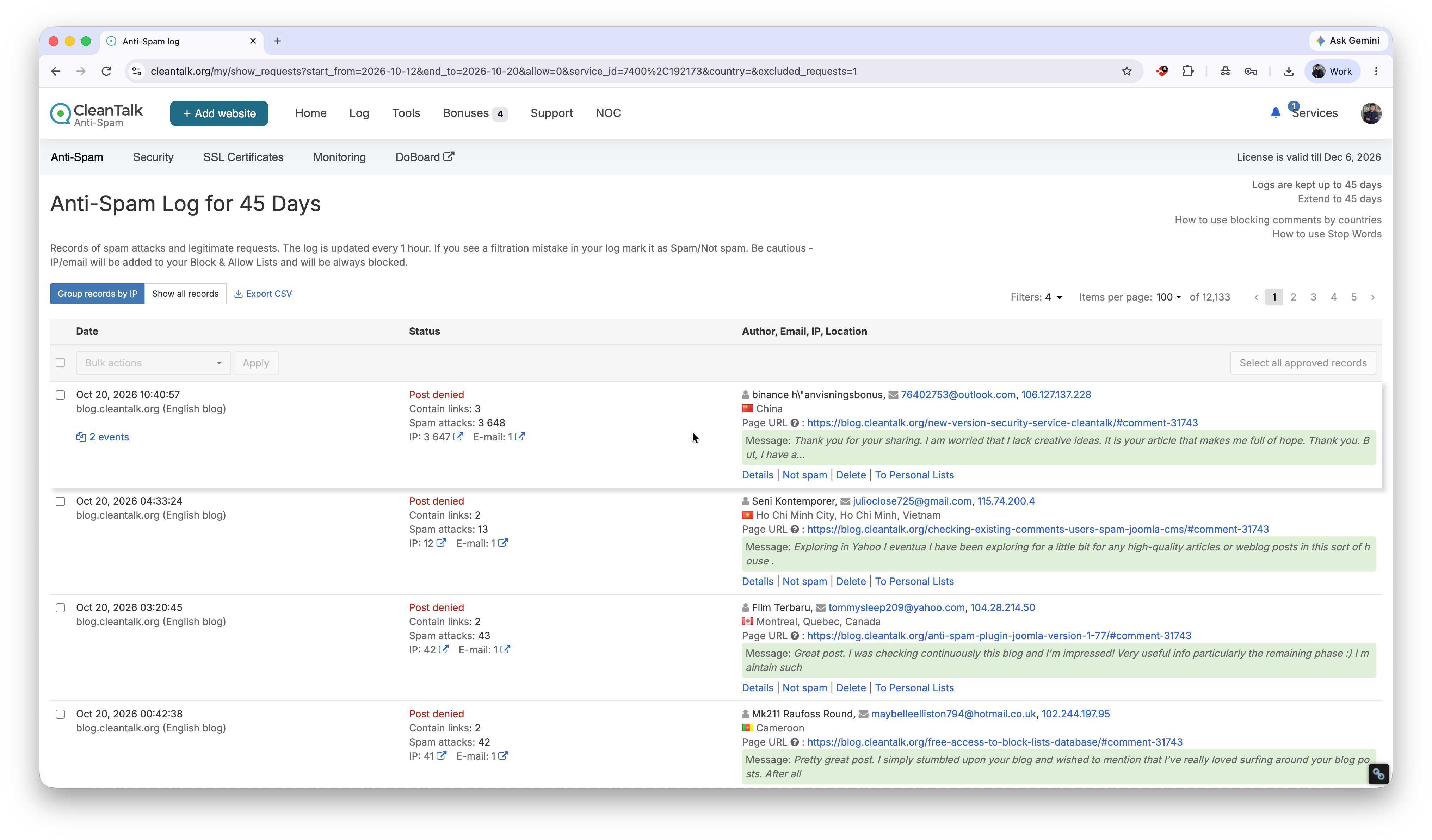
- 📋 Anti-Spam Log — shows every checked request, so you can see what was accepted or blocked and review possible false positives.
- 🔒 Contact Data Protection — protects published email addresses and phone numbers from being harvested by bots.
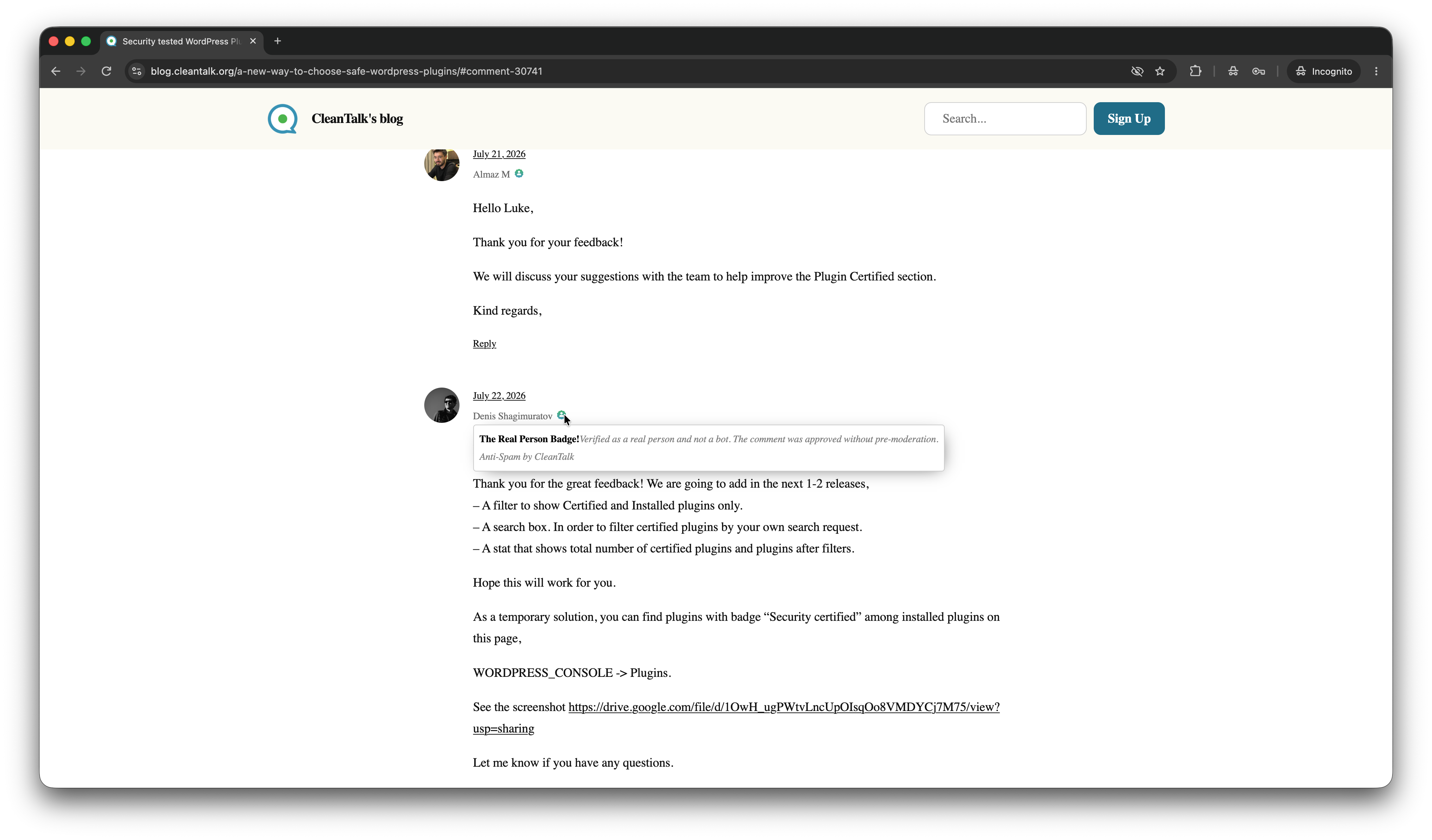
- 👤 Real Person Badge! — identifies and highlights real people in WordPress comments and can automatically approve legitimate, non-spam comments.
🧩 No CAPTCHA. No Puzzles. Less Friction.
CleanTalk analyzes submissions automatically in the background. Visitors don’t need to solve CAPTCHA challenges, select images, or complete additional verification steps.
⚡Quick Setup
Install the plugin, connect it to the CleanTalk Anti-Spam service, and your WordPress site is protected.
⭐ Public reviews
It’s more than just a tool to combat spam; it’s an integral component that enhances the overall quality and performance of your website.
techbusinessnews.com.auMejore la seguridad y protección contra spam de WordPress con CleanTalk Anti-Spam
The Hacker News.
Periodo de prueba gratis luego $12 por año
CleanTalk es un plugin anti-spam que funciona con el servicio premium Cloud Anti-Spam de cleantalk.org. Este plugin como servicio https://developer.wordpress.org/plugins/wordpress-org/detailed-plugin-guidelines/#6-software-as-a-service-is-permitted
🗂️ Managing Multiple Websites?
CleanTalk also works well for agencies, developers, and website managers. Protect and manage multiple client websites from one CleanTalk account with unlimited checks for spam.
💬 AntiSpam protection and moderation for comments
Protección anti-spam nativa para WordPress, comentarios de JetPack y cualquier otro plugins de comentarios. El plugin mueve los comentarios de spam a la carpeta SPAM o puede configurar la opción para prohibir los comentarios de spam silenciosamente. También puede activar la opción en la configuración del plugin para eliminar automáticamente los comentarios de la carpeta SPAM.
CleanTalk can also automatically approve legitimate, non-spam comments, helping you spend less time moderating your blog.
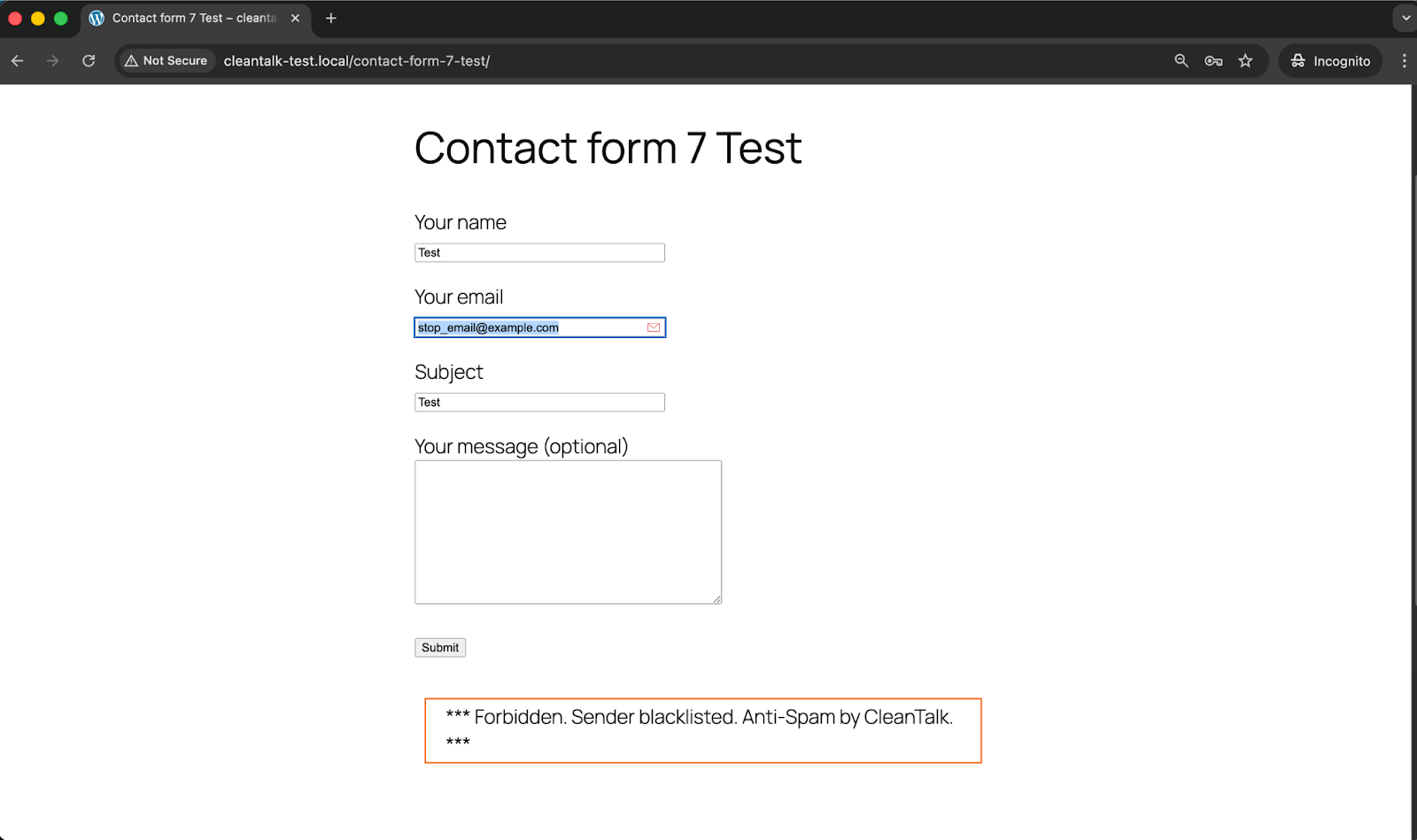
📩 Contact Form 7 Antispam
El plugin amplía la protección contra spam para Contact Form 7 (CF7). Se puede usar con cualquier otro filtro de spam de terceros.
Cómo proteger Contact Form 7 usando el plugin CleanTalk Anti-Spam
Contact Form by WPForms Antispam
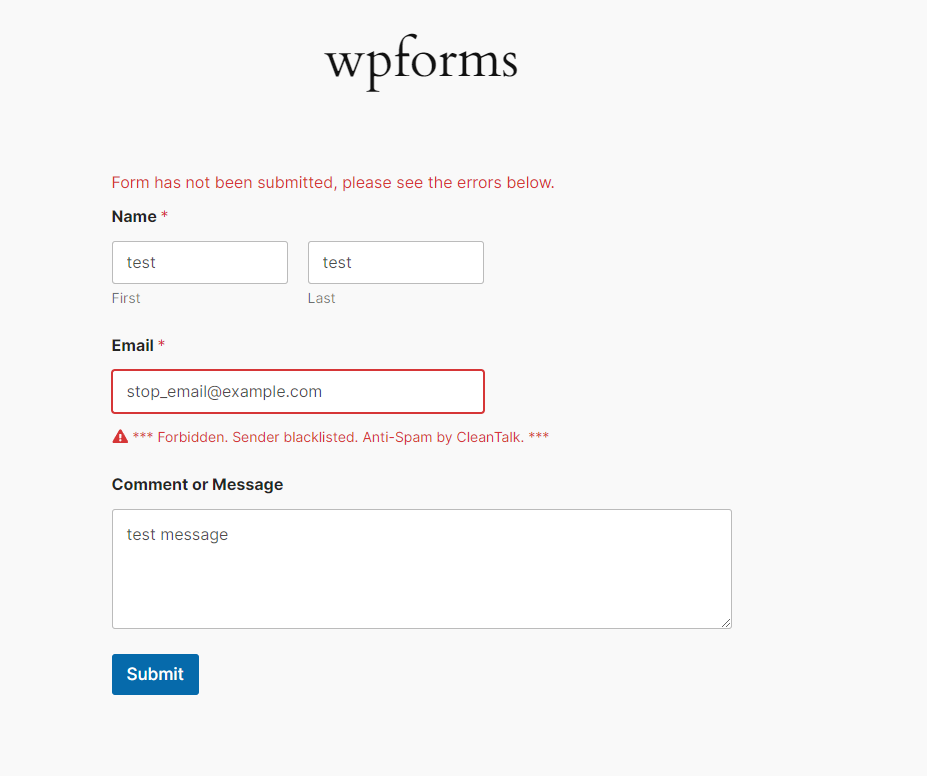
Plugin extends Contact Form by WPForms to provide spam protection. It filters spam submissions for each type of forms – simple contact form, marketing form, request a quote and etc.
Antispam for WooCommerce & fake orders filter
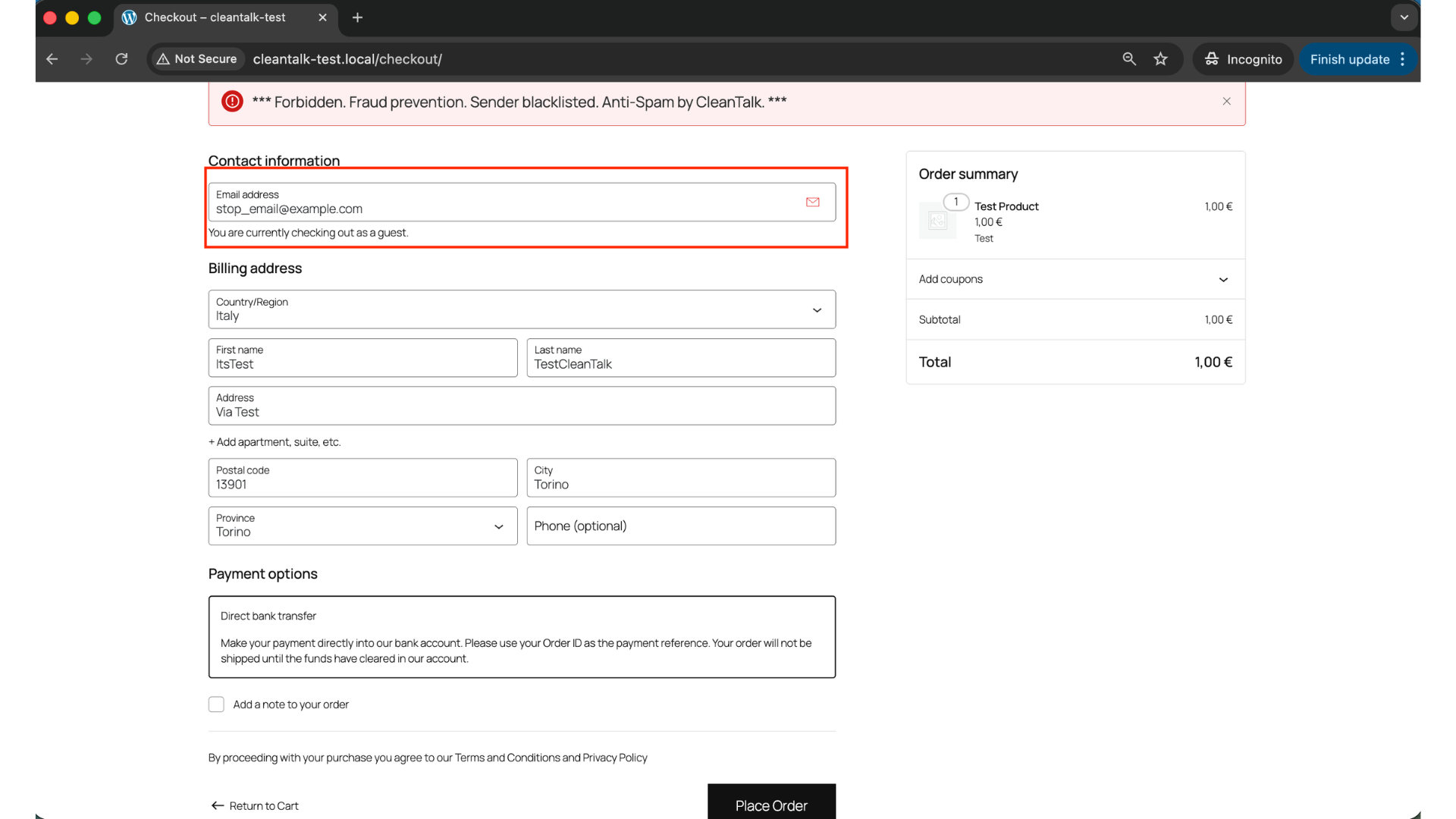
Anti-spam by CleanTalk filters spam registrations, spam reviews, and fake orders for WooCommerce (any eCommerce plugin as well). The plugin is fully compatible with WooCommerce 2.1+ and online stores.
Many other great contact, signups and all kind of forms that supported by Anti-Spam plugin by CleanTalk
- Asgaros Forum
- Avada Forms
- AWeber form builder
- Awesome Support – WordPress HelpDesk & Support Plugin
- Back In Stock Notifier for WooCommerce | WooCommerce Waitlist Pro
- bbPress by John James Jacoby
- Brave Popup Builder – Popup, Optins, Lead Generation, Survey & Interactive Content
- Brevo – Email, SMS, Web Push, Chat, and more by Brevo
- Calculated Fields Form
- Chatway Live Chat – AI Chatbot, Customer Support, FAQ & Helpdesk Customer Service & Chat Buttons
- Contact Form Clean and Simple
- Contact Form by BestWebSoft – Advanced WP Contact Form Builder for WordPress
- Contact Form Plugin by Fluent Forms Ninja forms
- Contact Form by Supsystic
- Contact Form Email
- Constant Contact Forms
- Comments – wpDiscuz By AdvancedCoding
- Customer Reviews for WooCommerce
- Floating Chat Widget: Contact Chat Icons, Telegram Chat, Line Messenger, WeChat, Email, SMS, Call Button – Chaty
- Forminator Forms – Contact Form, Payment Form & Custom Form Builder
- Easy Digital Downloads – eCommerce Payments and Subscriptions made easy
- eForm – WordPress Form Builder
- Elementor – Build, Design & Manage Forms From One Place
- Elfsight Blocks for Elementor — 80+ Widgets
- Events Manager – Calendar, Bookings, Tickets, and more! By Marcus (aka @msykes)
- Everest Forms – Contact Form, Payment Form, Quiz, Survey & Custom Form Builder with AI
- FiboSearch – Ajax Search for WooCommerce
- Flamingo
- Fluentbooking.com
- Formidable Forms – WordPress Form Builder for Contact Forms, Calculators, Quizzes & More
- Form Maker by 10Web – Mobile-Friendly Drag & Drop Contact Form Builder
- GeoDirectory – WP Business Directory Plugin and Classified Listings Directory
- GiveWP – Donation Plugin and Fundraising Platform
- gravityforms.com – Powerful data capture fueled by Gravity Forms
- Gwolle Guestbook
- Happyforms – Form Builder for WordPress: Drag & Drop Contact Forms, Surveys, Payments & Multipurpose Forms
- HivePress – Business Directory, Listings & Classified Ads Plugin
- HubSpot All-In-One Marketing – Forms, Popups, Live Chat
- Hustle – Email Marketing, Lead Generation, Optins, Popups
- JetFormBuilder — Dynamic Blocks Form Builder
- Jetpack – WP Security, Backup, Speed, & Growth
- Jotform – Online Forms — Customizable Payment, Contact, Quiz, Survey Form Builder
- Kadence Blocks — Page Builder Toolkit for Gutenberg Editor
- Kali Forms (Free & Pro) — Contact Form & Drag-and-Drop Builder
- Klaviyo
- Kulahub
- Landing Page Builder – Coming Soon page, Maintenance Mode, Lead Page, WordPress Landing Pages
- Leaky Paywall
- LearnPress – WordPress LMS Plugin for Create and Sell Online Courses
- Lead Form Builder & Contact Form By ThemeHunk
- Login & Register Customizer – Popup | Slider | Inline | WooCommerce
- MailChimp Forms by MailMunch
- MailOptin – Popup, Optin Forms & Email Newsletters for Mailchimp, HubSpot, AWeber Etc.
- My Sticky Elements – All-in-one Sticky Floating Contact Form, Call, Click to Chat, and 50+ Social Icon Tabs
- MetForm – Contact Form, Survey, Quiz, & Custom Form Builder for Elementor
- Newsletter – Send awesome emails from WordPress by Stefano Lissa
- Newsletters by Tribulant Software
- Newsletters – MC4WP: Mailchimp for WordPress
- NEX-Forms – Ultimate Forms Plugin for WordPress by Basix
- Nextend Social Login and Register by Nextendweb
- Ninja forms by Kevin Stover
- Piotnet by piotnet.com
- Product Enquiry for WooCommerce (Now with AI Assistant) By WisdmLabs
- Quform by quform.com
- QuickCal by quickcal.co
- RegistrationMagic – Custom Registration Forms, User Registration, Payment, and User Login By Metagauss
- Simple Registration for WooCommerce By Astoundify
- Smart Forms – when you need more than just a contact form By EDGARROJAS
- Strong Testimonials By WP Chill
- SureForms – Drag & Drop Contact Form & Form Builder, Payment Form, Survey, Quiz & Calculator By Brainstorm Force
- User Registration & Membership – Free & Paid Memberships, Subscriptions, Content Restriction, User Profile, Custom User Registration & Login Builder By wpeverest
- Visual Form Builder By Matthew Muro
- WP Booking System – Booking Calendar By Roland Murg
- User Frontend: AI Powered Frontend Posting, User Directory, Profile, Membership & User Registration By weDevs
- WS Form LITE – Drag & Drop Contact Form Builder By Mark Westguard
- Wufoo Shortcode By wronganswersonly
- WP User Frontend, UserPro
- WordPress Landing Pages
- ZeroBounce Email Verification & Validation By zerobounce
- Zoho Forms – Drag & Drop Form Builder for Websites – Contact Forms, Payment Forms, Order Forms & More By Zoho Forms
Protection for the forms above works as a built-in feature of Anti-Spam by CleanTalk without requiring any additional actions from the user.
Check existing users and comments for spam. Bulk spam comments removal. Spam comment Cleaner
With the help of anti-spam by CleanTalk you can inspect through existing users, comments to find and quickly delete spam at once. To use this function, go to WP Console -> Comments -> Find spam comments/users.
Listas negras privadas para el servicio anti-spam
Bloquea automáticamente los comentarios y registros de tu lista negra de direcciones de correo electrónico/IP privada.
Ocultar el campo “Web” para comentarios
Esta opción oculta el campo “web” de los formularios de comentarios estándar de WordPress. Después de eso, los spammers no podrán enviar enlaces de spam usando el campo “web” en la parte inferior del formulario de comentarios.
Spam FireWall
Spam FireWall allows blocking the most active spam bots before they get access to your website. It prevents spam bots from loading website pages so your web server doesn’t have to perform all scripts on these pages. Also it prevents scanning of pages of the website by spam bots. Therefore Spam FireWall significantly reduces the load on your web server. Spam FireWall also makes CleanTalk the two-step protection from spam bots. Spam FireWall is the first step and it blocks the most active spam bots. CleanTalk Anti-Spam is the second step and checks all other requests on the website in the moment of submitting comments/registers etc. How does it work?
- The visitor enters to your web site.
- Los datos de las solicitudes HTTP se verifican en casi 5.8 millones de IPs identificadas de bots de spam.
- Si es un bot de spam activo, el bot obtiene una página en blanco; si es un visitante, recibe una página normal. Este proceso es completamente transparente para los visitantes.
CleanTalk SpamFireWall is similar to Cloudflare’s DDoS protection and Bot Management solutions. However, it runs locally on your server, uses your existing hosting and DNS settings, and does not route all your HTTP/HTTPS traffic through Cloudflare’s cloud.
Spam FireWall: Anti-Flood & Anti-Crawler
Spam FireWall: Anti-Flood and Anti-Crawler options are intended for blocking unwanted bots, content parsing, shop goods prices parsing or aggressive website scanning bots. Learn more https://cleantalk.org/help/anti-flood-and-anti-crawler
By default, well-known good bots — including AI crawlers such as GPTBot (ChatGPT), ClaudeBot (Claude), Google-Extended (Gemini), and Copilot — are allowed. You can choose which of these bots to block individually in your private lists. Blocking a bot will stop the corresponding AI service from accessing your content.
¿Cómo proteger sitios de bots de spam sin CAPTCHA?
CleanTalk Anti-Spam protects websites from spam bots without using traditional CAPTCHA, reCAPTCHA, or other visitor challenges. Instead of showing CAPTCHA puzzles, the service uses behavioral analysis, invisible JavaScript tests, and a global spam database to detect spam automatically in the background. This CAPTCHA-free anti-spam protection works for contact forms, comments, registrations, and WooCommerce checkouts without creating friction for real visitors. By replacing CAPTCHA with automated spam detection, CleanTalk helps improve usability, accessibility, and conversion rates while still blocking spam effectively.
Sometimes CAPTCHA reminds us of the doodles of a two year old child. For users with vision problems CAPTCHA is an insurmountable obstacle. Users hate captcha. Captcha for users means “hate”. Unreadable CAPTCHA stops about 80% of site visitors. After 2 failed attempts to decipher CAPTCHA 95% of visitors reject further attempts. At the sight of CAPTCHA and after input errors, many visitors leave the resource. Thus, CAPTCHA helps to protect the resource spam both from bots and visitors. CAPTCHA is not a panacea from spam. Doubts concerning the Need for CAPTCHA?
“Ultimately, CAPTCHAs are useless for spam because they’re designed to tell you if someone is ‘human’ or not, but not whether something is spam or not.” Matt Mullenweg
Validación de correo electrónico en tiempo real. ¿El correo electrónico es real o no?
It is very important to be sure that the user used his real email address. Spambots very often use fake email addresses, i.e. which addresses do not exist. CleanTalk will check email addresses for existence in real time. Non-existing email addresses also entail several other problems for website owners.
Mejora tu lista de correo electrónico con la validación del correo electrónico sin correos electrónicos falsos.
Bloqueo de correos electrónicos desechables y temporales.
Bloquea usuarios falsos y sospechosos con correos electrónicos desechables y temporales para mejorar la entrega del correo electrónico. Por lo tanto, también evita la actividad malintencionada, los bots de spam y los trolls de internet.
Detiene el spam en el formulario de búsqueda.
Los robots de spam pueden usar tu formulario de búsqueda para hacer una solicitud GET con texto de spam.
CleanTalk Anti-Spam tiene la opción de proteger el formulario de búsqueda de tu web de los bots de spam. Cada vez, la búsqueda genera una nueva página y si hay muchas solicitudes, esto puede crear una carga adicional. Entonces, en algunas condiciones, las búsquedas de spam pueden indexarse, lo que afecta al SEO,
Siempre sabrás qué buscaban los usuarios en tu sitio.
Desactivar los comentarios
Esta opción desactiva los comentarios en tu sitio. Puedes elegir una o varias opciones:
- Desactivar los comentarios para las entradas
- Desactivar los comentarios para las páginas
- Desactivar los comentarios para los medios
When using Disables comments, existing comments will not be deleted and will remain on the pages.
Email, Phones Address Encoder
CleanTalk Anti-Spam offers a feature called “Encode contact data” that is designed to encode all email addresses on the website pages. Encoding email, phontes addresses increases the level of protection of contact data from being abused, parsed, getting spammed and used in spam mailing lists by bots and online criminals. To reveal the encoded email address simply click on it and it will be decoded instantly.
Honeypot field
The option helps to block bots. The honeypot field option adds a hidden field to the form. When spambots come to a website form, they can fill out each input field. Enable this option to make the protection stronger on these forms. Learn more about supported forms here.
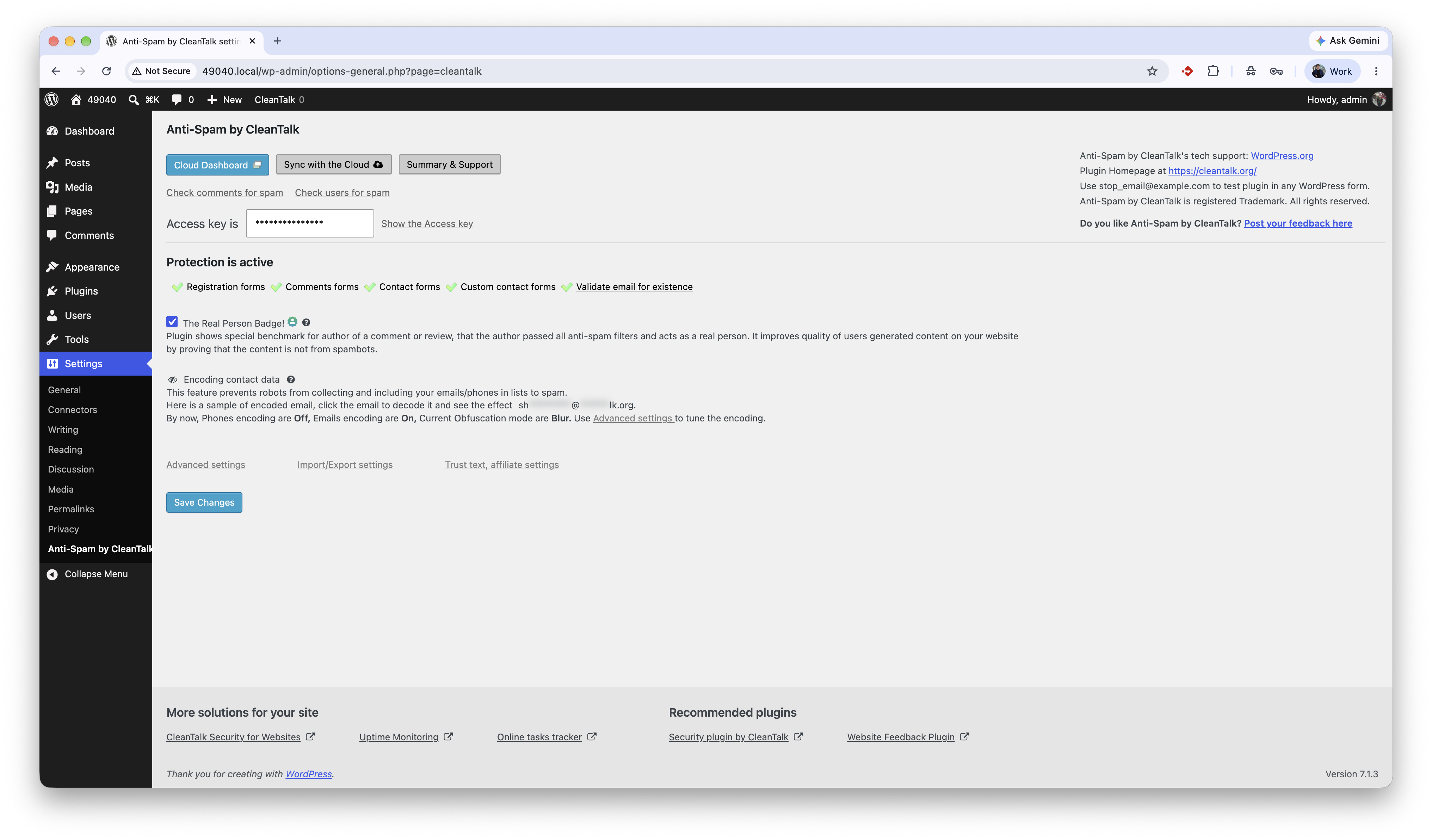
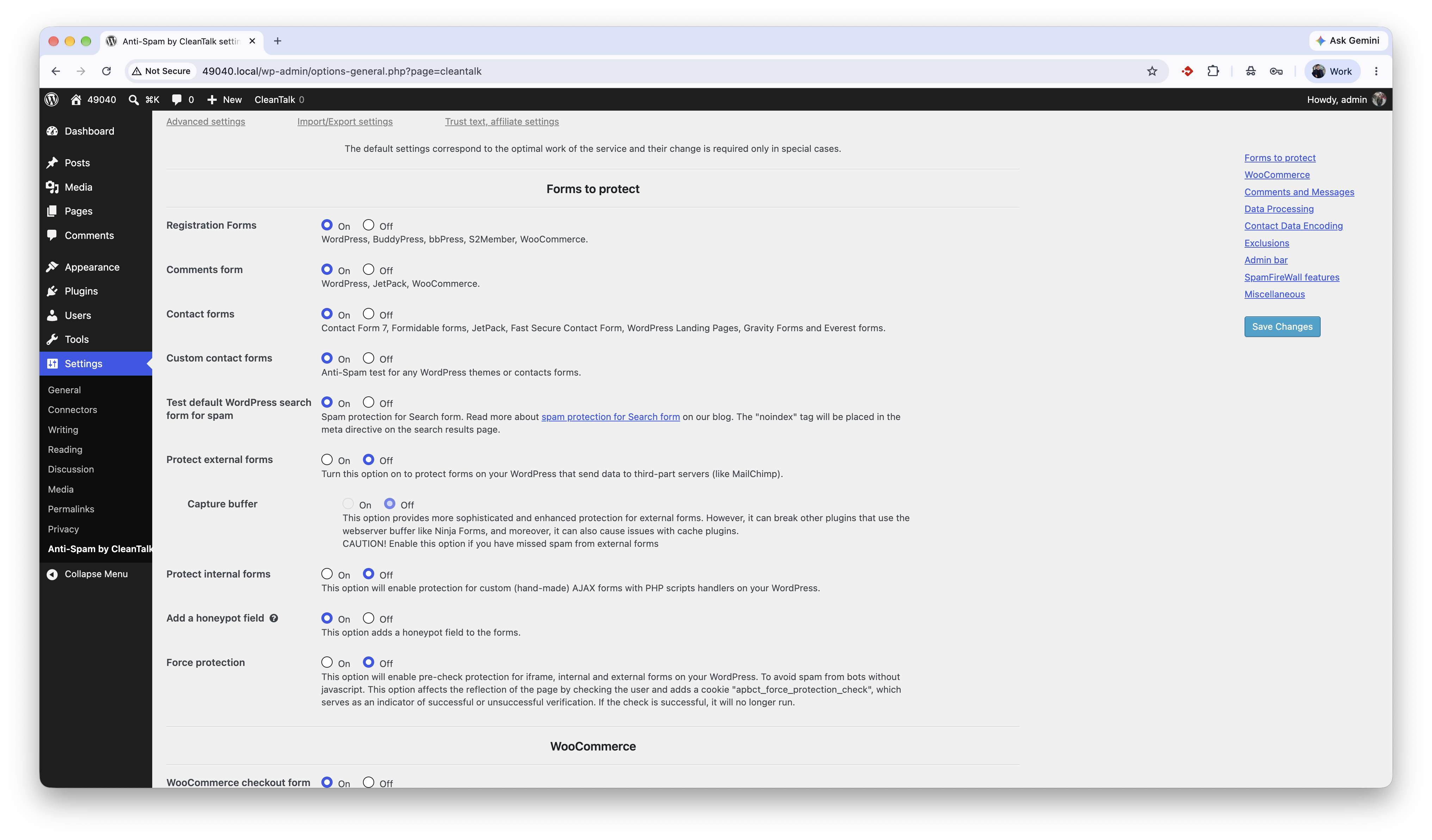
Capturas de pantalla
Instalación
Instrucciones de instalación
Download, install and activate ‘Anti-spam by CleanTalk’.
Obtener clave de acceso https://cleantalk.org/register
Enter Access key in the settings: WordPress console -> Settings -> Antispam by CleanTalk
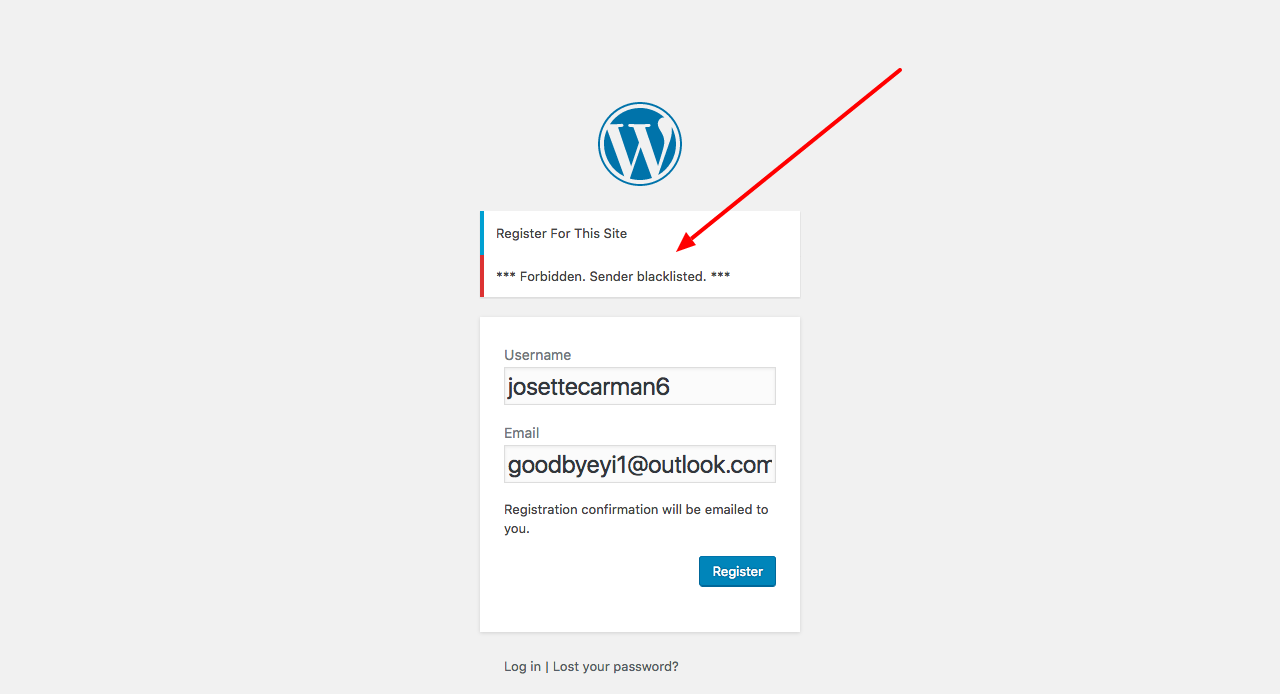
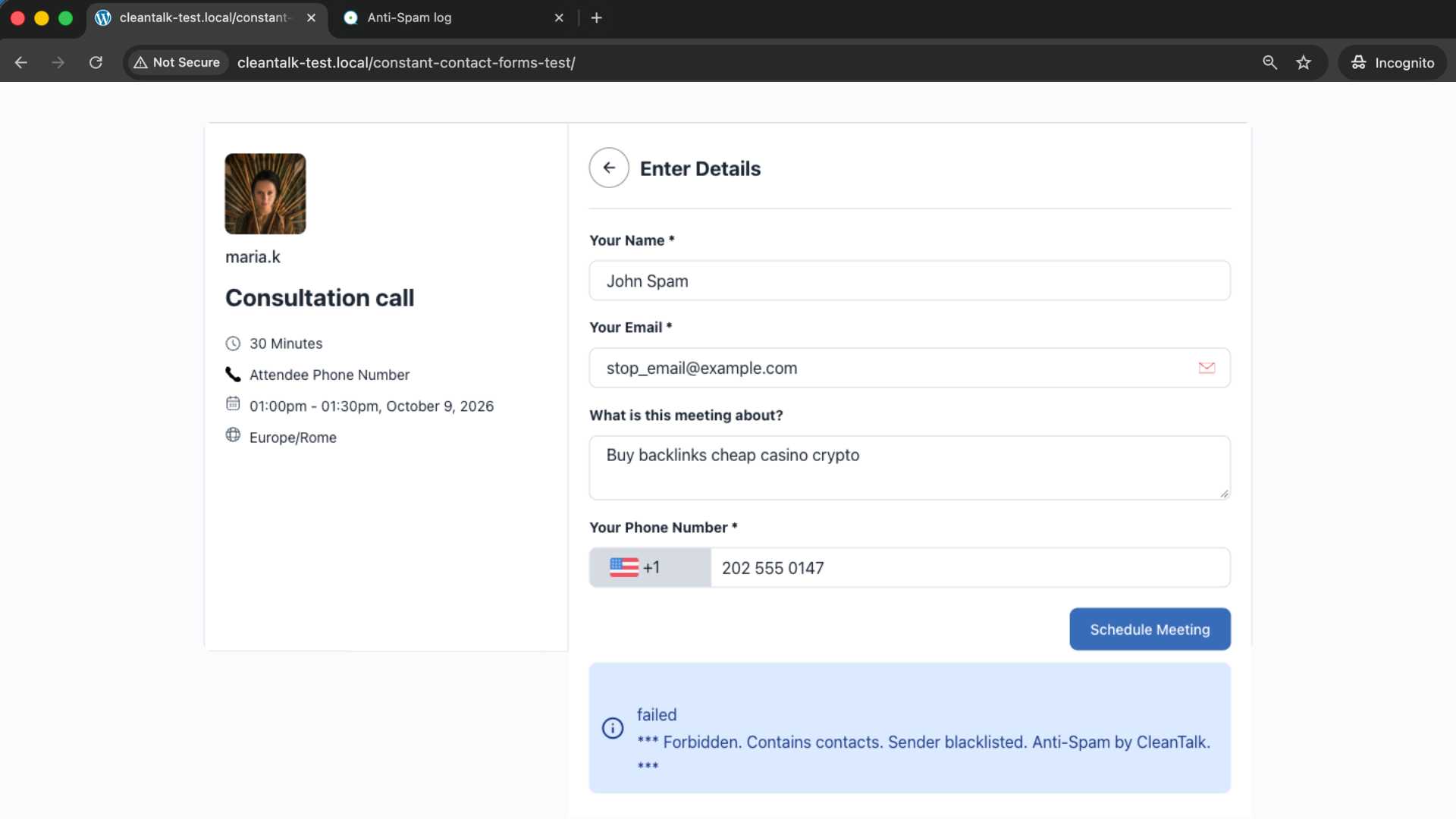
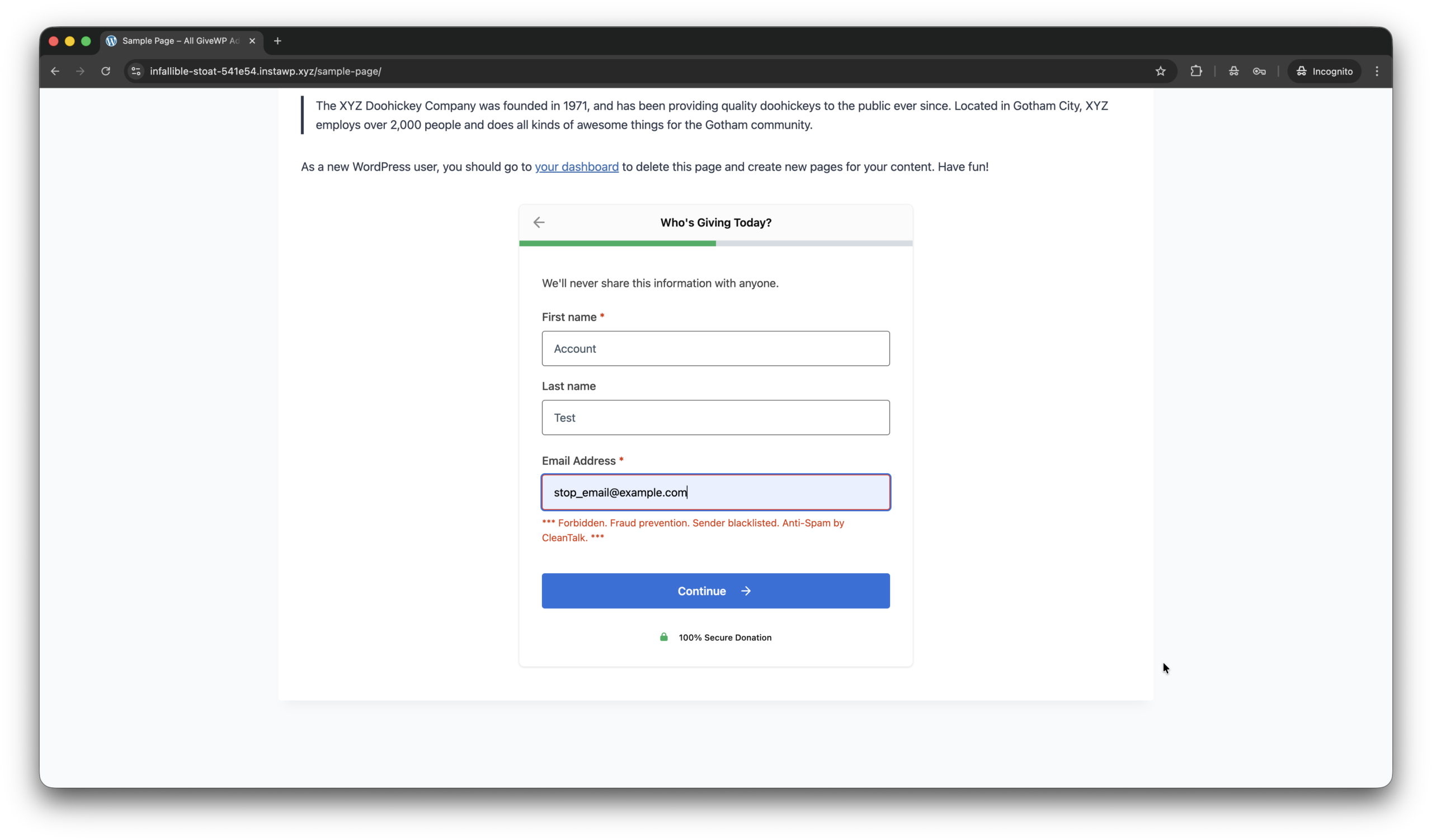
Realiza un comentario de spam ficticio (registro o mensaje de contacto) con el correo electrónico stop_email@example.com. Deberías ver el aviso: Prohibido. Remitente en la lista negra.
¡Listo! El plug-in está listo para usar.
Video guide – Anti-Spam Plugin Installation in WordPress
Important! To test spam protection you must post a dummy submissions as website visitor (use must logged out from WordPress console), because the plugin doesn’t filter submissions from WordPress administrators.
¿Cómo se puede configurar el plugin en la versión WPMU?
In WordPress multisite version you can switch the plugin to use Global Access key. In this way the plugin doesn’t show any options to enter Access key in plugin settings and doesn’t show Trial banner in WordPress backend. To setup global CleanTalk access key for all websites in WPMS, define constant in your wp-config.php file before defining database constants:
define('CLEANTALK_ACCESS_KEY', 'place your key here');
Hazlo antes de activar el plugin. Si el plugin ya está activado, desactívalo, agrega el código y actívalo nuevamente. Ahora, todos los subsitios tendrán esta clave de acceso.
FAQ
-
Does CleanTalk stop contact form spam?
-
Yes, CleanTalk stops spam in contact forms, registration forms, comments, and other forms on your website. It uses a combination of algorithms and a cloud-based database to identify and block spam submissions in real-time.
-
Does CleanTalk protect WooCommerce from fake orders and spam registrations?
-
Yes, CleanTalk protects WooCommerce from fake orders and spam registrations. It checks all incoming orders and registrations against its anti-spam database and algorithms to ensure that only legitimate users can place orders or register on your site.
-
Which WordPress forms does CleanTalk protect?
-
CleanTalk protects all WordPress forms, including but not limited to:
* Comments
* Registration forms
* Contact forms
* Sign-up forms
* Search forms
* Subscription forms -
¿Por qué me envían spam?
-
Spammers want to get backlinks from your site to improve their site’s PageRank or redirect your visitors to malicious sites.This level of spam can damage your reputation with readers and commentators if you fail to tackle it. It is not uncommon for some WordPress websites to receive hundreds or even thousands of comments every week. However, by using a CleanTalk plugin, spam can be easily handled by your WordPress website.
-
¿Es segura la protección antispam para los visitantes móviles?
-
Sí, lo es. El plugin no bloquea a los visitantes móviles ni a los visitantes del sitio de escritorio. Utiliza varias pruebas antispam independientes para reducir el número de resultados falsos y tener una tasa de falsos positivos lo más baja posible. Múltiples pruebas antispam ayudan a evitar bloqueos falsos/positivos para los visitantes reales del sitio incluso si una de las pruebas falla.
-
¿Cómo puedo probar la protección anti-spam?
-
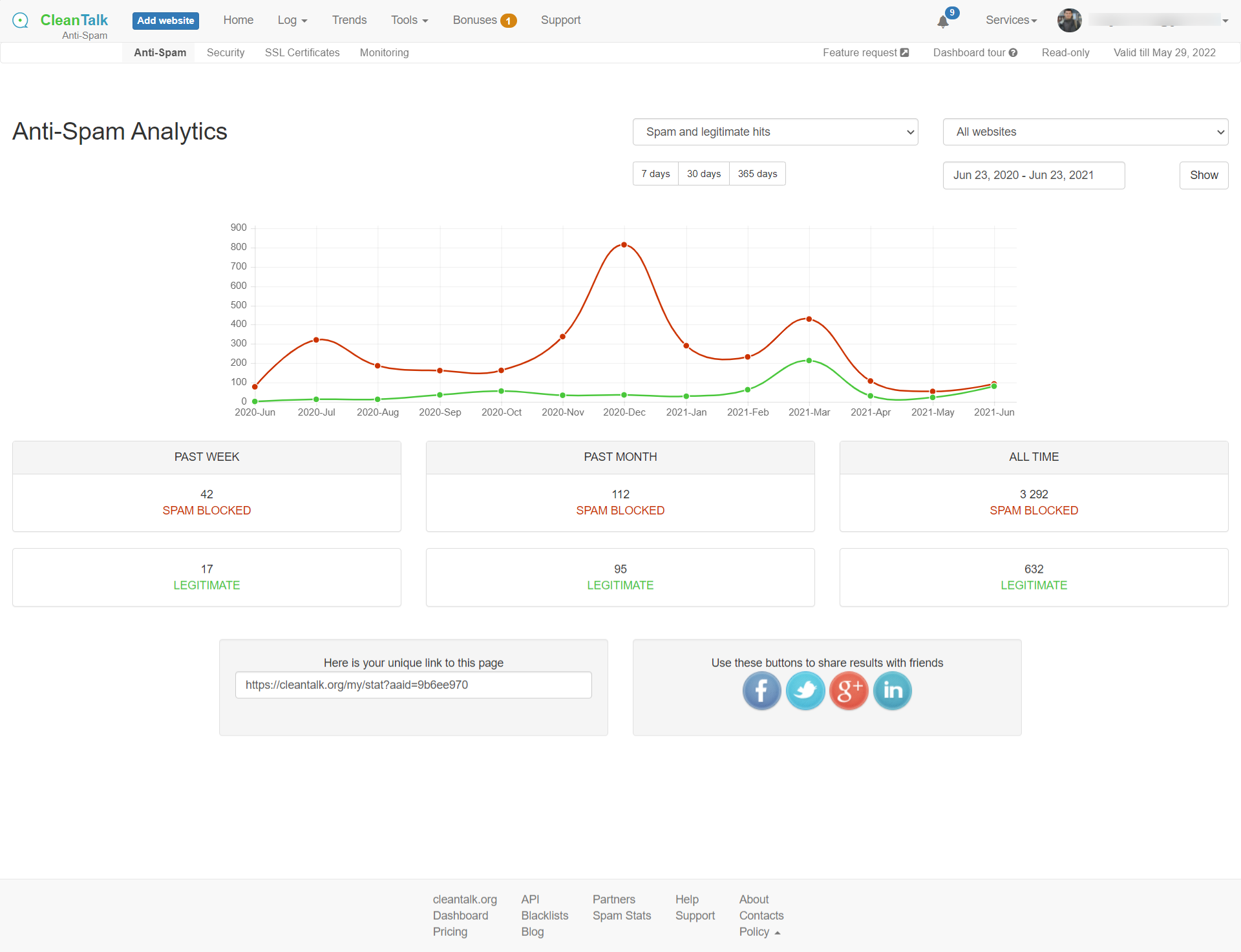
Please use the email stop_email@example.com for comments, contacts or signups to see how the anti-spam protection works. Also, you can see the logs for the last 7 days in the Dashboard or look at the folder “Spam” for banned comments.
-
¿Cómo detiene el plugin el spam?
-
Por favor, ten en cuenta – las acciones del administrador no se están comprobando.
El plugin usa varias pruebas simples para detener a los spammers:
- Prueba anti-spam de JavaScript. El 99% de los bots de spam no tienen compatibilidad completa con las funciones de JavaScript. Por lo tanto, el plugin tiene el código que puede ejecutar un visitante normal y no puede ejecutarlo el bot de spam.
- Correo Electrónico, IP, comprobar la entrada de actividad de spam de dominio. El plugin utiliza la base de datos en línea en la actividad de spam cleantalk.org, que consta de más de 20 millones de registros de actividades spam de los IPs, correo electrónicos, dominios y ASN. Si el IP o el correo electrónico del remitente está en la base de datos, el remitente recibe algunas puntuaciones de spam. Para reducir la tasa de falso/positivo el plugin no solo utiliza la prueba de lista negra para prohibir los spammers, el remitente será prohibido cuando, y solo cuando las pruebas múltiples de spam han fracasado.
- Tiempo de envío del comentario. Los bots de spam suelen enviar la información inmediatamente después de que se carga la página, esto sucede porque los bots de spam no llenan realmente el formulario web, solo envían datos $_POST al blog. El visitante normal envía los datos después de varios segundos o minutos.
-
¿Qué pasa con el spam de pingback y trackback?
-
The plugin does not filter trackbacks or pingbacks, but it can disable them using WordPress core functionality. To enable this option, go to: WordPress Dashboard Settings Anti-Spam by CleanTalk Advanced Settings “Disable Pingbacks and Trackbacks”.
-
¿Puedo utilizar CleanTalk para eliminar la espera de comentarios de spam?
-
Yes, you can. The plugin has the option to test all pending comments via database of spam active IP/Email, found spam comments will be moved to Trash folder.
-
¿Cómo encuentra el plugin spam en comentarios pendientes o cuentas registradas?
-
El plugin comprueba todos los comentarios que no son spam en la base de datos de la lista negra y te muestra los remitentes que tienen actividad de spam en otras webs.
Hay algunas diferencias entre la base de datos de lista negra y la API para protegerte de los registros/comentarios de los robots de spam online. Las listas negras muestran todo el historial de la actividad de spam, pero nuestra API (que se usa en las pruebas de spam) también se basa en otros parámetros: último día de actividad, número de ataques de spam durante los últimos días, etc. Estos mecanismos nos ayudan a reducir el número de resultados falsos. Por tanto, no hay nada extraño si algunos correos electrónicos o IPs no se encuentran en las pruebas en lote de los comentarios/cuentas.Para revisar los comentarios por favor ve aquí:
WordPress console -> Comments -> Find spam comments
Para revisar los usuarios por favor ve aquí:
WordPress console -> Users -> Find spam users
-
Is the plugin compatible with WordPress MultiUser (WPMU or WordPress network)?
-
Yes, the plugin is compatible with WordPress MultiUser. Each blog in multisite environment has individual anti-spam options for the protection from spam bots.
-
Después de la instalación, noté que el número de ataques de spam ha aumentado en las estadísticas.
-
There are a few reasons for this:
- With the indexing of your web-site by the search systems, appearance of external links and better search results position, your web-site attracts more and more spambots.
- Los sistemas de protección no transparentes como CAPTCHA o pregunta/respuesta, que no tienen estadísticas de ataques de spam, no le permiten ver toda la imagen, o la imagen está incompleta.
- Los métodos de conteo para ataques de spam y bots de spam son diferentes para diferentes sistemas, por lo tanto, aparece la diversidad. Buscamos proporcionar estadísticas detalladas.
-
Why my dummy “spam” comment passed to the WordPress?
-
El plugin tiene varias opciones para detectar bots de spam y humanos. Si solo publica texto de spam como este:
"I want to sell something", "Buy something here.." and etclos comentarios se pasarán, porque el plugin detecta que el remitente es un humano. Por lo tanto, utiliza el correo electrónico especial stop_email@example.com para probar la funcionalidad antispam o espera unos días para ver cómo funciona el plugin.
-
¿Es gratis o de pago?
-
The plugin includes a free trial and requires a paid subscription after the trial ends. It uses the CleanTalk cloud to filter spam on your website, providing highly effective spam protection. Cloud-based filtering is more sophisticated than standalone solutions, reducing the risk of blocking legitimate visitors while allowing fewer spammers through.
Pricing starts at $12/year/site and includes unlimited spam checks.
-
¿Puedo utilizar CleanTalk con plugins de caché?
-
Anti-spam by CleanTalk no utiliza código HTML estático en sus plantillas, por lo que todas las funciones anti-spam funcionan correctamente con cualquier plugin de caché de WordPress.
-
¿El plugin protege contra bots de spam si uso formularios con servicios de terceros?
-
Sí, lo hace. El plugin protege los formularios web de tus webs que envían datos a servidores de terceros (como MailChimp). Para activar esta protección, establece la opción “Proteger formularios externos” en los ajustes del plugin.
-
¿Es CleanTalk compatible con Cloudflare?
-
CleanTalk es totalmente compatible con CloudFlare. El servicio no filtra las IP de CloudFlare (AS13335) a través de la base de datos de listas negras, por lo que en este caso el plugin/servicio filtra los robots de spam utilizando otras pruebas antispam.
-
¿ Es CleanTalk compatible con una red de distribución de contenidos (CDN)?
-
Sí, lo es. CleanTalk funciona con cualquier sistema de CDN, es decir, CloudFlare, MaxCDN, Akamai.
-
¿Puedo utilizar la funcionalidad de CleanTalk en mis plugins?
-
Yes, you can. Follow this guide https://cleantalk.org/help/api-check-message
-
Veo dos cargas del script cleantalk_nocache.js. ¿Por qué lo usas dos veces?
-
This script is used for AJAX JavaScript checking. Different themes use different mechanisms of loading, so we use two methods for loading our script. If you absolutely know what you are doing, you can switch one of the methods off by defining constants in your wp-config.php file:
define('CLEANTALK_AJAX_USE_BUFFER', false); //false - don't use output buffering to include AJAX script, true - use ito
define('CLEANTALK_AJAX_USE_FOOTER_HEADER', false); //false - don't use wp_footer() and wp_header() for including AJAX script, true - use it -
¿Puedo agregar exclusiones para algunas páginas de mi sitio?
-
Yes, you can. There is a special setting in plugin settings.
You could use this guide to learn more: https://cleantalk.org/help/exclusion-from-anti-spam-checking#wordpress -
¿Qué No puedo enviar mis datos personales a los servidores CleanTalk?
-
Sí, puedes excluir tus datos. Hay un ajuste especial en los ajustes del plugin.
Puedes usar esta guía para obtener aprender más: https://cleantalk.org/help/exclusion-from-anti-spam-checking#WordPress_field_exclusions -
How to test Spam FireWall?
-
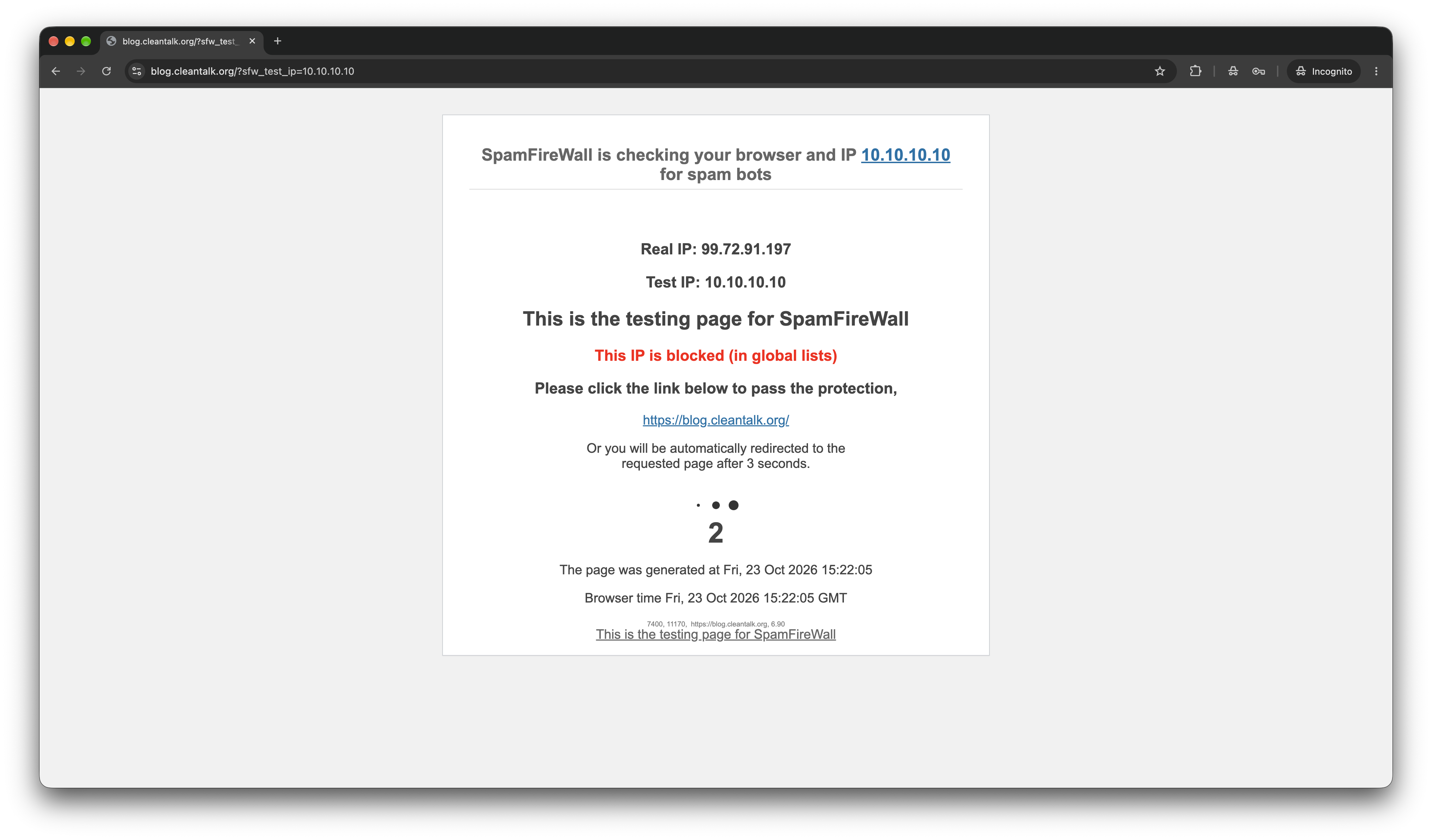
Use la IP especial 10.10.10.10 en la URL para probar Spam FireWall. Por ejemplo,
https://cleantalk.org/blog/?sfw_test_ip=10.10.10.10¡Atención! El modo de incógnito debe estar activado en tu navegador cuando realizas una prueba. Para activar el modo de incógnito, presiona Ctrl + May + N para los navegadores Chrome, Opera y Safari; presiona Ctrl + May + P para Firefox, Internet Explorer y Microsoft Edge. Una guía completa para habilitar el modo de incógnito está aquí: https://www.wikihow.com/Activate-Incognito-Mode
-
How can I enter access key in WPMU version?
-
Para configurar la clave de acceso global de CleanTalk para todos los web en WPMU, define la constante en tu archivo “wp-config.php” antes de definir las constantes de la base de datos:
define('CLEANTALK_ACCESS_KEY', 'place your key here');Ahora, todos los subsitios tendrán esta clave de acceso.
-
¿Funciona el plug-in con Varnish?
-
CleanTalk works with Varnish, it protects WordPress against spam, but by default the plugin generates a few cookies for the protection from spam bots and it also disables Varnish cache on pages where CleanTalk’s cookies have been stored. To get rid of the issue with cache turn off the option ‘Set cookies’ in the plugin settings.
WordPress console -> Settings -> CleanTalk -> Advanced settingsAhora el plugin protegerá los comentarios de WordPress, los registros y la mayoría de los formularios de contacto populares, pero no protegerá algunos de los formularios de contacto que se usan con poca frecuencia.
-
Does the anti-spam plugin work with Accelerated Mobile Pages (AMP)?
-
Yes, it does. But you have to turn off the SpamFireWall and the option ‘Use AJAX for JavaScript check’ in Advanced settigns of the plugin to be fully compatible with Accelerated Mobile Pages.
-
¿Debo cambiar algo en los ajustes del plugin o en mi escritorio de CleanTalk cuando cambio mi web de HTTP a HTTPS o viceversa?
-
No. You don’t need to change anything in the plugin’s settings or in your CleanTalk Dashboard. The plugin will work regardless of the protocol.
-
Gestión de comentarios de spam
-
Por defecto, todos los comentarios de spam se colocan en la carpeta de spam, ahora puedes cambiar la forma en que el plugin trata los comentarios de spam:
- Move to the Spam folder. All spam comments will be placed to the folder “Spam” in the WordPress Comments section except comments with Stop-Words. Stop-Word comments will be always stored in the “Pending” folder.
You can prevent the proliferation of Spam folder. It can be cleaned automatically using the option “Keep spam comments for 15 days.” Enable this option in the settings of the plugin: WordPress Admin Page -> Settings -> Antispam by CleanTalk -> Advanced settings -> enable “Keep spam comments for 15 days” -> Save Changes.
-
Mover a la papelera. Todos los comentarios de spam se colocarán en la carpeta “Papelera” en la sección de comentarios de WordPress, excepto los comentarios con palabras de parada. los comentarios de palabras de parada siempre se almacenarán en la carpeta “Pendiente”.
-
Ban comments without moving to WordPress backend. All spam comments will be deleted permanently without going to the WordPress backend except comments with Stop-Words. Stop-Word comments will be always stored in the “Pending” folder.
Los comentarios bloqueados y prohibidos se pueden ver en el registro anti spam aquí: https://cleantalk.org/my/show_requests?int=week
Para administrar las acciones con comentarios de spam, ve al panel de control, selecciona la web para la que deseas cambiar las acciones y ve a “Ajustes” debajo del nombre de la web.
Por favor, lee más aquí:
https://cleantalk.org/help/spam-comment-management -
¿Es compatible el plugin con la RGPD de la UE?
-
Sí lo es. Por favor, lee este artículo,
https://cleantalk.org/publicoffer#cleantalk_gdpr_compliance -
Is CleanTalk Google reCAPTCHA alternative?
-
Yes, CleanTalk can be used as an alternative to reCAPTCHA, but it works differently.
Instead of showing challenges, it blocks spam automatically in the background with no user interaction, improving user experience and conversions. -
Yes — CleanTalk can be used as an alternative to Akismet.
They solve the same problem, but CleanTalk protects all site forms (not just comments) and works as a broader, cloud-based anti-spam solution. -
¿El plugin antispam protegerá mi tema?
-
Yes, it will. The Anti-spam by CleanTalk is compatible with any WordPress theme.
-
¿Debería usar otras herramientas anti-spam (Captcha, reCaptcha, etc.)?
-
CleanTalk stops up to 99.998% of spam bots, so you can disable other anti-spam plugins (especially CAPTCHA-type anti-spam plugins). In some cases several anti-spam plugins could conflict with each other.
Reseñas


Colaboradores & Desarrolladores
“Anti-Spam, Spam FireWall by CleanTalk” es software de código abierto. Las siguientes personas han contribuido a este plugin.
Colaboradores


“Anti-Spam, Spam FireWall by CleanTalk” ha sido traducido en 24 idiomas. Gracias a los traductores por sus contribuciones.
Traduce “Anti-Spam, Spam FireWall by CleanTalk” a tu idioma.
¿Interesado en el desarrollo?
Revisa el código, echa un vistazo al repositorio SVN, o suscríbete al registro de desarrollo por RSS .
Historial de cambios
6.91 27.10.2026
- Fix. Settings. Improve hide function.
- Fix. SFW. AC/AF pass cookie value fixed. (#917)
- Upd. Firewall. Improve fw check.
- Fix. Settings. Getting brief fixed. (#914)
- Fix.code.improve statement (#912)
- Upd. Code. Editing token validation for ipv6
- Upd. Code. Editing the definition of an authorized user
- Fix. Code. Set cookie expires attribute fixed.
- Fix. Anti Flood. Passed cookie fixed. (#910)
- Fix. Integration. Brevo (Sendinblue) integration fixed. (#911)
- Fix. Cookies. Sync event token on refresh events.
- Fix. Alt Sessions. Removed duplicated request.
- Fix. Contact Encoder. Fixed mobile layout.
- Upd. Cleantalk.php. Rotate moderate. Now use CURLOPT_RESOLVE for IP instead of converting IP as string if IP is used as fallback. (#894)
- New. Integration. LeakyPaywall plugin.
- Fix. Code. Fix getID multi sign.
6.90 13.10.2026
- Fix. Comments checker. Feedback success message fixed. (#907)
- Fix. Force protection. Checking bot detector fixed.
- Fix. Code. Parsing the response and text output
- Fix. Code. Replacing the first occurrence of the search only in the element text
- Fix. ContactEncoder. Edit to the tag attribute definition
- New. Integrations. BuddyNext plugin registration.
- Upd. Contacts encoder. Short codes functionality optimized. (#900)
- Fix. ContactEncoder. Default value for method
6.89.1 08.10.2026
Fix. Settings. WooCommerce protection options changed.
6.89 05.10.2026
New. Integration. Integration with Pagelayer.
New. WooCommerce. Spam orders admin list table redesigned: statuses, bulk actions, sortable totals.
Upd. ContactsEncoder. Lot of search logic updates.
New. Plugins page. Show changelog in the update notice.
Upd. WooCommerce. New option to manage if rejection message have to be shown for blocked visitor.
Upd. Firewall. Emergency bypass logic updated to token-via-email model.
Fix. SimpleMembership. Editing the integration for working with a multi-site.
Fix. ExternalForms. Editing changes to form fields, checking whether they belong to the formSelector.
Fix. Contacts Encoder. Simple precheck content before high-cost logic run.
Fix. Code. Checking ajax_type and editing ctPublicFunctions search.
Fix. Code. Deleting service fields after checking for spam.
Fix. JS. Flag for logic initiation in case of a one-time DOMContentLoaded event.
6.88 16.09.2026
New. ContactEncoder. Add option to exclude selected contact data.
New. Code. IMetric service. Integrations performance metrics.
New. BotDetectorService. Frontend data log.
New. Code. Integrations performance base metrics.
Upd.Code. frontend_data logger.
Upd. BotDetectorService. FD log updates.
Upd. IMetricDTOTrait. Now integration metrics can be disabled via const APBCT_SERVICE__DISABLE_INTEGRATION_METRICS.
Upd. Settings. On wpms improve warnings appears.
Upd. Frontend Data log. AltSession transport implemented.
Upd. Code. Make patterns for case-insensitivity and improve helper methods.
Upd. Integrations. Improve ajax prefilter.
Upd. ContactEncoder. Imrove area-label processing.
Upd. ContactEncoder. Improve shortcode flow.
Mod. Banners. Editing texts in trial and renew banners
Fix. ContactEncoder. Unfreeze composer version.
Fix. RemoteCalls. Edits by update_settings.
Fix. SFW. Clearing SFW Outdated errors when updating by cron or in manual mode
Fix. AltSession. Editing in rest alt session endpoint
Fix. Moderate url fixed.
Fix. RemoteCalls. Edits by update_settings
Fix. ContactEncoder. Shortcode edits
Fix. AltSession. Editing in rest alt session endpoint
Fix. Alt cookies. Validation apbct_antiflood_passed fixed.
Fix. Imetric. Cast to int float values.
Fix. Cookie. Renaming the wordpress_apbct_antibot cookie
Fix. Code. Fixed compatibility with php8.5.
Fix. TRP. Editing styles.
6.87 02.09.2026
Fix. Integrations. Improve statement to attaching assets on login page.
Fix. ContactEncoder. Improve compatibility with WP Grid Builder.
New. Integrations. Add compatibility with WebMagicStudio. (#860)
Fix. ContactEncoder. Improve shortcode statement. (#861)
Fix. FW. Improve AC module to correct processing loopback. (#862)
Fix. FW. Improve flow on block page to reduce duplicate headers.
Fix. ContactEncoder. Improve shortcode statement. (#863)
Upd. Code. Security review
Fix. Settings. Update notify statement for approved comments.
Ref. Cookie. Removing unnecessary code
New. Settings. Add CSP nonce support. (#868)
Fix. Settings. Add localize to form sign.
Fix. Settings. Improve template processing.
Fix. ContactEncoder. Skip encoding inside excluded HTML attributes. (#869)
New. Settings. Warn user before cookie mode changed if a cache detected in the environment.
CP. Typo fix.
Fix. Connection reports. Deleted old (6 months) reports. (#871)
Fix. Request. Fallback to socket when cURL is unavailable
6.86 19.08.2026
- New. Banners. New banner design
- Fix. Wizarg. Edit style
- Mod. Banners. Edit layout full page banner
- Mod. Banners. Bringing banners to a unified look with spbct
- Upd. TRP. Modified TRP badge size.
- Fix. SFW. Improve gathering logs.
- Upd. Renamed the account creation button and description. Add new params in request
- Fix. ContactEncoder. Improve compabilities.
- Fix. ContactEncoder. Improve statement before process data.
- Upd. Integrations. Improve flow on external forms.
- Customization Anti-Crawler options
- Fix. ContactEncoder. Improve statement before process data.
- Fix. Code. Improve structure.
- Udp.Code.Constants
- Udp. Search form. Process requests only if a native search form is used.
- Fix. Settings. Improve curl wrapper.
- Fix. Integrations. Improve cowork with otp verification.
- Upd. SFW. Improve AntiCrawler flow.
- Fix. ContactEncoder. Improve compatibility with WP Grid Builder.
- Fix. Integrations. Web Magic Studio.
- Fix. Integrations. Improve detect Web Magic Studio.
- Upd. Readme. Tested up to WP 7.1.
6.85 05.08.2026
Fix. Code. Unit tests isolation implemented.
Fix. Integrations. Fixed Forminator multi-step form email gathering.
Fix. Integration. Tutor LMS – tutors signup catching implemented.
Fix. Settings. Fix work of templates in WL mode.
Fix. Settings. Improve compatibility with third-party plugins.
Fix. Settings. Update certificate requirements.
Fix. WC spam orders. Unused code removed.
New. Integrations. Event Prime integration implemented.
New. Integrations. Add AMember integration implemented.
Upd. ContactEncoder. Improve skip shortcode work.
Upd. SFW. Update SFW worker remote call.
Upd. Honeypot. Hidden fields updated.
Upd. Integrations. Nextend Social Login. Set altsession mode if Google auth provided and set up.
Upd. Remote Calls. Call \’update_settings\’ has been updated.
Upd. Spam orders. New column order_date added.
6.84 23.07.2026
New. Integration. WooCommerce. Spam order details modal windows implemented.
New. Integration. Catch fetch request. Iframe forms of sender.com protected.
Fix. Settings. Improve alt storage.
Fix. ContactEncoder. Addition typecheck.
Fix. Code. Deprecated notice fixed.
Fix. Integrations. XStore checkout update flow.
Fix. Integrations. Woo fluent checkout update flow.
6.83.1 16.07.2026
Upd. Settings. Implement honey test.
6.83 09.07.2026
New. Settings. Getting apikey wizard.
New. RateLimit. Enabled the RateLimit shared library
New. Footer. New link on Website Feedback Plugin
Upd. Contacts Encoder. Flow improvements.
Upd. ContactEncoder. Improve shortcode flow.
Mod. BannerReview. Changing the design of the review banner
Mod. LinkConstructor. Changing all links on the settings page to LinkConstructor
Fix. ContactEncoder. Edits made in the shortcode omitted from encoding.
Fix. SFW. RSS exclusion fixed.
Fix. RemoteCalls. Editing multiple calls
Fix. SFW. Update SFW fix
Fix. SFW. Modules die pages fixed.
Fix. Integration. Amelia integration fixed: event_token added.
Fix. Integration. Brevo integration fixed.
Fix. Integration. WooCommerce register requests protection fixed.
6.82 24.06.2026
- New. Integration. Integration with Email Subscribers
- Fix. Integration. Editing the doBlock method
- New. Integration. Integration edits when on and off js
- Fix. Code. Editing the check_value parametere
6.81 10.06.2026
- New. Code. Amelia integration
- Code. Links from backend
- Fix. Code. Improve statement.
- Fix. Code. Editing the array key transfer
- Fix. SFWUpdateLog. Transferring values to placeholders prepare()
- Fix. SFW. Mixing values in cookies SFW
- New. Pingback and trackback rejection implemented.
- Code. Mobile styles fix (#803)
- Mod. Integrations. Opting out of force alt cookies for SmartForms. (#808)
6.80 28.05.2026
- Fix. catchJqueryAjax. Object as null comparison fixed.
- Fix. CatchXHR. Mailpoet integration added to provide the event_token.
- Upd. Bot Detector Service. Added alternative source URL.
- Upd. Bot Detector Service. Updates.
- Fix. PHP8. Prevent duplicate headers before sending HTTP response code.
- Fix. TRP. Correctly save TRP hashes.
- Mod. Settings. Transferring an option and deleting its description
- Fix. Code. Bug fixes after WP 7.0 update
- Fix. Admin banners. Call-to-action buttons visibility fixed.
- Mod. Settings. Editing the description of the Anti-Crawler option
- Fix. Settings. Edit long description
- Mod. Integration. Opting out of force alt cookies for UserRegistrationPro members
- Fix. BotDetector. Editing the bot detector connection
- Fix. CheckJS. Edit the check_js entry if the global key is not available
- Fix. Code. Added a space between the username and the TRP text
6.79.1 25.05.2026
- Fix. Admin banners. Call-to-action buttons visibility fixed.
6.79 14.05.2026
- Mod. Settings. Moving the AC option
- Fix. Search forms. Add a sign of ‘s’ GET param to a native search form signs.
- Fix. Contacts Encoder. Shortcodes. Content sanitization improved.
- Fix. NoCookieData. Correcting an error when encoding a NoCookie array
- Fix. CheckForSpam. Editing the deletion of spam check logs
- Mod. AntiCrawler. Editing the option description
= Look for early changelogs in changelog.txt=