Sensei LMS – Online Courses, Quizzes, & Learning

Descripción

Crea cursos, lecciones y cuestionarios en línea bonitos y atractivos.

Sensei LMS es un potente plugin de gestión del aprendizaje de Automattic, la empresa detrás de WordPress.com, WooCommerce y Jetpack. En Automattic usamos Sensei LMS para todos nuestros cursos de formación para empleados.

¡Comparte tus conocimientos y enseña libremente con Sensei LMS!

Potentes características de LMS

  • Integra sin problemas Sensei LMS en tu sitio de WordPress. Sensei LMS se ve muy bien con cualquier tema y se puede personalizar para que coincida con tu marca y estilo.
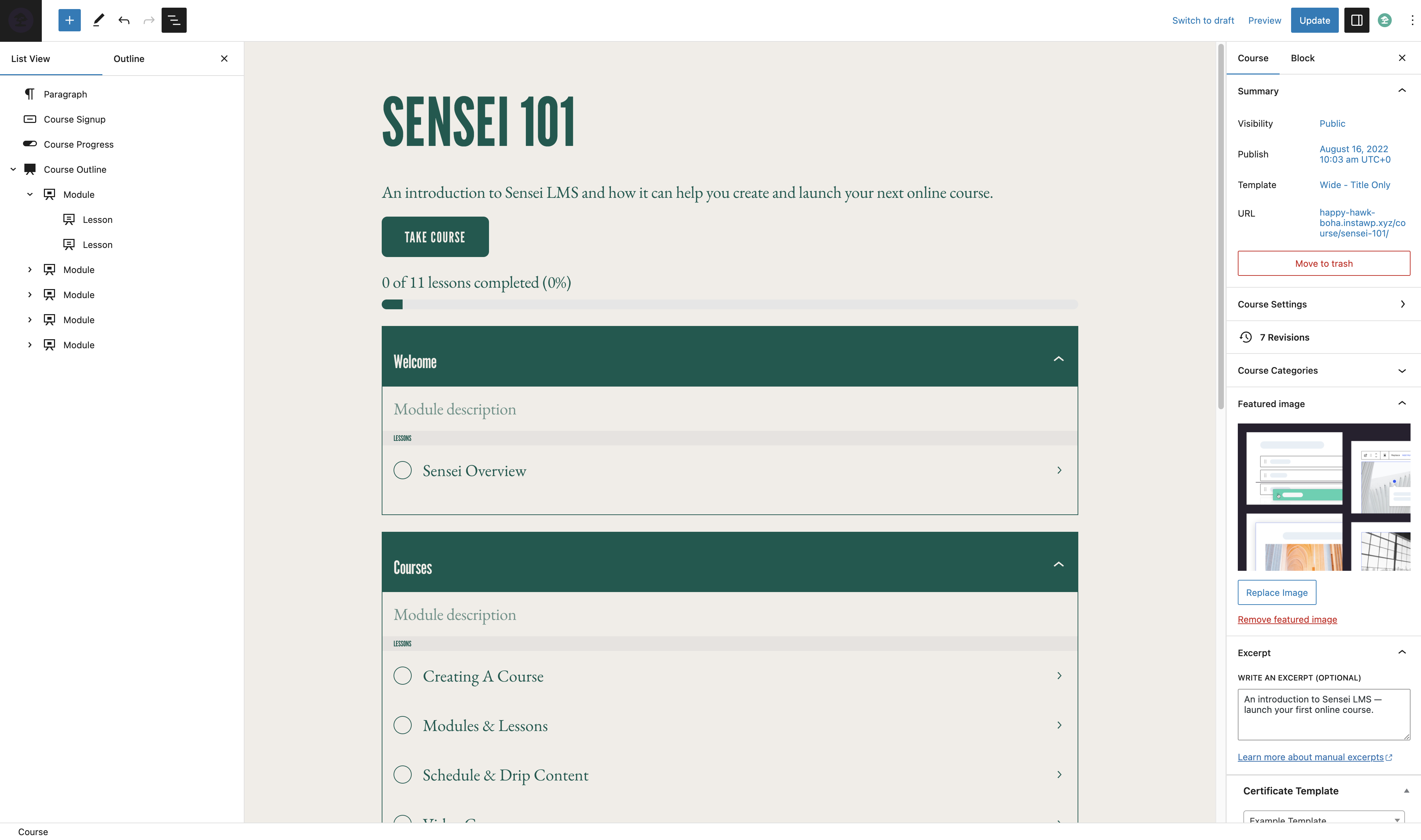
  • Crea cursos atractivos con el editor de bloques de WordPress, que aprovecha al máximo el tema Course gratuito de Sensei.
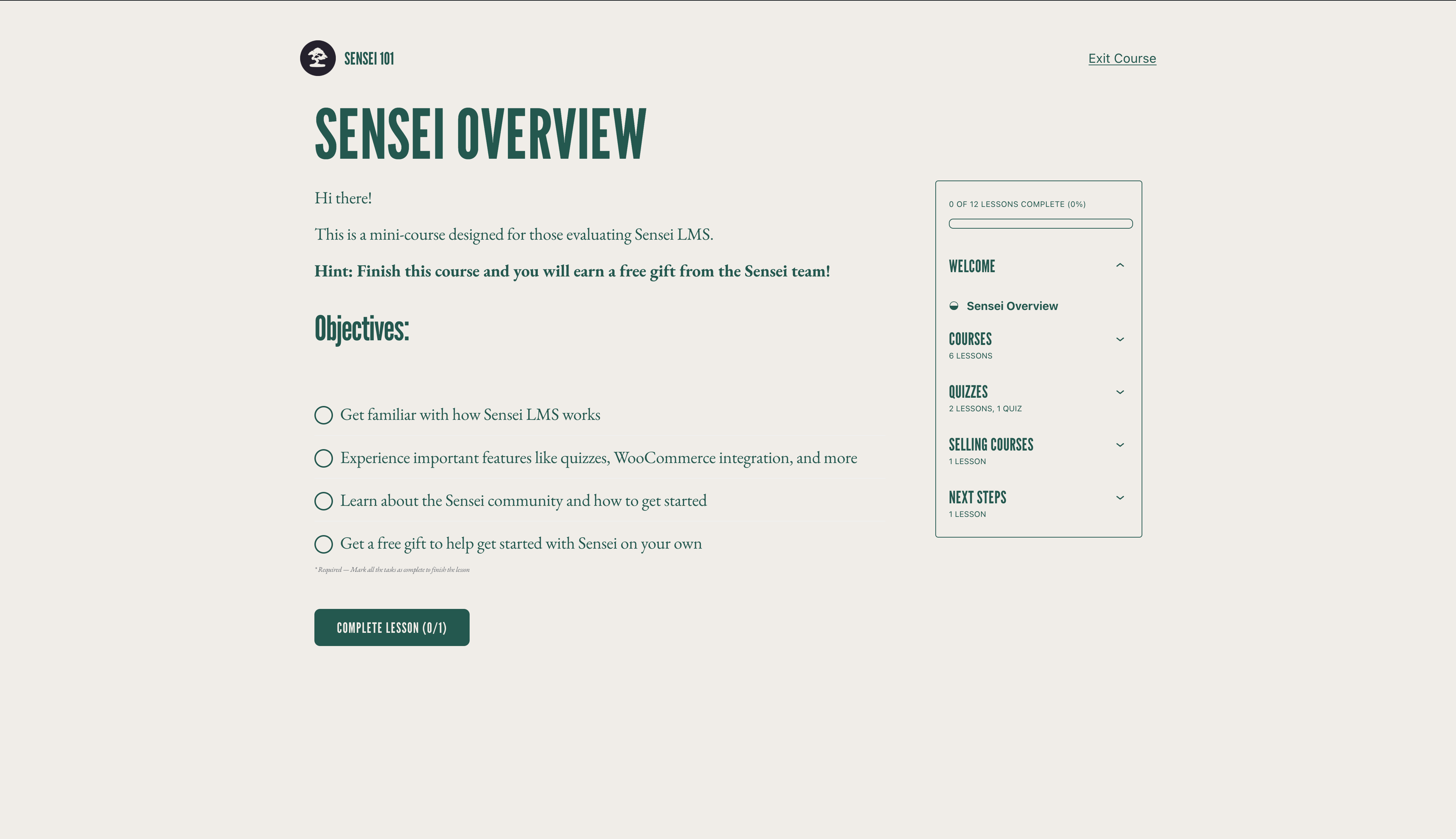
  • Activa el modo de aprendizaje para una experiencia de aprendizaje inmersiva y sin distracciones.
  • Haz seguimiento del progreso y rendimiento de los estudiantes con informes detallados.
  • Incrusta videos desde YouTube, Vimeo y VideoPress para cursos basados en video.
  • Agrega el bloque de lista de cursos a cualquier página o entrada para mostrar los cursos disponibles.

Crea cuestionarios efectivos

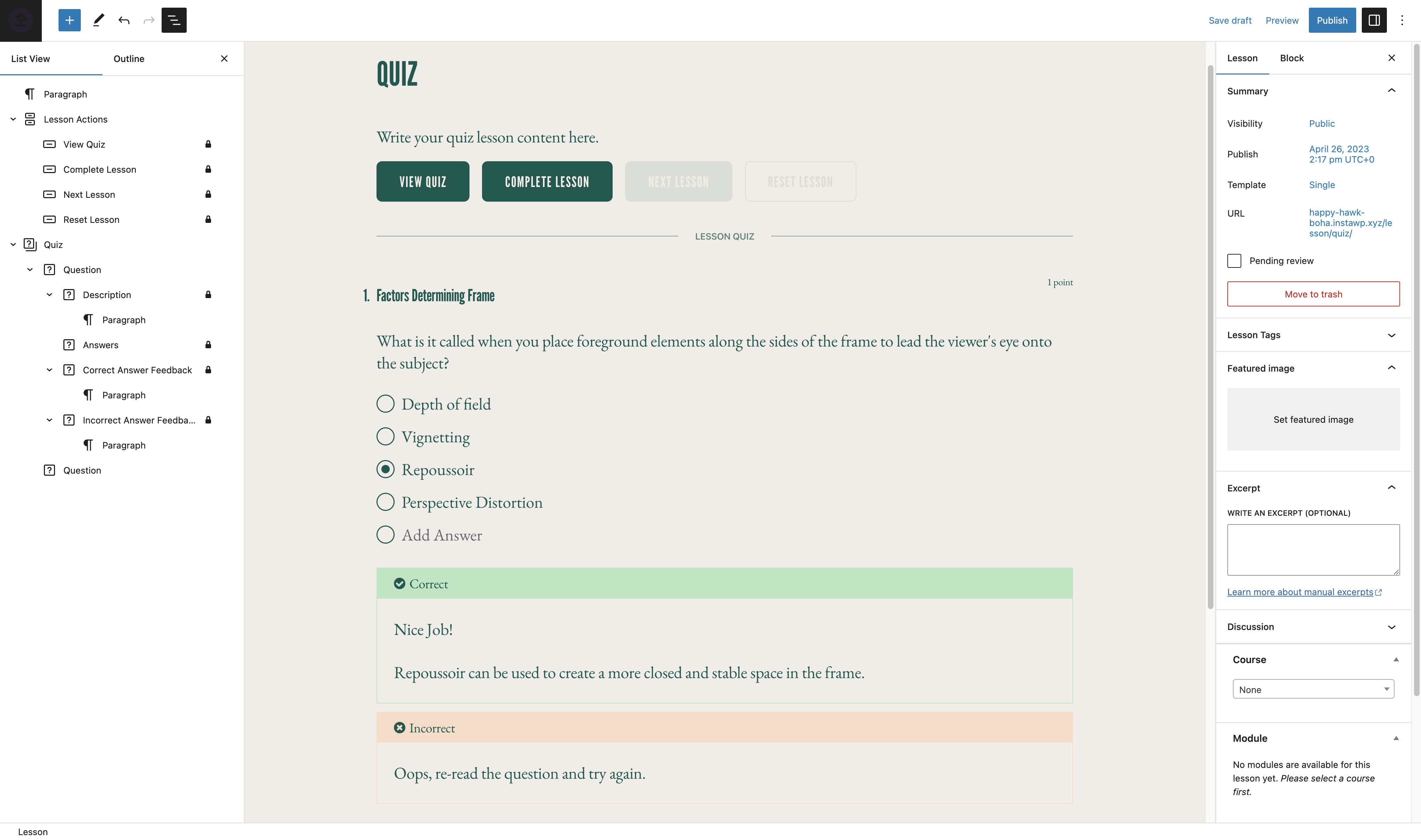
Los cuestionarios son una forma poderosa de mejorar la comprensión de tus estudiantes sobre los conceptos clave y realizar un seguimiento de su progreso. Elige entre varios tipos de preguntas y configuraciones del cuestionario, como opción múltiple, rellenar el espacio en blanco, verdadero/falso, respuesta libre, cargas de archivos y más.

Exhibe tus cursos

Envía tu curso a la exhibición pública de cursos de Sensei LMS en https://senseilms.com/showcase/. La exhibición de cursos de Sensei LMS te permite llegar a nuevas audiencias y así ampliar la visibilidad de tu curso.

Descubre el poder de Sensei Pro

Saca todo el potencial de tus cursos con Sensei Pro.

Integración con WooCommerce: Pon un precio y vende cursos sin esfuerzo con solo unos pocos clics. Sensei Pro se integra perfectamente también con las extensiones WooCommerce Subscriptions, Payments, Memberships y Affiliates.

Programación de contenido por goteo: controla el ritmo de las lecciones en tus cursos especificando cuándo los estudiantes pueden acceder al contenido de las lecciones en intervalos fijos después de comenzar el curso o en una fecha determinada.

Bloques interactivos inmersivos: Enriquece tus lecciones, páginas o entradasa con atractivos videos, tarjetas interactivas, imágenes con zonas activas y listas de tareas.

Funciones de cuestionario mejoradas: establece un temporizador para los cuestionarios e incorpora un tipo de pregunta de ordenación. Con Sensei LMS Pro, puedes incluir preguntas de cuestionario individuales en cualquier contenido de WordPress, no solo en cuestionarios.

Grupos y seguidores fáciles: Organiza a los estudiantes en grupos y seguidores para gestionar el acceso y personalizar sus experiencias de aprendizaje.

Periodos de acceso al curso: Define una fecha de inicio y una cantidad de tiempo en el que los cursos seguirán estando disponibles para los estudiantes.

Contenido condicional: personaliza el recorrido de aprendizaje ocultando o mostrando lecciones y contenido según grupos, estado de inscripción y fecha.

Soporte prioritario dedicado: nuestro equipo de ingenieros expertos y amables está siempre disponible para ofrecerte asistencia y garantizar tu éxito.

Tarjetas interactivas: Agrega texto, videos, imágenes, incrustados y más a ambos lados del tipo de bloque de tarjeta interactiva.

Co-profesores: Comparte la propiedad de un curso con co-profesores que puedan editar ajustes del curso, lecciones y cuestionarios.

Aprende más sobre Sensei Pro.

Extensiones gratuitas

Certificates: Genera automáticamente bonitos certificados descargables en PDF para los estudiantes cuando completen un curso.

Aprende más sobre Sensei LMS Certificates.

Post To Course Creator: Crea cursos rápidamente convirtiendo entradas actuales en lecciones de un curso en solo unos pocos clics.

Aprende más sobre Sensei LMS Post To Course Creator.

Capturas de pantalla

Bloques

Este plugin proporciona 3 bloques.

  • Course Title
  • Exit Course
  • Course Theme Lesson Module

Instalación

Instalación automática

  1. Accede al escritorio de tu WordPress y ve a Plugins > Agregar nuevo.
  2. Introduce “Sensei LMS” en el campo de búsqueda.
  3. Una vez hayas localizado el plugin, haz clic en Instalar ahora.
  4. Haz clic en Activar.
  5. Configura los ajustes dirigiéndote a Sensei LMS > Ajustes.

Instalación manual

  1. Descarga el archivo del plugin a tu computador y descomprímelo.
  2. Utilizando un programa FTP o el panel de control de tu alojamiento, sube la carpeta del plugin descomprimido al directorio wp-content/plugins/ de tu instalación de WordPress en el servidor.
  3. Accede a tu escritorio de WordPress y activa el plugin desde el menú Plugins.
  4. Configura los ajustes dirigiéndote a Sensei LMS > Ajustes.

FAQ

¿Dónde puedo obtener soporte para Sensei LMS?

Para el plugin gratuito, por favor, usa los foros de soporte para cualquier pregunta que tengas. Vigilamos regularmente los foros y responderemos lo más pronto que podamos.

También puedes revisar nuestra documentación en la web para más guías, tutoriales y otra información valiosa.

¿Dónde puedo informar de fallos o contribuir a mejoras para el plugin?

Sensei se desarrolla en público en Github. Invitamos a cualquiera a informar de un error, enviar una solicitud de publicación y seguir nuestro progreso.

Visita Sensei LMS en Github.

¿Funciona Sensei con plugins de membresía?

Sensei LMS se puede usar en conjunto con Sensei Pro y WooCommerce Memberships para permitirte vender cursos como parte de un plan de membresía. Mira el artículo sobre vender cursos como una membresía para más detalles.

¿Cómo puedo estar al día de nuevas versiones y anuncios de Sensei LMS?

Por favor, visita el blog de Sensei o apúntate a nuestra lista de correo.

¿Cómo puedo incluir mis cursos en la exhibición de Sensei LMS?

Para saber cómo enviar un curso a la exhibición de Sensei LMS, y los requisitos, por favor, ve nuestra documentación sobre la exhibición de cursos.

¿Es compatible Sensei con cursos en directo, integración con Zoom o webinarios?

¡Sí! Puedes agregar enlaces en una lección de un curso a Zoom, Google Meet o cualquier plataforma que elijas. Además, Sensei incluye un diseño de lección conjunta que puedes seleccionar al crear una nueva lección, para ayudarte a que sea aún más fácil.

¿Funciona Sensei en WordPress multisitio?

Sensei LMS funciona de maravilla en WordPress multisitio. Aunque una licencia de Sensei Pro solo cubre un sitio, el plan Sensei Agency permite la activación de Sensei Pro en hasta 20 sitios. Si usas o planeas usar Sensei Pro en un multisitio con más de 20 sitios, por favor, contáctanos para hacerte un precio personalizado.

¿Cómo puedo vender cursos como parte de una membresía?

Sensei LMS es compatible con Sensei Pro y WooCommerce Memberships, permitiéndote vender cursos como parte de un plan de membresía.

Ve vender cursos como membresía para más detalles.

¿Funcionará Sensei en mi idioma?

Los miembros de la comunidad han traducido el plugin gratuito Sensei LMS a 18 idiomas, y Sensei Pro ha sido traducido profesionalmente a 16 idiomas. Se agradecen las contribuciones para mejorar aún más.

Reseñas

18 de Junio de 2025 5 respuestas
I've used the premium version, been through struggles and hurdles and the support team was on the task. Happy and satisfied. I like how "stock" WordPress-iy it looks. I must say though, i hateeeee the default font lol.
8 de Mayo de 2025 1 respuesta
Not allowing to sell without paid woo commerce integration. Atleast allow basic stuff in free tier.
22 de Enero de 2025 3 respuestas
The plugin doesn't work. I've tried to contact them several back and they just don't get back. They have a AI bot which doesn't help, I've asked for human support with 0 answer… avoid this plugin!
14 de Enero de 2025 3 respuestas
To hard, complicated and almost impossible to edit styles, on Gutenberg everything is blocked, so no edition is allowed. With Elementor no way to edit anything, most of the containers don't display on Elementor. The "Course displays" both options, the list and grid displays, look not ugly, horrible when using Elementor. The fact that the only documentation available is equal to zero, don't make things easier. If you like green and the default theme, all good. UPDATE after hours I find the classes that have troubles with Elementor: .alignfull and .alignwide I set the margin inline to 0 !important and now finally things look good. Also delete all sensei css classes on the Gutenberg editor. Still not able to make a loop container or even open Elementor editor if the element "Course list" is displayed on screen
8 de Agosto de 2024 1 respuesta
I love lots of things about Sensei LMS but there are some key features I think needs to be added to improve the UX and to add more for users. I really wish there was a more dedicated team to the project that can listen to the users and take on new features otherwise it will just be the case that people go to other LMS plugins. So much potential here but I do wonder if anyone is bothered about making this the best LMS out there.
Leer los 40 comentarios

Colaboradores & Desarrolladores

“Sensei LMS – Online Courses, Quizzes, & Learning” ha sido traducido en 27 idiomas. Gracias a los traductores por sus contribuciones.

Traduce “Sensei LMS – Online Courses, Quizzes, & Learning” a tu idioma.

¿Interesado en el desarrollo?

Revisa el código, echa un vistazo al repositorio SVN, o suscríbete al registro de desarrollo por RSS .

Historial de cambios

4.26.4 – 2026-09-29

Seguridad

  • Check the destination course permissions when changing the lesson course from the bulk editor.
  • Enforce course edit permissions when creating a module from the course editor.
  • Enforce lesson edit permissions when saving the course structure.
  • Ensure Learning Mode applies colour values without changing block markup.
  • Escape the label attribute in the Exit Course block.
  • Escape the teacher name and archive link rendered by the sensei_teachers shortcode.
  • Improved how locked lesson content is excluded from frontend listings.
  • Improved how private messages are excluded from frontend queries.
  • Improved how the admin lesson and course fields are initialised so that post content cannot influence them.
  • Improved the authorization of lesson completion.
  • Improved the authorization of private messages sent to teachers.
  • Improved the authorization of usage tracking events.
  • Improved the handling of files uploaded as quiz answers.
  • Improved the privacy of private messages.
  • Improved the scoping of teacher comment moderation.
  • Made request-input handling consistent across the admin and frontend.
  • Prevent students from changing their quiz answers after the quiz has been submitted.
  • Require the Order Courses capability to save the course order.
  • Restrict the legacy lesson quiz save handler to the lesson being saved.

Cambiado

  • Reports Overview Students and Courses header counts now read HPPS progress tables when High-Performance Progress Storage is enabled. #8231
  • Reports Overview students per-row average grade now reads HPPS progress tables. #8205
  • Reports Overview students per-row course counts now read HPPS progress tables when High-Performance Progress Storage is enabled. #8231
  • Resolve HPPS storage configuration consistently across progress query services and repositories. #8248
  • Update Sensei blocks to Block API version 3 so they render in the WordPress iframe block editor. #8190
  • Update the Action Scheduler package to version 4.1.0. #8166
  • Update the pelago/emogrifier package to version 7.3.0. #8231

Obsoleto

  • Deprecate the sensei_analysis_user_lesson_grades filter. #8205

Corregido

  • Fix a fatal error when a teacher triggers a module hierarchy rebuild.
  • Fix a PHP 8 TypeError when post_updated fires with a null post object during autosave. #8222
  • Fix a PHP 8.4 deprecation notice when exporting CSV files. #8213
  • Fix a thick border showing on Course Outline modules in the editor when the module border setting is off. #8191
  • Fixed a PHP deprecation notice when reviewing a grade for an unanswered True/False question. #8214
  • Fixed a PHP warning when changing a course’s teacher on a course with no modules. #8225
  • Fixed edits to a WPML-duplicated lesson’s quiz landing on the original language’s quiz and questions. #8220
  • Fixed quiz answers, grades, resets, and lesson and course quiz surfaces breaking when the admin uses a secondary language or the lesson is translated on multilingual sites. #8130
  • Fixed saving a translated course overwriting and stealing the original course’s lessons on WPML sites. #8219
  • Fixed the quiz saved message not showing in Learning Mode. #8272
  • Fixed the student management and grading screens showing no students when the WPML admin language is not the original one. #8224
  • Fixed the text domain on the “Generate quiz questions with AI” upsell label so it can be translated. #8230
  • Fix garbled text in button blocks whose text uses non-Latin characters when the button URL is set at render time. #8226
  • Fix lesson/module hamburger menu being hidden on mobile when the course title is too long. #8094
  • Fix lesson order not reaching WPML translations when the translated lessons are not duplicates. #8246
  • Fix lessons removed from a course staying in its WPML translations after the translation is updated. #8245
  • Fix PHP 8.4 deprecation warnings from implicitly nullable function parameters. #8199
  • Fix Sensei templates in the Site Editor when Gutenberg’s Template activation experiment is enabled. #8250

Development

  • Refactored course report lesson metrics into dedicated progress aggregation and grading statistics services. #8249
  • Remove the unused sensei_question_slug filter registration from the WPML compatibility class. #8215

4.26.3 – 2026-08-20

Seguridad

  • Scope the Students management user search to student accounts. #8174
  • Require the grading capability on the lessons dropdown AJAX endpoint and scope it to the caller’s own lessons.
  • Restrict adding a student to a lesson so it is only allowed through the lesson’s own course.
  • Prevent a teacher from deleting another teacher’s unused module.
  • Remove the admin notice that exposed the administration email address to non-administrators.

Eliminado

  • Remove the course and lesson editor tours. #8150

Corregido

  • Fix a false “already owned by another teacher” error that blocked saving a course containing a module without a resolvable owner. #8180
  • Fix course layouts and Sensei blocks not loading when Show template is enabled. #8139
  • Fix quiz results and grading showing a previous attempt’s grades after a retake from another language on multilingual sites. #8125
  • Fix spacing and styling of quiz question options when using the iframed block editor. #8172
  • Fix the Grading screen Grade button and row titles when the admin uses a secondary language on multilingual sites. #8121
  • Fix the quiz results page showing questions in the language the quiz was taken in instead of the viewer’s language on multilingual sites. #8124
  • Fix lesson prerequisites pointing to the original-language lesson on WPML-translated lessons. #8132
  • Fix lessons appearing out of order in translated courses when a new lesson is translated with WPML, and attach WPML lesson duplicates to the translated course. #8149
  • Fix PHP 8.1 deprecation notices rendered into the quiz page for unanswered Multi Line questions. #8146
  • Fix quiz question titles and answers not being translated on WPML-translated lessons. #8100
  • Fix the Add Student form layout on the Students page. #8147
  • Fix the misaligned Reset filter button on the Grading screen. #8122
  • Fix typo in My Courses Page setting description. #8106 👏 @Hashim1999164
  • WordPress 7.1 Compatibility: Course and lesson block colors match the theme in the iframed post editor. #8179
  • WordPress 7.1 Compatibility: Fix a PHP notice logged by Learning Mode templates. #8179
  • WordPress 7.1 Compatibility: Learning Mode and email templates appear in their own group in the Site Editor. #8179

4.26.2 – 2026-07-29

Seguridad

  • Align the sensei-messages REST endpoint results with documented message visibility. #8032
  • Ensure manual quiz grading submissions respect lesson ownership. #8035
  • Apply private message permissions to replies returned by the core comments REST API. #8037
  • Scope the Students “load more courses” action to courses the current teacher can manage. #8043
  • Check quiz ownership in the legacy quiz-editor actions before applying changes. #8044
  • Limit the modules course search to courses the current user is allowed to edit. #8049
  • Only allow enrolled students to mark a course as complete. #8050
  • Scope the Reports CSV export to the current teacher’s own courses, lessons and learners. #8053
  • Ensure quiz resets are only allowed when retakes are enabled for the quiz. #8054
  • Limit editing, deleting, and course assignment of a module to the module’s owner. #8089

Cambiado

  • Disable the onboarding tour. #8014
  • Migrate student start date editing to use progress repositories instead of direct comment meta access. #7933
  • Open course outline AI upsell in a new tab. #8023

Corregido

  • Fix alignment of option descriptions in the setup wizard’s purpose step. #8013
  • Fix an infinite save loop when editing a lesson with a quiz block while a plugin (e.g. Polylang) injects extra fields into the REST response. #8036
  • Fix duplicate frontend notices when the same keyed notice is added multiple times on classic themes. #8051
  • Fix content import stalling permanently when CSVs reference many or large remote media files. #8064
  • Fix PHP Fatal TypeError on PHP 8.x caused by malformed className attribute definition in the Module Title block. #8093
  • Fix the position of the Course(s) field description on the module add and edit screens. #8090
  • Fix export and import dropping private lessons and questions. #8068
  • Fix export content search missing matching lessons/courses/questions. #8048
  • Fix PHP 8.4 deprecation warnings for implicitly-nullable parameters by declaring explicit nullable types. #8021
  • Fix React ref warning in the quiz block toolbar by forwarding refs through the number controls. #8033
  • Fix React render-phase update warning when opening Course Settings in the course editor. #8041
  • Fix remote featured images with query-string URLs failing to import. #8063
  • Fix translated quiz titles keeping the original-language title when using WPML. #8096
  • Prevent the Welcome to Course email from being sent more than once to the same student for the same course. #8046