
Descripción
Experience a better way to translate your WordPress site and go multilingual, directly from the front-end using a visual translation interface.
TranslatePress is a WordPress translation plugin that anyone can use.
The interface allows you to easily translate the entire page at once, including output from shortcodes, forms and page builders. It also works out of the box with WooCommerce.
Built the WordPress way, TranslatePress – Multilingual is a GPL and self hosted translation plugin, meaning you’ll own all your translations, forever. It’s the fastest way to create a bilingual or multilingual site.
Multilingual & Translation Features
- Translate all your website content directly from the front-end, in a friendly user interface (translations are displayed in real-time).
- Fully compatible with all themes and plugins
- Live preview of your translated pages, as you edit them.
- Image translation support, for translating images, sliders and other media.
- Support for both manual and automatic translation
- Ability to translate dynamic strings (gettext) added by WordPress, plugins and themes.
- Integrates with Google Translate, allowing you to set up Automatic Translation using your own Google API key.
- Translate larger html blocks by merging strings into translation blocks.
- Place language switchers anywhere using shortcode [language-switcher], WP menu item or as a floating dropdown.
- Editorial control allowing you to publish your language only when all your translations are done
- Conditional display content shortcode based on language [trp_language language=”en_US”] English content only [/trp_language]
- Possibility to edit gettext strings from themes and plugins from English to English, without adding another language. Basically a string-replace functionality.
- Translate only certain paths and exclude content from being translated
- Translation Block feature in which you can translate multiple html elements together
- Native Gutenberg support, so you can easily translate Gutenberg blocks
- Out of the box WooCommerce compatibility
- Use our FREE Website Translation tool/widget to browse any website into your own language.
Note: this plugin uses the Google Translation API to translate the strings on your site. This feature can be enabled or disabled according to your preferences.
Users with administrator rights have access to the following settings:
- select default language of the website and one translation language, for bilingual sites
- choose whether language switcher should display languages in their native names or English name
- force custom links to open in current language
- enable or disable url subdirectory for the default language
- enable automatic translation via Google Translate
Powerful Translation Add-ons
TranslatePress – Multilingual has a range of premium Add-ons that allow you to extend the power of this WordPress translation plugin:
Pro Add-ons (available in the premium versions only)
- Extra Languages – allows you to add an unlimited number of translation languages, with the possibility to publish languages later after you complete the translation
- SEO Pack – lets you translate meta information (like page title, description, url slug, image alt tag, Twitter and Facebook Social Graph tags & more) for boosting your multilingual SEO and increase traffic. Works with all popular SEO plugins.
- Translator Accounts – create or allow existing users to translate the site without admin rights
- Browse as User Role – view and translate content that is visible only to a particular user role
- Navigation Based on Language – configure and display different menu items for different languages
- Automatic User Language Detection – redirect first time visitors to their preferred language based on their browser settings or IP address
- DeepL Automatic Translation – The DeepL Automatic Translation add-on lets you automatically translate your website through the DeepL API
Keyboard Shortcuts
- CTRL ( ⌘ ) + S – Save translation for the currently editing strings
- CTRL ( ⌘ ) + ALT + Z – Discard all changes for the currently editing strings
- CTRL ( ⌘ ) + ALT + → (Right Arrow) – Navigate to next string
- CTRL ( ⌘ ) + ALT + ← (Left Arrow) – Navigate to previous string
Website
Documentation
Visit TranslatePress WordPress Translation plugin documentation page
Add-ons
Demo Site
You can test out TranslatePress – Multilingual plugin by visiting our demo site
Capturas de pantalla
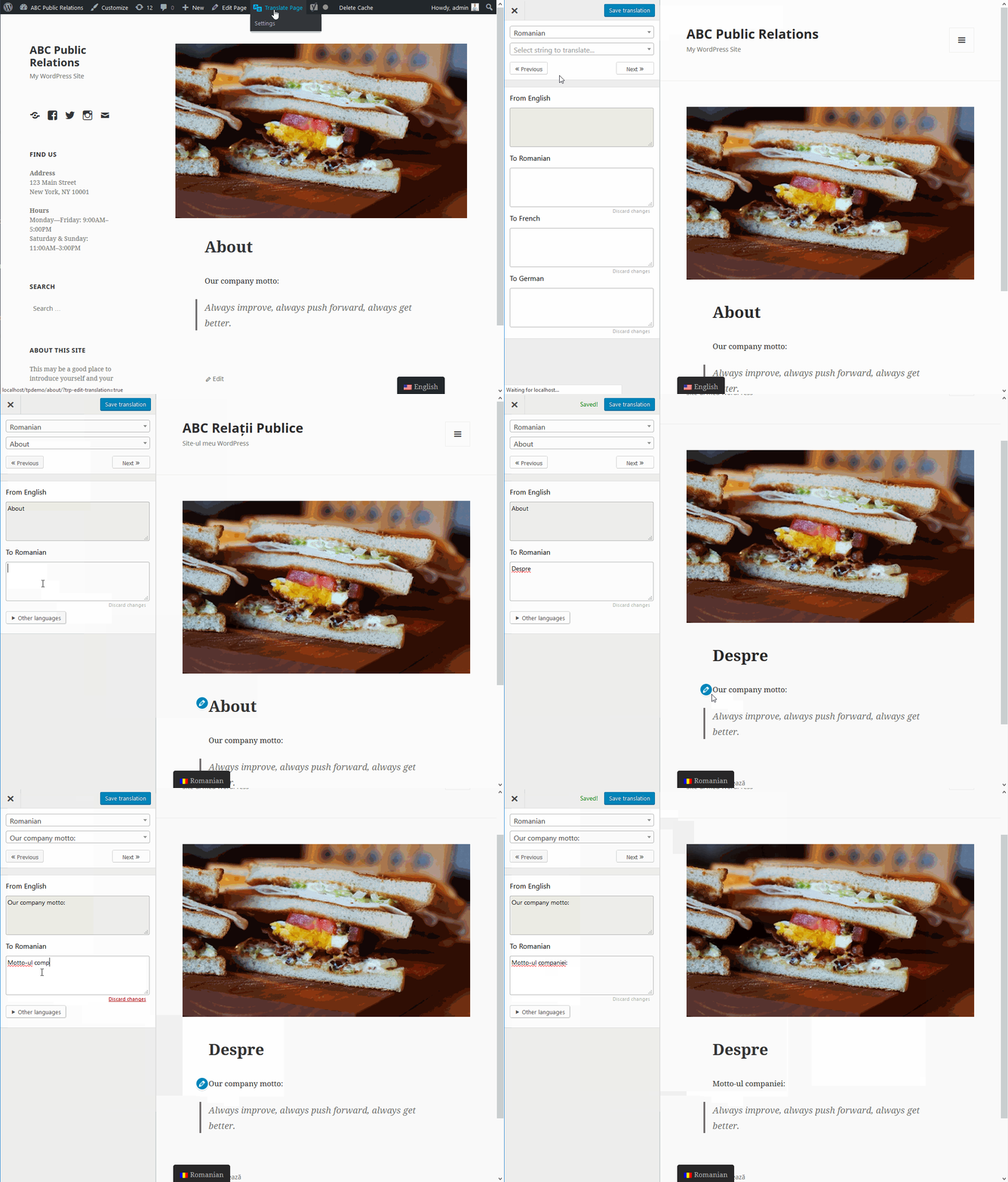
TranslatePress front-end visual translation editor in action 
Front-end translation editor used to translate the entire page content 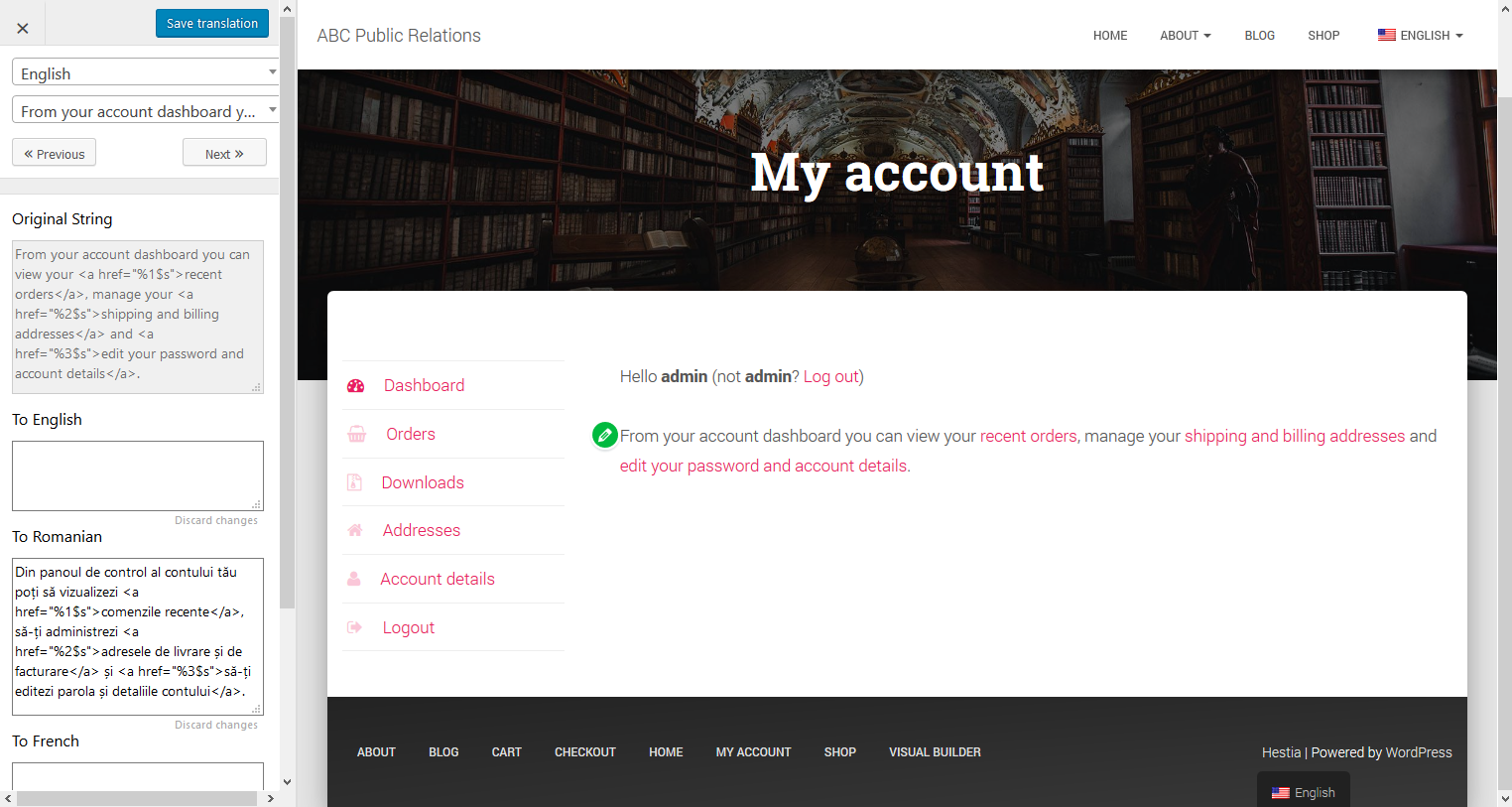
How to translate a dynamic string (gettext) 
Translating WooCommerce Products for your multilingual store 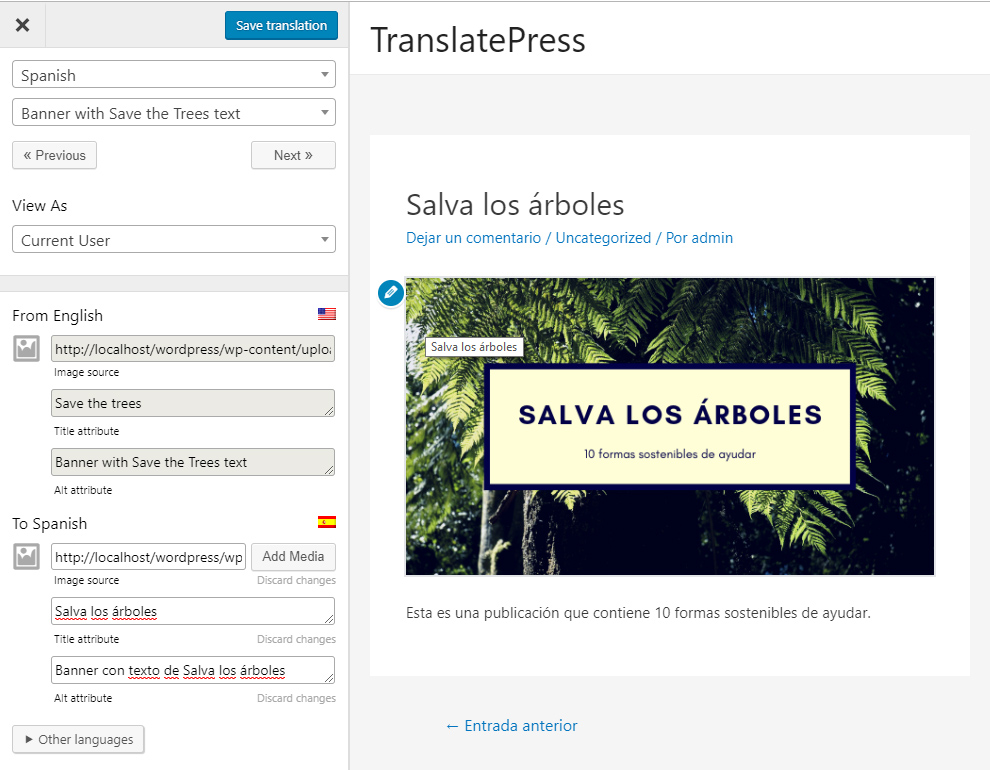
Translate Images and Image Sliders 
Settings Page 
Floating Language Switcher 
Menu Language Switcher
Bloques
Este plugin proporciona 1 bloque.
- Language Switcher Displays the Language Switcher.
Instalación
- Upload the translatepress folder to the ‘/wp-content/plugins/’ directory
- Activate the plugin through the ‘Plugins’ menu in WordPress
- Go to Settings -> TranslatePress and choose a translation language.
- Open the front-end translation editor from the admin bar to translate your site.
FAQ
-
Where are my translations stored?
-
All the translation are stored locally in your server’s database.
-
What types of content can I translate?
-
TranslatePress – Multilingual plugin works out of the box with WooCommerce, custom post types, complex themes and site builders, so you’ll be able to translate any type of content.
-
How is it different from other multilingual & translation plugins like WPML or Polylang?
-
TranslatePress is easier to use and more intuitive altogether. No more switching between the editor, string translation interfaces or badly translated plugins. You can now translate the full page content directly from the front-end. This makes TranslatePress a great alternative to plugins like Polylang and WPML. For more details check out this WordPress Translation Plugin Comparison: TranslatePress vs WPML vs Polylang vs Gtranslate.
-
How do I start to translate my WordPress site?
-
After installing the plugin, select your secondary language and click “Translate Site” to start translating your entire site exactly as it looks in the front-end.
-
Will it slow down my website?
-
TranslatePress will have little impact on your site speed. For more details see Top WordPress Translation Plugins Compared Based on Page Load Time
-
Can you translate your WooCommerce store?
-
Yes, TranslatePress works out of the box with WooCommerce. You can use to build a multilingual WooCommerce store.
-
Where can I find out more information?
-
For more information please check out our documentation.
Opiniones


Colaboradores & Desarrolladores
“Translate Multilingual sites – TranslatePress” es software de código abierto. Las siguientes personas han contribuido a este plugin.
Colaboradores


“Translate Multilingual sites – TranslatePress” ha sido traducido en 10 idiomas. Gracias a los traductores por sus contribuciones.
Traduce & #8220;Translate Multilingual sites – TranslatePress” a tu idioma.
¿interesado en el desarrollo?
Revisa el código , echa un vistazo al repositorio SVN , o suscríbete al log de desarrollo por RSS .
Historial de cambios
2.7.5
- Improved page load speed by caching translation blocks query
- Improved page load speed by adding index by block type
- Fixed frequency of diagnostics usage requests when Marketing Opt-in is active
2.7.4
- Fixed compatibility issue with WP Job Board Pro PDFs
- Fixed compatibility issue with Brikk theme forms
- Fixed scanning plugins and theme files for translation when Oxygen is active
2.7.3
- Improved automatic translation character count to better enforce enforce daily limit
- When Marketing opt-in feature is enabled, automatic translation usage is included in the non-sensitive diagnostic tracking data
- Added support for translating more meta tags
2.7.2
- Fixed translation saved confirmation message in the Translation Editor
- Fixed CSS issue in Advanced settings
- Fixed notice in TranslatePress settings
2.7.1
- Fixed potential security issue in the language switcher
- Fixed floating language switcher appearance when displaying only flags on sites with many languages
- Minor UI tweaks in TranslatePress settings
2.7.0
- Fixed issue with Exclude only certain paths advanced option on subfolder path installs
- Improved Error Manager by outputting the entire failed query
- Improved SQL error handling in trp-ajax calls
2.6.9
- Added compatibility with WooCommerce Product Filters by barn2
2.6.8
- Fixed relative urls with anchor links on translated pages
- Fixed searching in translated languages on sites with specific plugins combination
2.6.7
- Added new feature that displays translation percentage for current page in Translation Editor
- Added RSS Feed support for translating title, content and excerpt
- Added support for Duplicate Page plugin resolving post slug translation conflict
- Added compatibility with Fluent Forms
- Added compatibility with WooCommerce Bookings plugin
- Added WP Webhooks Automator under recommended plugins
- Fixed deprecated warning in PHP 8.1
2.6.6
- Allow translation of comments and categories in REST API
- Improved compatibility with Complianz plugin
- Improved rules for creating translation blocks
2.6.5
- Fixed some cases of unnecessarily detecting text inside script tags
- Fixed compatibility code with Oxygen
2.6.4
- Improved page loading speed when WooCommerce is active
- Fixed some cases of errors on function insert_gettext_string
- Fixed edge case issue with missing tables
2.6.3
- Improved page loading speed by optimizing code handling gettext
- Improved page loading speed when Query Monitor plugin is active
- Fixed internal links not being translated when using Do not translate certain paths feature
- Fixed trp-gettext wrappings on Query Monitor strings
- Fixed flag for Hindi and Punjabi (India) languages
2.6.2
- Fixed absolute paths not working in the Exclude Paths From Translation option
- Fixed Pencil icon displayed in wrong positions on WP Forms in the Translation Editor
- Added missing Sindhi language flag
- When Marketing opt-in feature is enabled, list of active plugins is now included in the non-sensitive diagnostic tracking data
- Updated logos for Profile Builder and Paid Member Subscriptions in the recommended plugins section
2.6.1
- Improved DOM parser to better handle HTML comments
- Improved Database optimization tool’s default operations
2.6.0
- Fixed some cases of 404 on translated pages for WooCommerce permalinks
- Improved compatibility with RankMath
2.5.9
- Added loader component as extra parameter in trp_allow_tp_to_run hook to ease integration with 3rd parties
- Fixed edge case error with undefined variable $disabled_language
- Fixed notice about deprecated property in php 8.2
- Fixed edge case error in class-error-manager.php file
2.5.8
- Fixed some cases of disappearing CPT slugs translations leading to 404 pages
- Fixed incorrectly adding empty href attributes to link tags on translated pages
- Fixed PHP 8 deprecated notices regarding dynamically defined properties
2.5.7
- Added a new item in Database optimization tool to fix some cases of gettext not being selectable in Translation Editor
- Fixed Edit pencil icon being difficult to click when hovering over certain text in Translation Editor
- Added compatibility with WooCommerce High-Performance Order Storage (HPOS)
- Improved compatibility with WP Rocket
2.5.6
- Improved settings UI by showing formality option only for languages and translation engines that support it
- Fixed focus on search input when opening the languages dropdown in settings
- Removed unnecessary calls for Marketing opt-in feature
2.5.5
- Redesigned TranslatePress Settings Advanced tab UI using subtabs
- Improved the translation status icons for the case when multiple strings are shown at once in Translation Editor
- Fixed deprecated notice on php 8
2.5.4
- Updated look of language switchers for shortcode generated and floating options
- Added notice in TranslatePress settings to avoid adding duplicate languages with different formalities
- Fixed deprecated warning triggered by date_create function
- Fixed bug with some strings not being editable in Translation Editor
2.5.3
- Improved security by escaping form actions
- Fixed filtering by gettext domain in String Translation
- Fixed title positioning in String Translation UI
- Added more information in our opt-in non-sensitive diagnostic tracking
2.5.2
- Redesigned Translation Editor UI to match the latest WordPress style
- Fixed hreflang language code attribute for languages with formal/informal in their default code
- Added missing Aragonese language flag
2.5.1
- Added Language Switcher block in Gutenberg Editor
- Fixed edge case error regarding __return_true function
2.5.0
- Improved converting urls in different languages
- Fixed language switcher directing to page not found in some edge cases
Click Here to view the full changelog.