
Descripción
This plugin displays Google Business Reviews on your WordPress website through a public and approved by Google API without crawling and other unofficial methods. With this plugin, you can be sure of the right way for showing Google Reviews.
Displaying Google Rating and Reviews on your site is the easiest and most effective way to increase your customer confidence and, as a result, increase sales!
By the way, with the Business version of this plugin, you can get better results, because it shows all reviews, auto syncs these, supports other platforms like Facebook, Yelp which you can mix and has many other great features!
Free plugin features
- Unlimited connections Widgets and Google Places, not just one like in other similar plugins
- Full GDPR support (no third-party calls)
- All connected Google ratings and reviews are automatically updated
- Awesome, responsive and really cool Slider, Grid and List layouts which works anywhere – mobile, table, desktops and HD
- Collect new Google Reviews and increase your Google Rating with a ‘review us on G’ button
- Slider don’t fit? You can use a List or Grid layout or hide the reviews and show just a rating badge
- Monthly statistics displaying an increase in the number of reviews
- Display the reviews through a shortcode, widget or any page builder: Gutenberg, Elementor, Page Origin, Beaver Builder, WPBakery, Divi and others
- Hide certain reviews from displaying, sometimes it may not only be a negatively rated review
- Upload your own Google business photo
- Use Pagination to hide some of the reviews
- Trim long reviews with “read more” link
- Works on a dark websites
- Multi language support
- Ability to customize layout with additional CSS
- Zero load time: SVG, lazy load images and the smallest size of assets (css: 3kb, js: 8kb)
Get More Features with Business version
The business version of the plugin uses another Google API to show all reviews. It’s also official and approved by Google like in the free plugin, but can uses only for business owners and show all reviews. To connect reviews, just log in through your Google My Business (GMB) owner account and that’s it.
- Shows ALL Google reviews with constant automatic updates through official Google My Business (GMB) API without any unofficial workarounds like crawling
- Connecting and showing reviews is easier than ever, just log in through your GMB owner account
- Flash theme: increase user trust, social proof and sales via beautiful popups with your real recent reviews
- Ability to connect one, several or all your Google locations just through one log in
- Mix ratings and reviews between each other from the same or different platforms: Google, Facebook, Yelp
- Awesome and beautiful layouts: list, grid, slider, float and embedded badges
- Absolutely unique feature: a custom rating and reviews template will allow to create your own layout
- Lift important reviews to the top
- Show/hide any elements (business photo, name, rating, reviews, avatars, names, time and etc)
- Any Sorting: recent, oldest, rating, striped, random
- Include/Exclude words filter to show or hide certain reviews
- Minimum rating filter
- Priority support
Additional Free Reviews Plugins
Why limit your reviews to just Google Reviews? Check out our other free reviews plugins to add to your site as well:
Support
If you have any questions regarding this plugin or business version, you can contact us directly.
We offer 24/7 email support in English.
We recommend the following order when searching for answers:
1. Plugin’s support page in wp-admin: Google Reviews / Support.
2. Check topics or ask a new question here: Support Forum
3. Try to find similar question/answer on our Live Chat page
4. If you still can’t find the answer, feel free to email us: support@richplugins.com
To find out more about who we are and what we do, here are some useful links:
Roadmap
- Test-feature: weekly reviews auto-updates
Capturas de pantalla

Google Reviews slider 
Google Reviews list 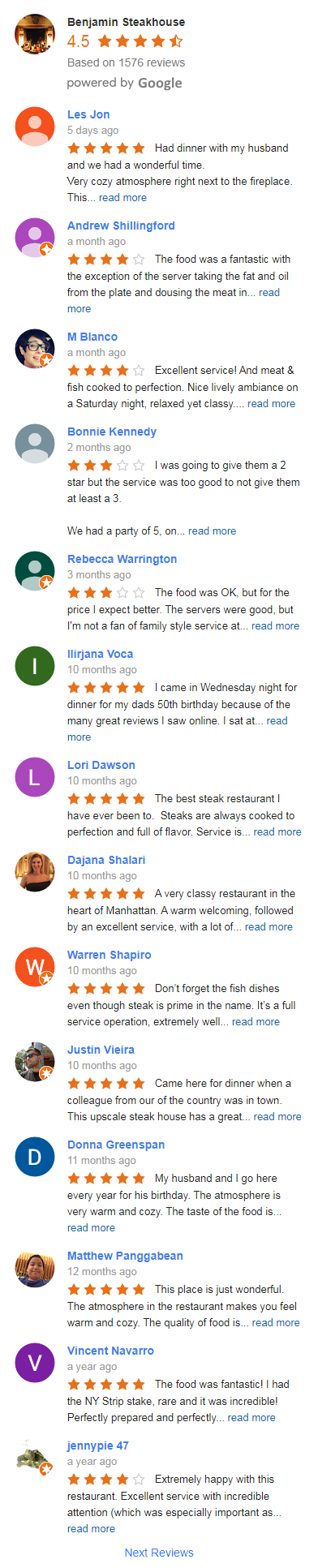
Google Reviews widget 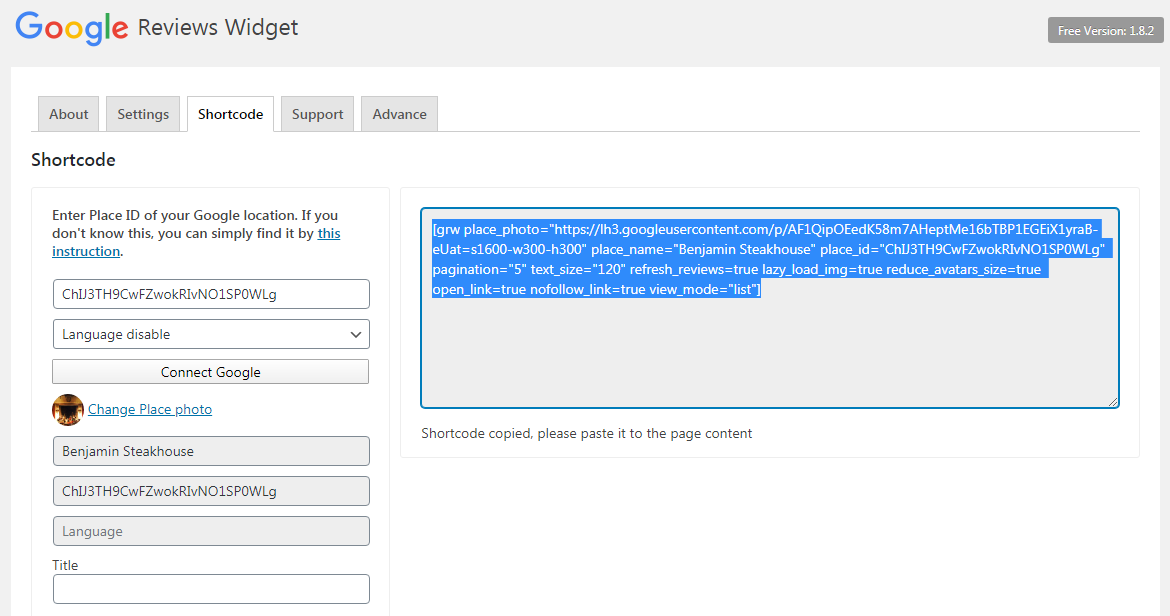
Google Reviews shortcode builder 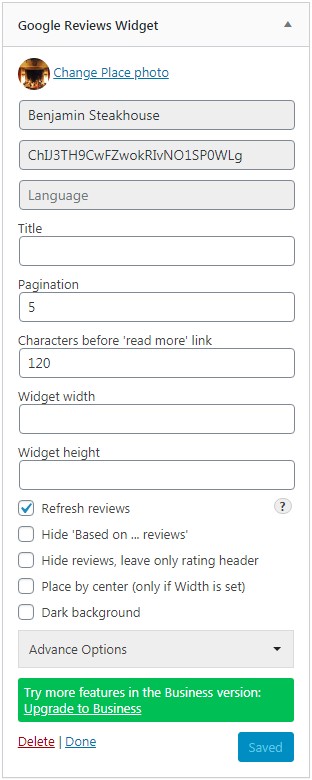
Google Reviews sidebar widget
Bloques
Este plugin proporciona 1 bloque.
- Google Reviews Block Block for Google map reviews. Easy way to show your Google place reviews on WordPress pages!
Instalación
- Unpack archive to the ‘wp-content/plugins/’ directory or install the plugin through the WordPress plugins screen directly
- Activate the plugin through the ‘Plugins’ menu in WordPress
Opiniones


Colaboradores & Desarrolladores
“Plugin for Google Reviews” es software de código abierto. Las siguientes personas han contribuido a este plugin.
Colaboradores
“Plugin for Google Reviews” ha sido traducido en 15 idiomas. Gracias a los traductores por sus contribuciones.
Traduce & #8220;Plugin for Google Reviews” a tu idioma.
¿interesado en el desarrollo?
Revisa el código , echa un vistazo al repositorio SVN , o suscríbete al log de desarrollo por RSS .
Historial de cambios
3.6.1
- Bugfix: twice CSS file in Remove Unused CSS safelist for WP Rocket plugin
3.6
- Bugfix: fixed Remove Unused CSS safelist for WP Rocket plugin
- Improve: added Lithuanian language
3.5
- New Settings: load assets (js/css) by demand (only on pages where shortcodes/widgets are)
- Bugfix: remove double quotes in shortcode for ID attribute
- Some translation fixes
3.4
- Improve: added main CSS file to Remove Unused CSS safelist (WP Rocket plugin)
- Bugfix: incorrect width of a slider flex review container (grw-review)
3.3
- Improve: editor can moderate Google reviews
- Improve: ‘review us on G’ button style fixes
- Bugfix: wp_enqueue_script was called incorrectly
- Bugfix: rateus popup disappear after vote
3.2
- Security issue fix (escape shortcode attributes)
- Improve: database creation code
- Improve: error message when connecting empty Google place
- Bugfix: undefined property $rating/$reviews for empty Google place
- Bugfix: plugin updates when existing install
- Rename ‘next reviews’ to ‘more reviews’ text
3.1
- Bugfix: reviews disappear after slider return back
- Bugfix: reviews shift if slider resize
3.0
- Improve: New Grid layout
- Improve: new box shadow option
- Improve: new radius border option
- Improve: redesign Slider layout
- Improve: added default Google business photo
- Bugfix: Google place may be null in reviews connection
- Update to WordPress 6.4
2.9
- Simple Google reviews block implementation done
- Improve: added executed time in refresh schedule
- Bugfix: correct number of months on overview page
- Some translation fixes
- Style fixes
2.8
- Update to WordPress 6.3
- Improve: block connections and options sidebar
- Improve: request newest reviews in daily update schedule
- Bugfix: showing all empty reviews for empty place
2.7
- Improve: block starting
- Improve: Google Reviews connection wizard
- Improve: show reviews with empty language attribute
- Improve: default language if it’s not select English
2.6.2
- Improve: possibility to get more than 5 reviews on initial connection
- Improve: hide service options on Settings page
- Bugfix: height fix for empty reviews in Slider theme
- Bugfix: Overview stats errors fixing for long periods
- Bugfix: escape encrypted API key in the debug information
2.6.1
- Bugfix: JavaScript errors on Overview page (incorrect stats time)
2.6
- Improve: slider auto-play option
- Bugfix: PHP 8.2 support
- Bugfix: encrypted Google API key saved
- Bugfix: correct calculation for overview usage stats
- Links fixed
2.5.1
- Improve: test mode for auto refresh reviews schedule
- Improve: auto enable reviews update schedule if Google API key saved
- Improve: Google connection handler redone to ajax
- Improve: overview page has usage stats
- Improve: overview page has a monthly period for stats graph
- Added promo coupon for the business version link
- Some CSS fixes
2.5
- Improve: autosave reviews feed by timeout
- Improve: contrast (Next Reviews link color)
- Bugfix: rating header photo centered
- CSS small fixes
2.4.2
- Improve: encrypted Google API key in debug information
- Improve: moved Google Places API connection service to richplugins domain
- Bugfix: PHP warning about empty icon for place
- Bugfix: wrong business_id field in the database
2.4.1
- Bugfix: language change error in the new Google connection wizard
2.4
- Improve: Google reviews connection wizard
- Bugfix: database warnings fixes
2.3
- Improve design: stars color, widget builder
- Bugfix: wrong argument in foreach loop
- Bugfix: Undefined property key in reviews connection
- Bugfix: Undefined property language in the reviews update schedule
- Update to WP 6.2
2.2.9
- Improve: new options (rating by center, hide biz photo, hide biz name)
- Improve: contrast (backgrounds and colors)
- Improve: added WP language in debug information
- Improve: SVG prev & next buttons in slider
- Translation fixes (for Slovenian, Dutch)
2.2.8
- Improve: GDPR full support
- Improve: save business and user images locally
- Improve: change language dynamically
- Improve: reconnect button
- Bugfix: clear cache in refresh reviews schedule
- Bugfix: business photo is not round
- Bugfix: floor round for time ago months
2.2.7
- Bugfix: Stop instant autoscroll of the slider
- Improve: business plugin description update
2.2.6
- Bugfix: undefined array key ‘place_id’
- Bugfix: the query argument of wpdb::prepare() must have a placeholder
- Bugfix: empty feed in reviews update schedule
- Bugfix: some style fixes
2.2.5
- Improve: reviews update daily schedule
- Bugfix: slider lite correctly fit with one column layout
- Bugfix: CSS RTL rule fixes
2.2.4
- Bugfix related with the previous release
2.2.3
- Security: check admin role in widget create function
- Improve: initial Google reviews connection
- Improve: redirect to a widget builder page after plugin’s activation
- Some language fixes
2.2.2
- New Overiew page
- Bugfix: slider lite resize
- Some translation fixes
- Update to WP 6.1
2.2.1
- Bugfix: Undefined property $hide_writereview
- Some translation fixes
2.2
- Feature: ‘review us on G’ button in the List layout
- Feature: option for hide ‘review us on G’ button
- Bugfix: remove scrollbar in FF browser
- Some translation fixes
- Some style fixes
2.1.9
- Update to WP 6.0
- Bugfix: null property error in the scroll event
2.1.8
- Improve: new slider button text ‘review us on G’
- Improve: separate slider and common options in widget builder
- Improve: slider active dots blue color
- Bugfix: slider dots round
2.1.7
- Improve: slider hide prev & next buttons option
- Improve: slider hide dots option
- Bugfix: multiple duplicate of business photos
- Bugfix: duplicate reviews
2.1.6
- Bugfix: slider fixed with latest webkit
- Bugfix: wrong text domain for load_plugin_textdomain
2.1.5
- Improve: added updated timestamp in Google place table
- Bugfix: forced update old databases
- Bugfix: wrong text domain
- Bugfix: checking POST param (update_db_ver) in settings save
- Bugfix: nofollow & open new tab for Google place link
2.1.4
- New slider feature: speed option
- Slider responsive bug
- Translation fixes (for Dutch)
2.1.3
- New slider option: text height
- New slider option: hide border
- Added Latvian language
- Translation fixes
- Style fixes
2.1.2
- Translation fixes
- Style fixes
2.1.1
- Update to WP 5.9
- Improve: RTL support (for admin)
- Improve: some style fixes
- Small bug fixes
2.1.0
- Bugfix: broken the ‘See All Reviews’ link without header
- Bugfix: wrong language ISO codes for Chinese (correct zh and zh-Hant)
2.0.9
- Improve: added settings for manually db updates
- Bugfix: conflict with a business version
- Bugfix: broken the ‘See All Reviews’ link without header
- Bugfix: wrong language ISO codes for Chinese (correct zh and zh-Hant)
2.0.8
- Bugfix: js errors if reviews are hidden in the slider
- Bugfix: slider is not responsive on some wp themes
- Translation fixes
2.0.7
- Slider layout: bug and style fixes
2.0.6
- Great features – slider layout and ‘Write a Review’ button!
2.0.5
- Reassembled production assets (js, css)
2.0.4
- Bugfix: duplicate reviews for empty language
- Style fixes
2.0.3
- Ajax auto-save for widgets
- Small bug fixes
2.0.2
- Improve instantly Google reviews connection
- Separated assets to dist and src for speed up the loading
- Preparing a database for introducing rating & reviews stats
- Deleted unused JS libraries
- Dropped unused db columns
- Update support page
2.0.1
- Instantly Google reviews connecting
- Full Google reviews multi-language support
- Bug and style fixes
2.0
- Plugin keeps the widgets and shortcodes
- Reviews feed builder
- Separate menu in wp-admin
- Fully architecture redesign
- Bug fixes
1.9.9
- Bugfix: PHP 8 problem (vsprintf(): Argument #2 ($values) must be of type array)
1.9.8
- Improved usability
- Installation guide fixed
- Bugfix: __ function instead of grw_i
1.9.7
- Update to WordPress 5.8
- Update settings page and Full Installation Guide
1.9.6
- Little bugfix
- Removed external debug information
1.9.5
- Remove http in svg type
1.9.4
- Update to WordPress 5.7
- Improve: added Ukrainian language
- Bugfix: little fixes in Swedish translation
1.9.3
- Bugfix: powered by icon large width
1.9.2
- Updated welcome description
- Added hi-res powered by images
- Improve: RTL support
- Bugfix: business avatar shadow
- Bugfix: ‘read more’ supports UTF
1.9.1
- Small bugfix with a translations
- Update to WordPress 5.6
1.9
- Improve: Added Full Installation Guide
- Improve: Added Slovenian language
- Improve: Increased refresh reviews timeout
- Bugfix: Google default avatar quality is 128px
1.8.9
- Improve: Added Swedish language
- Bugfix: Google default avatar quality is 128px
1.8.8
- Update to WordPress 5.5
- Improve: Added Lao language
- Improve: Added Greek language
- Improve: Added Russian language
1.8.7
- Added text domain and path for localization
- Bugfix: W3C compatibility
- Bugfix: Some fixes for fr_FR locale
1.8.6
- Bugfix: create db fixes
1.8.5
- Improve: added reviews moderation
- Bugfix: some fixes with locales
1.8.4
- Bugfix: fatal error when reinstall from scratch
- Bugfix: little fixes for locales
1.8.3
- Improve: added new locale sk_SK
- Improve: added new locale de_AT
- Improve: update installation video, readme and screenshots
- Bugfix: Yoast XML plugin makes ‘Class not found’ error
1.8.2
- Improve: added ‘Based on … reviews’ feature
- Improve: added hide reviews option
1.8.1
- Update to WordPress 5.3
- Improve: added dots for read more link
- Improve: added width, height, title for img elements (SEO)
- Improve: added rel=”noopener” option
- Improve: added new locale cs_CZ
1.8
- Improve: added advance options panel
- Bugfix: 404 link to all reviews page for some places
1.7.9
- Bugfix: is_admin checks for notice
1.7.8
- Improve: shortcode support
- Improve: added new locale bg_BG
- Improve: admin notie
- Bugfix: undefined widget property in Elementor
1.7.7
- Bugfix: some style fixes
1.7.6
- Bugfix: fix French, Dutch and German translations
1.7.5
- Update to WordPress 5.2
- Bugfix: conflict with a Bootstrap css in the widget
1.7.4
- Improve: added auto schedule for refreshing Google reviews
- Improve: added new locale fi_FI
- Improve: added new locale he_IL
1.7.3
- Improve: reduce reviewer avatars size
- Improve: added option for image lazy loading
1.7.2
- Update readme and links to the business version
1.7.1
- Improve: added hook to enqueue scripts and styles
1.7
- Update to WordPress 5.1
- Bugfix: issue with an empty language
1.6.9
- Improve: ‘read more’ link feature
- Improve: direct link to reviews on Google map
- Improve: language support of Google reviews
- Improve: added centered option
- Improve: update widget design
- Improve: update setting page design
1.6.8
- Update plugin to WordPress 5.0
- Improve: added a default sorting by recent
- Improve: added a detailed instruction how to create a Google Places API key
1.6.7
- Bugfix: fixed the issues with working on site builders (SiteOrigin, Elementor, Beaver Builder and etc)
- Bugfix: aseerts loaded with plugin’s version to uncached
1.6.5
- Bugfix: fill hash in reviews database
1.6.4
- Important note: Google Places API now returns reviews with anonymous authors, we added support of this
- Improve: widget works in any page builders (SiteOrigin, Elementor, Beaver Builder and etc.)
1.6.3
- Important note: Google has changed the Places API and now this is limited to 1 request per day for new accounts, we have changed the plugin according to this limitation
- Improve: added feature to upload custom place photo
1.6.2
- Bugfix: remove deprecated function create_function()
1.6.1
- Improve: support of SiteOrigin builder
- Bugfix: fix css classes for the setting page
1.6
- Feature: Added pagination
- Feature: Get business photo for place
- Feature: Added maximum width and height options
- Improve: Added compatibility with WP multisite
- Improve: Added checking of Google API key
- Bugfix: change DB.google_review.language size to 10 characters
- Bugfix: corrected time ago messages
1.5.9
- Fixed incorrect messages in the time library
- Added Italian language (it_IT)
1.5.8
- Improve: Added language setting
- Added Polish language (pl_PL)
- Added Portuguese language (pt_PT)
- Update plugin to WP 4.9
1.5.7
- Widget options description corrected
- Bugfix: widget options loop
- Added Danish language (da_DK)
1.5.6
- Tested up to WordPress 4.8
- Improve: change permission from activate_plugins to manage_options for the plugin’s settings
- Bugfix: CURLOPT_FOLLOWLOCATION for curl used only with open_basedir and safe_mode disable
- Bugfix: cURL proxy fix
1.5.5
- Update description
- Bugfix: use default json_encode if it’s possible
1.5.4
- Bugfix: badge, available for old versions, not clickable
1.5.3
- Bugfix: set charset collate for plugin’s tables
- Improve: extract inline init script of widget to separate js file (rplg.js), common for rich plugins
1.5.2
- Full refactoring of widget code
- Bugfix: widget options check
- Bugfix: SSL unverify connection
- Bugfix: remove line breaks to prevent wrapped it by paragraph editor’s plugins
- Added debug information
1.5.1
- Added Catalan language (ca)
- Added Spanish language (es_ES)
- Added Turkish language (tr_TR)
1.5
- Remove ‘Live Support’ tab from setting page
- Added instruction and video how to get Google Places API Key
- Added Dutch language (nl_NL)
1.49
- Bugfix: time-ago on English by default, update readme, added fr_FR locale
1.48
- Bugfix, update readme
1.47
- Added localization for German (de_DE)
1.46
- Bugfix: remove unused variable
1.45
- Bugfix: auto-updating existing place rating
1.44
- Update readme
1.43
- Bugfix, Added search by Google Place ID
1.42
- Bugfix: update path images in reviews helper
1.4
- Bugfix: update path images