WooCommerce Stripe Payment Gateway

Descripción

Cambiar el comportamiento de los consumidores ha dado lugar a una explosión de métodos y experiencias de pago, lo cual es excelente para aumentar la conversión y reducir costos, pero puede resultar difícil para las empresas mantenerlo. Ofrece a tus clientes una experiencia de finalizar compra (checkout) de primera clase mientras te mantienes centrado en tu núcleo de negocio. Este es el plugin oficial creado por Stripe y WooCommerce.

Aumenta tus ingresos un 11,9 % con una experiencia de pago optimizada de Stripe

La experiencia de pago mejorada de Stripe puede ayudar a los clientes:

  • Impulsa la conversión: Ofrece una experiencia óptima en móvil, tablet y escritorio con un pago adaptable, y ofrece 23 métodos de pago, incluidos Link, Apple Pay y Google Pay, listo para usar.
  • Amplía tu base de clientes: Convierte a clientes que, de otro modo, podrían abandonar su carrito con métodos de compra ahora, paga después como Klarna, Affirm y Afterpay/Clearpay, monederos como Apple Pay, Google Pay, Alipay y WeChat Pay, y métodos de pago locales como Bancontact en Europa y Alipay en Asia Pacífico. Ofrece una experiencia de pago localizada con compatibilidad lista para usar para mensajes de error localizados, idiomas de derecha a izquierda y el ajuste automático de los campos de entrada según el método de pago y el país.
  • Atiende la demanda actual de los clientes y localiza la experiencia: ofrece métodos de pago locales, como ACH Direct Debit, Bacs Direct Debit, Bancontact, BECS Direct Debit, BLIK, Boleto, Cash App Pay, EPS, iDEAL, Multibanco, OXXO, pagos domiciliados preautorizados, Przelewy 24 y SEPA Direct Debit, y permite que los clientes paguen en su moneda local en más de 150 países con Pricing adaptativo.
  • Lucha contra el fraude: Detecta y previene el fraude con Stripe Radar, que ofrece herramientas de detección de fraude integradas de forma perfecta y potente, que utilizan el aprendizaje automático para detectar y marcar como potencialmente fraudulentas las transacciones.
  • Accept in-person payments for products and services: Use the Stripe Terminal M2 card reader or get started with no additional hardware using Tap to Pay on iPhone, or Tap to Pay on Android, with WooCommerce POS in the free WooCommerce mobile app.
  • Suscripciones de soporte: da soporte a los pagos periódicos con varios métodos de pago mediante WooCommerce Subscriptions.
  • Gestionar el flujo de caja: Recibe pagos en minutos con los pagos instantáneos de Stripe, si eres elegible.
  • Alcanzar el cumplimiento de PCI-DSS con campos de entrada alojados de Stripe Elements.
  • Es compatible con / da soporte a la identificación sólida de clientes (SCA).

Stripe está disponible para propietarios de tiendas y vendedores en 46 países de todo el mundo, con más por venir.

Notas de compatibilidad

Los siguientes elementos señalan versiones específicas que incluyen cambios importantes, características o funciones que se desaconsejan (deprecaciones).

  • 11.1.0
    • Sofort is no longer offered at checkout, since Stripe discontinued it on March 31, 2025; existing Sofort orders can still be refunded and Sofort-initiated subscriptions keep renewing
  • 11.0.0
    • El pago exprés combina el resultado del filtro `wc_stripe_express_checkout_normalize_address` con la dirección que ha enviado; eliminar un campo ya no lo borra, por lo que debes devolver una cadena vacía.
  • 10.9.1
    • Algunos asistentes de pago exprés ahora requieren que el llamador especifique si está en el contexto del carrito de WooCommerce
  • 10.9.0
    • Express checkout processes Classic Checkout custom fields by default (opt out via the wc_stripe_express_checkout_enable_classic_checkout_custom_fields filter)
  • 10.8.0
    • Solución completa de finalizar compra optimizada, activada por defecto para las tiendas existentes aptas
    • Precios adaptativos activados por defecto para comercios existentes elegibles
    • Eliminado código obsoleto y constantes de la versión 10.2.0 y anteriores – Lista completa – PR #5294
  • 10.7.0
    • La solución completa de finalizar compra optimizada se ha reactivado por defecto para instalaciones nuevas
    • Precios adaptativos activados por defecto para instalaciones nuevas
    • Se quitaron métodos de administración obsoletos que llamaban a wc_deprecated_function – Lista completa – PR #5066
  • 10.6.0
    • Precios adaptativos disponibles
  • 10.4.0
    • La solución completa Optimized Checkout ya no está activada por defecto para instalaciones nuevas
    • Eliminada la clase principal del backend de botones de solicitud de pago, `WC_Stripe_Payment_Request`, que estaba obsoleta en la versión 10.2.0.
    • Se quitó la clase WC_Stripe_Apple_Pay obsoleta
  • 10.3.0
    • Eliminadas las clases heredadas de métodos de pago de finalizar compra y los métodos de recuperación de ajustes
  • 10.2.0
    • Solución completa de finalización de compra/pago optimizada, activada por defecto para todas las instalaciones nuevas
    • Agregar importes mínimos de transacción para BRL, INR, NZD, THB, CZK, HUF, AED, MYR, PLN, RON.
  • 10.1.0
    • Mejorada la gestión de la dirección de pago rápido para países sin estados o códigos postales
  • 10.0.0
    • Los botones de solicitud de pago se reemplazan por completo mediante el pago exprés.
    • Finalizar compra heredado está completamente obsoleto y ya no está disponible.
  • 9.8.0
    • Solución completa de finalización de compra optimizada disponible mediante una configuración de ajuste
    • Desactivaremos los métodos de pago de Affirm o Klarna si el plugin oficial correspondiente está activado.
  • 9.7.0
    • Mejorada la compatibilidad del pago exprés para campos de pago personalizados
    • Validar los datos del cliente con los campos de facturación obligatorios desde finalizar compra/pago antes de enviarlos a Stripe
  • 9.6.0
    • Pago de heredado obsoleto por defecto
    • Los métodos de pago con vale se pueden utilizar para compras de suscripciones cuando haya renovaciones manuales disponibles.
    • Incluir datos de extensión del bloque de finalización de compra para pedidos de pago rápido
    • Add hooks to support custom checkout fields for Classic Checkout
  • 9.5.0
    • Sincronizar métodos de pago con Stripe
    • Admite el débito preautorizado (PAD) en Canadá y EE. UU.
    • Compatible con BLIK en Polonia y desde otros países de la UE
    • Admite pagos mediante domiciliación bancaria BECS en Australia

Capturas de pantalla

FAQ

¿En qué países específicos está disponible Stripe?

Stripe está disponible en los siguientes países, y más que vendrán:

  • Australia
  • Austria
  • Bélgica
  • Brasil
  • Bulgaria
  • Canadá
  • Croacia
  • Chipre
  • República Checa
  • Dinamarca
  • Estonia
  • Finlandia
  • Francia
  • Alemania
  • Gibraltar
  • Grecia
  • Hong Kong
  • Hungría
  • India
  • Irlanda
  • Italia
  • Japón
  • Letonia
  • Liechtenstein
  • Lituania
  • Luxemburgo
  • Malasia
  • Malta
  • México
  • Países Bajos
  • Nueva Zelanda
  • Noruega
  • Polonia
  • Portugal
  • Rumanía
  • Singapur
  • Eslovaquia
  • Eslovenia
  • España
  • Suecia
  • Suiza
  • Tailandia
  • Emiratos Árabes Unidos
  • Reino Unido
  • Estados Unidos

¿Requiere un certificado SSL?

¡Sí!, en el modo en directo se debe instalar un certificado SSL en tu sitio para utilizar Stripe. Además del cifrado SSL, Stripe proporciona un método JavaScript adicional para proteger los datos de la tarjeta utilizando Stripe Elements.

¿Tiene modo de producción y de pruebas para hacer comprobaciones?

Sí – el modo de producción y pruebas se gestionan con claves API que usas en una casilla de los ajustes de administración para cambiar entre ambas.

¿Dónde puedo encontrar la documentación?

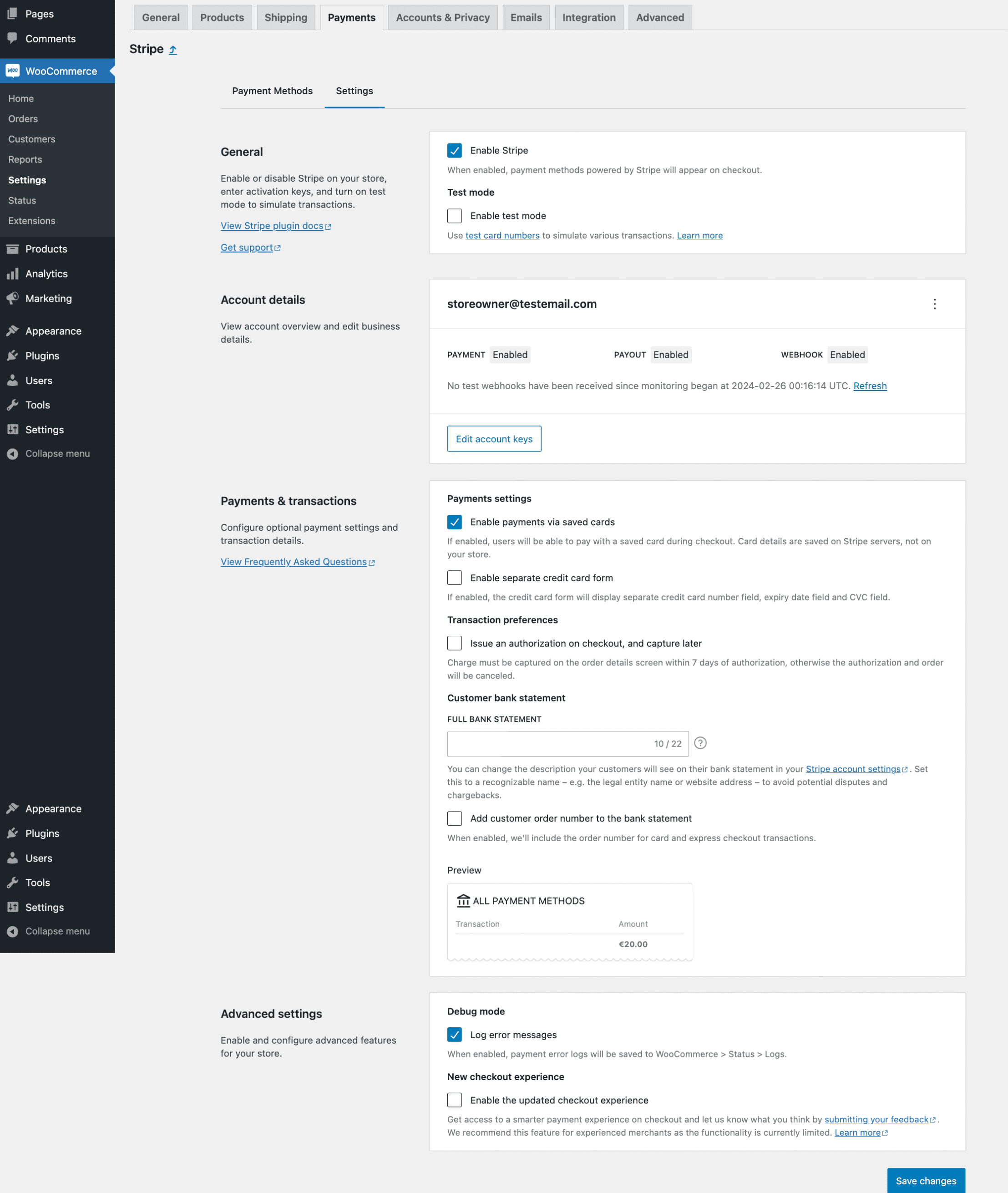
Echa un vistazo a la documentación de la extensión Stripe WooCommerce para obtener más información, incluyendo cómo instalar y configurar la extensión.

¿Dónde puedo conseguir soporte o hablar con otros usuarios?

Si te atascas, puedes pedir ayuda en el Foro del plugin.

Reseñas

13 de Octubre de 2026 2 respuestas
I experienced an issue with WooCommerce Stripe Gateway where the Apple Pay and Google Pay Express Checkout buttons stopped working, particularly when a coupon was applied to the cart. The browser console showed this error: WooCommerce Stripe Gateway: blocking checkout — Stripe.js was loaded from an unexpected source. Expected Stripe.js from js.stripe[dot]com On investigation, Stripe.js was being loaded from js.stripe-cdn[dot]net/v3 instead of the expected js.stripe[dot]com URL. The script itself returned HTTP 200, so it appeared to load successfully, but the plugin rejected the URL and blocked Express Checkout. The fix: I deactivated WooCommerce Stripe Gateway, replaced the existing plugin files with a clean installation, and reactivated it. This corrected the issue, and Express Checkout started working again. If you encounter the same error, check your browser console for the unexpected Stripe.js source warning. If Stripe.js is being loaded from js.stripe-cdn[dot]net and the plugin expects js.stripe[dot]com, reinstalling a clean copy of the plugin may resolve the problem. I hope this helps anyone else experiencing the same issue.
9 de Septiembre de 2026 1 respuesta
There was a duplicate payment on Stripe. Woocommerce & Stripe worked together to figure out why it made a duplicate payment. They was so very helpful in getting it figured out. The support with both Woocommerce & Stripe was Great. Thank You So Much.
2 de Septiembre de 2026 3 respuestas
Almost every update has been re-enabling the "link" feature. Now with the latest update , despite begin disabled , it is forcing the link options to be present and confusing customers . They have also implemented an element that you cannot see called "AiAgentPaymentSteering"it always amazes me when a company continues to find new ways to aggravate its customer base.
29 de Agosto de 2026 1 respuesta
Support was usually accurate, detailed and gradually guided through what was a somewhat difficult problem, and eventuated in a solution. The support team spent the time needed over several days, to sort it out.
13 de Julio de 2026 1 respuesta
They solved a problem that my company was dealing with that had been a huge issue for 6 months. I was at my wits in. They walked me through every possible scenario that could be causing the glitch and helped me fix it. They are the best and I cannot thank them enough. They really know what they are doing!
30 de Junio de 2026 1 respuesta
Excellent support. Wes quickly identified why the suggested workaround wasn't working, explained the underlying issue clearly, and provided a recovery process that successfully restored our affected subscription renewals using customers' saved Stripe payment methods. The guidance was accurate, professional, and helped us resolve the issue without requiring custom code. Thank you for the excellent support!
Leer los 237 comentarios

Colaboradores & Desarrolladores

“WooCommerce Stripe Payment Gateway” es software de código abierto. Las siguientes personas han contribuido a este plugin.

Colaboradores

“WooCommerce Stripe Payment Gateway” ha sido traducido en 37 idiomas. Gracias a los traductores por sus contribuciones.

Traduce “WooCommerce Stripe Payment Gateway” a tu idioma.

¿Interesado en el desarrollo?

Revisa el código, echa un vistazo al repositorio SVN, o suscríbete al registro de desarrollo por RSS .

Historial de cambios

11.1.0 – 2026-10-13

Nuevas características

  • Add – Automatically configure test mode when onboarding to a live account

Correcciones importantes y actualizaciones

  • Remove – Stop offering Sofort at checkout (discontinued by Stripe on March 31, 2025); refunds and subscription renewals for existing Sofort orders keep working
  • Fix – Show BLIK and ACSS payment methods at checkout when Optimized Checkout Suite is enabled
  • Fix – When checking if unpaid orders should be canceled, get the Stripe payment status, and update orders with Stripe payment details
  • Fix – Preserve manually configured webhooks during automatic reconfiguration and warn when the configured webhook no longer exists
  • Fix – Ensure retry with a saved payment method works after a declined Adaptive Pricing payment attempt on Classic Checkout
  • Fix – Allow Classic Checkout payments without a WooCommerce billing country field when Adaptive Pricing is enabled
  • Fix – Ignore Checkout Session failure webhooks after an order switches to another payment gateway
  • Fix – Prevent dropped webhooks, double processing, and skipped pre-order handling when requests race for the order payment lock
  • Fix – Show an error before submission when required custom checkout fields are empty in Classic Checkout
  • Fix – Allow payment methods to be enabled when they support a currency supplied by a multi-currency plugin
  • Fix – Prevent express checkout wallets from failing when rounded display items exceed the payment total
  • Fix – Accept shipping addresses in the express checkout wallet sheet for free trial subscription carts whose shipping is charged with the recurring payments
  • Fix – Point a saved Stripe Link payment method at the newest card selection when the customer re-enrolls through Link, so subscription renewals stop charging the replaced card
  • Fix – Retry matching a completed Adaptive Pricing checkout session to its order instead of giving up after the first attempt
  • Fix – Show the on-page 3D Secure authentication modal instead of a full-page redirect for card payments under Optimized Checkout with Dynamic Payment Methods
  • Fix – Stop refusing express checkout orders over required classic custom checkout fields on stores whose checkout page uses the checkout block and cannot render them
  • Fix – Remove account password data that may have been stored in order metadata by express checkout in version 10.9.0
  • Fix – Allow Klarna purchases for Puerto Rico shoppers, and refine billing country availability logic
  • Fix – Send a return URL when the browser confirms an express checkout (Apple Pay, Google Pay) or 3D Secure card payment, so a payment that needs a redirect can complete
  • Fix – Allow retries with an express wallet or saved card after a declined card under Optimized Checkout with Dynamic Payment Methods
  • Update – Ensure that application fees are not sent to Stripe for OAuth-connected accounts

Otras correcciones y actualizaciones

  • Fix – Return an error response when a Payment Method Configuration update fails in settings, so the frontend correctly displays an error instead of a false success notice
  • Update – Show the specific Stripe error reason in the settings save notice when a Payment Method Configuration update is rejected
  • Fix – Show the correct guidance when a subscription renewal fails because its Stripe mandate is invalid
  • Fix – Preselect the customer’s default saved Stripe payment method within the active gateway in Blocks checkout
  • Fix – Stop two requests from reclaiming the same expired Optimized Checkout or Agentic Commerce sync lock
  • Fix – Ensure the current Payment Method Configuration is specified for Optimized Checkout Suite and Adaptive Pricing
  • Fix – Show negative order fees as negative line items in Express Checkout on the Pay for Order page
  • Fix – Show coupon discounts as negative line items in Express Checkout on classic cart and checkout pages
  • Fix – Show negative cart fees (e.g. a discount extension applying its discount as a fee) as negative line items in Express Checkout on classic cart page
  • Fix – Stop disabling Level 3 data account-wide when Stripe rejects it for a request that declares a non-card payment method
  • Fix – Open testing and payment settings documentation links in new tabs
  • Fix – Show a useful error when a Stripe connection cannot start
  • Fix – Link to checkout when missing required custom fields block express checkout on other pages
  • Fix – Ensure that switching mode doesn’t show an incorrect payment method save error
  • Fix – Add robust checks against order attribution Javascript not being fully loaded in block checkout
  • Fix – Remove the duplicated period in the webhook status message when webhooks are pending
  • Update – Reduce the size of the express checkout JS bundle
  • Update – Reduce the size of the Stripe settings JS bundles by loading only the Gridicons they use
  • Update – Improve checks in the wallet payment confirmation flow
  • Update – Include the connected Stripe account ID in the account connection, account disconnection, and key update events sent when usage tracking is enabled
  • Update – Link the WooCommerce POS page from the in-person payments description in the readme

Cambios internos y próximas características

  • Add – Show the originating AI agent in the WooCommerce order Origin column for Agentic Commerce orders
  • Add – Agentic Commerce: add merchant settings to exclude add-on/configurator products from the feed or redirect shoppers to the store to check out, with per-product advisories in the feed preview
  • Fix – Reject agentic checkout line items with a zero or negative quantity, or a negative amount, when building shipping packages, instead of quoting rates from corrupted totals
  • Fix – Include cart contents in agentic checkout shipping calculations so content-dependent shipping methods such as table rate and weight-based return accurate rates
  • Tweak – Agentic Commerce: surface shipping zones with no flat-rate method (which contribute no shipping to the feed) in the feed preview and logs
  • Dev – Add E2E coverage for express checkout with free trial subscriptions, with and without shipping, including completing the purchase with Link
  • Dev – Block outbound HTTP requests from unit tests
  • Dev – Reduce Blocks Javascript by moving payment method icon styles into CSS
  • Dev – Mark the Sofort and Giropay payment method classes and constants as deprecated ahead of their removal
  • Dev – Make e2e tests runnable from Quality Insights Toolkit (QIT)
  • Dev – Update PHPCS rules and improve alignment with WordPress plugin rules

Mira el registro de cambios para obtener todos los detalles entre versiones.