

Descripción
Shortlist adds an “Add to wishlist” button to your WooCommerce shop loop and product pages. Shoppers save products, favourites and save-for-later items, then come back from a “Wishlist” tab in My Account, a page of their own, or anywhere you drop the [shortlist] shortcode.
Los invitados pueden guardar productos antes de iniciar sesión. La lista de un invitado se guarda en una cookie; la próxima vez que ese visitante inicie sesión, sus artículos guardados pasan a su cuenta, así que no se pierde nada en el paso de inicio de sesión. Las listas de los clientes que han iniciado sesión se guardan en una tabla de base de datos propia vinculada a su ID de usuario.
El plugin está escrito para tiendas a las que les importa el peso del frontend y la accesibilidad:
- The front-end script is vanilla JavaScript with no jQuery dependency. It is deferred and loaded in the footer.
- El botón conmutador reserva su espacio, por lo que cambiar entre los estados de agregar y quitar no redibuja la página (sin CLS).
- The toggle is a real
<button>witharia-pressed. When a product appears more than once on a page, every button for it updates together after a save, and the change is announced to screen readers through a polite live region. - El guardado y la eliminación ocurren a través de admin-ajax sin recargar la página.
En los productos variables, el botón sigue la variación seleccionada, así que el cliente guarda exactamente la talla o el color que eligió en lugar del producto superior. Hasta que elige las opciones, el botón permanece desactivado, con una pista que puedes redactar tú mismo.
El código fuente se encuentra en GitHub en github.com/wppoland/plogins-shortlist, ese es el lugar para informes de fallos y parches.
Documentación y enlaces
- Documentación: plogins.com/plogins-shortlist/docs/
- Página del plugin: plogins.com/plogins-shortlist/
- Código fuente: github.com/wppoland/plogins-shortlist
- Informes de fallos y solicitudes de características: github.com/wppoland/plogins-shortlist/issues
- Shortlist Pro: plogins.com/plogins-shortlist-pro/
Dónde pueden aparecer el botón y la lista
- La página de producto individual, debajo del área de agregar al carrito.
- Tarjetas de producto en los bucles de tienda, categoría y etiqueta.
- Product cards in block-theme Product Collection grids (for example a homepage grid in Twenty Twenty-Five), next to each card’s add-to-cart button.
- A header counter, via the
[shortlist_count]shortcode: a heart link to the wishlist with a live count badge. In a block theme, put it in the header with the Shortcode block. - A “Wishlist” tab in WooCommerce My Account, optionally showing a saved-item count like “Wishlist (3)”.
- A dedicated page you pick or create from the settings screen.
- Cualquier entrada o página, a través del shortcode
[shortlist]. - The block editor, via the Shortlist Wishlist block (server-rendered, so the editor preview matches the front end).
- El editor de Elementor, a través del widget Wishlist (misma lista que el shortcode; se carga solo cuando Elementor está activo).
Cada ubicación es un conmutador independiente en la pantalla de ajustes.
Ajustes
The Shortlist menu in wp-admin opens to shop managers (it uses the manage_woocommerce capability), not only administrators. From there you can:
- Activar o desactivar la lista de deseos, y decidir si los invitados pueden usarla.
- Choose where the button shows up: single product, shop loop, My Account, and a dedicated page.
- Show or hide the saved-item count on the My Account menu.
- Remove a product from the wishlist when the shopper adds it to the cart (off by default).
- Establecer las etiquetas de los botones de agregar y quitar, y la sugerencia de variación.
- Da forma a la propia lista: encabezado, texto de introducción y de lista vacía, cuántas columnas usa la cuadrícula, y qué detalles (imagen, nombre, precio, agregar al carrito, botón de eliminar) muestra cada producto guardado.
Cada ajuste tiene un “?” al lado que abre una breve explicación de lo que hace.
Shortlist solo carga su hoja de estilos y su script en las páginas donde realmente aparece la lista de deseos, así que el resto de tu tienda queda intacto.
Works with other Plogins plugins
- Quotlet – Request a Quote for WooCommerce – a “Request a quote for these items” button under the wishlist adds the saved quote products to a quote request. It follows Quotlet’s own on/off switch.
- Waitlist – Back in Stock for WooCommerce – out-of-stock simple products on the wishlist show Waitlist’s sign-up form right there; out-of-stock variable products link to their page. Switch: “Show the waitlist form on out-of-stock items on the wishlist”, on by default.
- Versus – Product Compare for WooCommerce – with two or more saved products, a “Compare these” button opens them in the comparison table.
Shortlist Pro
Shortlist Pro is a separate paid plugin that extends Shortlist.
Included in Shortlist:
- Wishlist button
- My Account tab
- [shortlist] shortcode
- Guest support
- AJAX add and remove
Shortlist Pro adds:
- Multiple named lists
- Share links
- Wishlist analytics
- Price alerts
The free edition is not a trial and its features stay available without a time limit.
- Shortlist Pro – plogins.com/plogins-shortlist-pro/
- Compare editions and pricing – plogins.com/plogins-shortlist-pro/pricing/
- PRO documentation – plogins.com/plogins-shortlist-pro/docs/
External Services
Shortlist no se conecta a ningún servicio externo. Guardar y eliminar elementos se realiza a través del endpoint admin-ajax de su propio sitio, y todos los datos de la lista de deseos permanecen en su base de datos de WordPress: las listas de clientes que han accedido viven en una tabla personalizada shortlist_items indexada por su ID de usuario, las listas de invitados viven en una cookie en el propio navegador del visitante hasta que acceden, y los ajustes se almacenan en la opción shortlist_settings. El plugin no envía correos electrónicos y no carga fuentes, scripts o rastreadores de terceros.
Traducciones
Plogins Shortlist es totalmente traducible y envía la plantilla plogins-shortlist.pot. Las traducciones son entregadas por los paquetes de idioma de WordPress.org desde translate.wordpress.org, que es donde se contribuyen el polaco, el alemán y el español; el propio paquete no contiene archivos de traducción compilados.
Capturas de pantalla
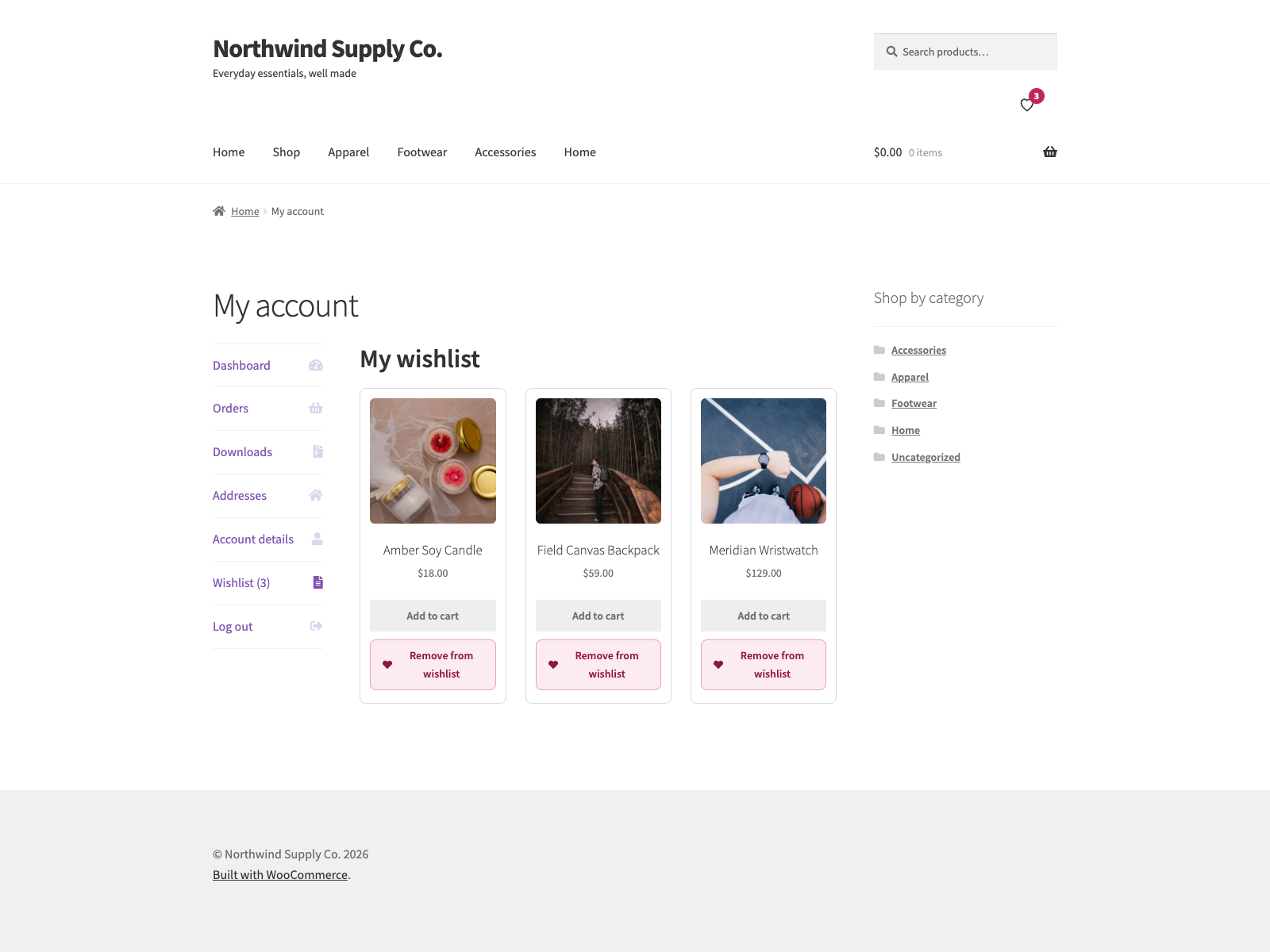
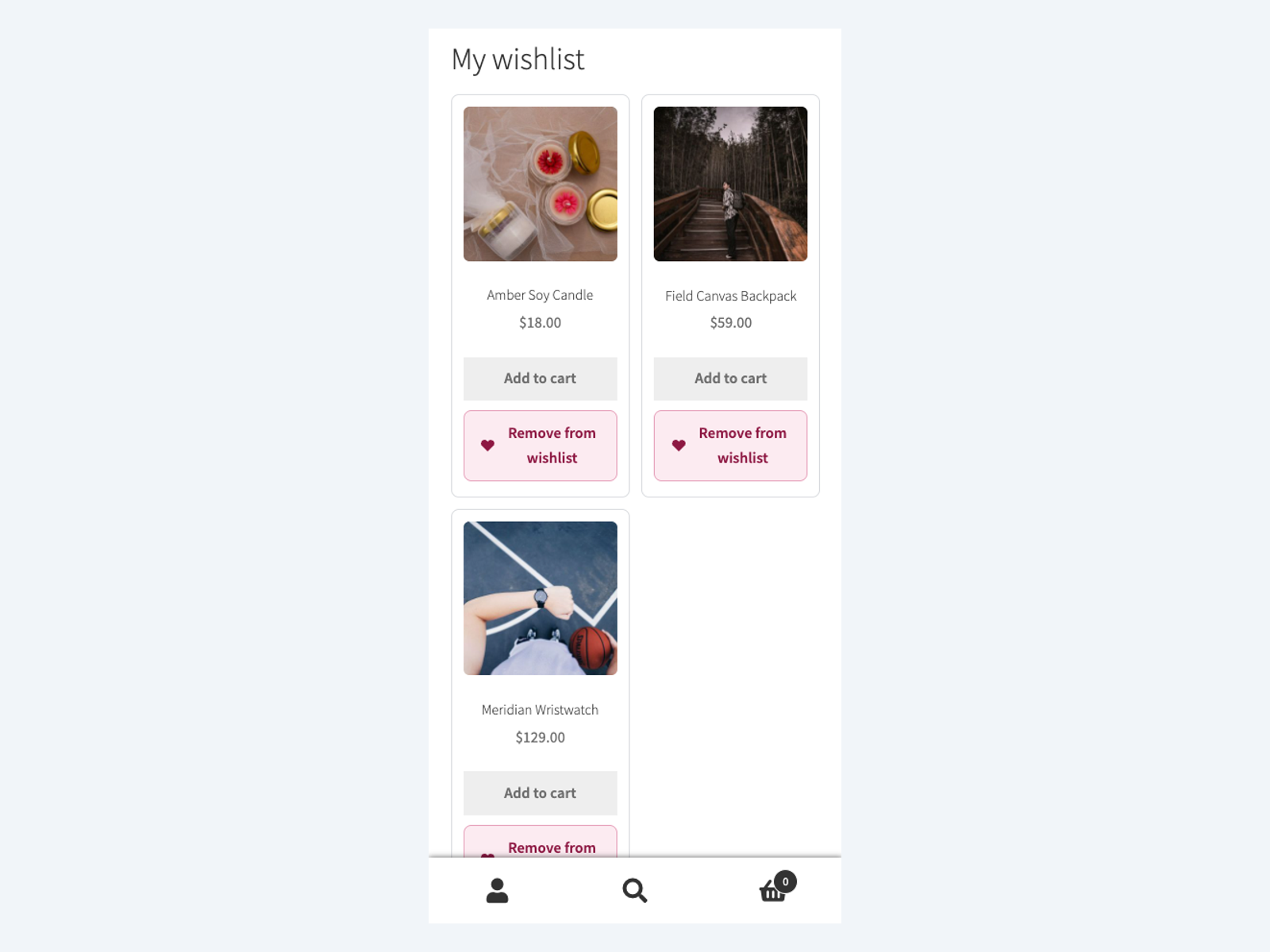
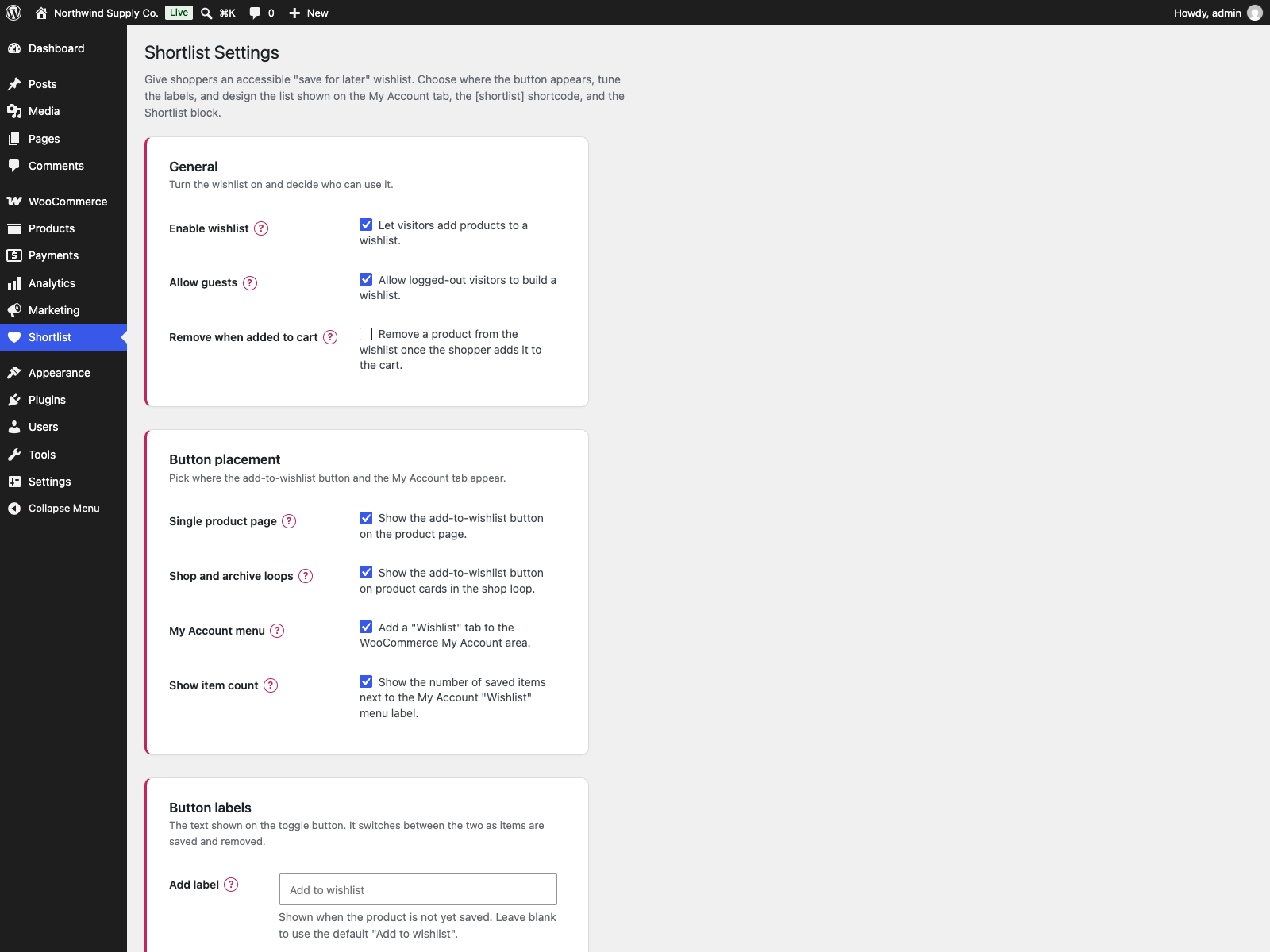
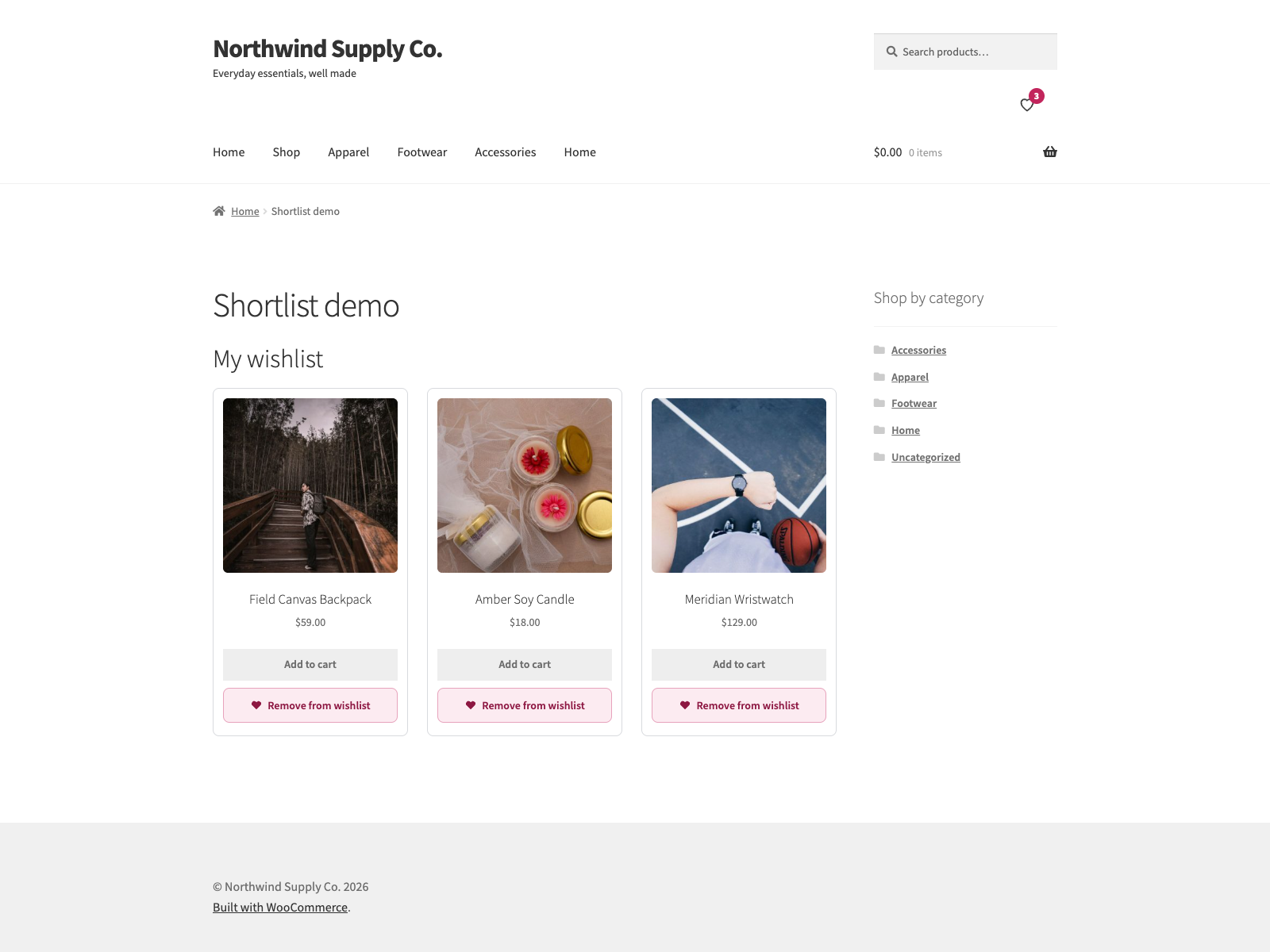
[shortlist_count] shortcode, showing three saved products.Bloques
Este plugin proporciona 1 bloque.
- Shortlist Wishlist Muestra la lista de deseos del comprador actual (la misma lista que el shortcode [shortlist]).
Instalación
- Upload the plugin to
/wp-content/plugins/shortlist, or install via Plugins > Add New. - Activate it. WooCommerce must be active.
- Visit the Shortlist menu in wp-admin to configure placement and labels.
FAQ
-
¿Requiere WooCommerce?
-
Sí. Shortlist requiere una instalación activa de WooCommerce.
-
¿Pueden los invitados usar la lista de deseos?
-
Sí, si lo permites en los ajustes. La lista de un invitado se guarda en una cookie y se fusiona con su cuenta la próxima vez que inicia sesión.
-
¿Usa jQuery?
-
No. El script del frontend del propio plugin es JavaScript puro sin dependencia de jQuery.
-
¿Cómo muestro la lista de deseos en una página?
-
Use the
[shortlist]shortcode, or rely on the “Wishlist” tab added to the WooCommerce My Account area. -
¿Funciona con productos variables?
-
Sí. En los productos variables, el botón de la lista de deseos sigue la variación seleccionada, así que el artículo guardado puede incluir la talla o el color elegidos.
-
How do I show a wishlist counter in the header?
-
Add the
[shortlist_count]shortcode to your header: in a block theme, edit the Header template part and insert a Shortcode block. It prints a heart link to your wishlist page (or the My Account wishlist tab) with a badge showing how many items are saved. Screen readers hear “Wishlist, 3 items”. The number is fetched by the browser after the page loads and updates as items are added or removed, so it stays correct on cached pages. -
Can I remove a product from the wishlist once it is in the cart?
-
Yes. Turn on “Remove when added to cart” in the General settings. When a shopper adds a saved product to the cart, it leaves their wishlist, and the counter and buttons on the page update. For a variable product, the saved variation is the one removed. It is off by default.
-
¿Puedo crear una página de lista de deseos dedicada?
-
Yes. Choose an existing page or create one from the Shortlist settings screen. The plugin can inject the
[shortlist]list automatically. -
¿Es accesible la lista de deseos?
-
Sí. El botón de la lista de deseos es un botón real con
aria-pressed, anuncios para lectores de pantalla y sin cambios de diseño cuando el estado guardado cambia. -
Does it work with Quotlet, Waitlist and Versus?
-
Yes. Quotlet adds a quote button for the saved quote products, Waitlist shows its sign-up form on out-of-stock items, and Versus adds a “Compare these” button when two or more products are saved. Only the Waitlist form has a switch, under Ecosystem integrations in the Shortlist settings.
-
Does this plugin work on WordPress Multisite?
-
Sí. Este plugin es compatible con WordPress Multisite. Actívalo para toda la red o en sitios concretos; cada sitio conserva sus propios ajustes y datos.
Reseñas

Colaboradores & Desarrolladores
“Shortlist – Wishlist for WooCommerce” es software de código abierto. Las siguientes personas han contribuido a este plugin.
Colaboradores
“Shortlist – Wishlist for WooCommerce” ha sido traducido en 8 idiomas. Gracias a los traductores por sus contribuciones.
Traduce “Shortlist – Wishlist for WooCommerce” a tu idioma.
¿Interesado en el desarrollo?
Revisa el código, echa un vistazo al repositorio SVN, o suscríbete al registro de desarrollo por RSS .
Historial de cambios
1.1.6
- Fixed: deleting the plugin on a multisite network now removes its wishlist table and settings from every site, not only the main one.
1.1.5
- Fixed: the site could fatal (“Unknown named parameter”) when another Plogins plugin with an older copy of the shared library was active. The plugin’s bundled copy now lives under its own namespace.
1.1.4
- Changed: the wishlist-to-quote button moved into Quotlet, which shows it only while its quote requests are on and only for the saved quote products, so the Quotlet switch left the settings here. With Waitlist active, an out-of-stock item on the wishlist shows the Waitlist sign-up form itself instead of a link to a #waitlist anchor that did not exist; a variable product links to its page, where the variation is picked. The Quotlet and Waitlist lines under Ecosystem integrations link to the plugin search on the Add Plugins screen when the plugin is not installed.
- Fixed: a wishlist page that holds the [shortlist] shortcode and is also chosen as the Wishlist page (the page Create page makes) showed the wishlist twice, with every button under it doubled. It now shows once; a chosen page without the shortcode still gets the list added.
1.1.3
- New: with Quotlet active, the wishlist page can show a Request a quote for wishlist button that copies the saved items into the quote list and opens the quote page. With Waitlist active, out-of-stock items in the wishlist show a Notify when available link to the product page. Both can be switched off under Ecosystem integrations in the settings.
1.1.2
- The Upgrade to PRO links open the pricing page in the admin’s language where plogins.com has one, and tell plogins.com which plugin the visit came from (utm_source, utm_medium and utm_campaign in the link). Nothing is sent from your site.
- Readme: the PRO section lists what the free plugin includes and what the paid edition adds as two lists, which WordPress.org can display (it does not display tables).
1.1.1
- Readme only: a PRO section with links to the paid edition.
1.1.0
- New:
[shortlist_count]shortcode for the header, a heart link to the wishlist with a count badge and a spoken label such as “Wishlist, 3 items”. The count is loaded in the browser and updates after every add or remove, so a cached page never shows another shopper’s number. - New: the add-to-wishlist button on block-theme Product Collection grids, next to each card’s add-to-cart button. On a block theme’s shop page, where WooCommerce also runs the classic loop hook, each product still gets one button.
- New: “Remove when added to cart” setting, off by default. A saved product leaves the wishlist when it is added to the cart, including when its quantity in the cart is raised; for a variable product the saved variation is removed.
- Fixed: on Storefront and other themes that float WooCommerce product loops, the wishlist grid squeezed every card to a narrow column and left an empty first cell.
1.0.21
- Privacy: after a customer signed in, the items they had saved as a guest kept the guest cookie’s id, and that cookie stays in the browser after logout. The next person at that browser saw the customer’s wishlist and could remove items from it. Items handed to an account now leave the guest list, and guest lookups no longer match account items.
- Fixed: a product saved both as a guest and on the account was listed twice after signing in, and counted twice in “Wishlist (n)”.
- Fixed: items saved as a guest were not moved to the account when the visitor registered, on the My Account form or at checkout, because that sign-in never fires wp_login.
- Fixed: the Shortlist Wishlist block could not be added in the block editor. Its script loaded before the editor’s own scripts and stopped with an error, so the block never registered.
- Fixed: a page built with the Elementor Wishlist widget got the list without its stylesheet and script, so it was unstyled and its remove buttons did nothing.
- Fixed: switching the wishlist off left the [shortlist] shortcode, the block and the My Account wishlist URL still printing the list.
1.0.20
- The upgrade notice’s “Coming soon” and “Get notified” labels are English source strings for every language; Polish sites used to get their own Polish source text, which translators in other languages then saw untranslated.
1.0.19
- Security (low): the wishlist accepted any product ID, including draft, pending and private products, and then showed that product’s name, price and image on the wishlist page. A visitor could read unpublished products by sending guessed IDs. Products the visitor cannot read are now refused and are no longer listed.
1.0.18
- Display name drops the “Plogins ” prefix. The slug, the text domain and every option key are unchanged, so nothing on an existing install moves.
1.0.17
- The sidebar upgrade promo now follows the same dismissal as the banner. Dismissing the banner used to leave a full-height advert on the settings screen for good, which is not what the WordPress.org guideline on upgrade prompts means by used with moderation.
1.0.16
- Fixed: the saved-item count loaded every saved product to count them. The My Account menu badge and the number returned after every add or remove asked the database for the whole list and then built a full product object per row, so a shopper with forty saved items paid forty product loads for one number, on every My Account page view. The count is now a single COUNT query and loads nothing.
1.0.15
- Changed: the listing now says a paid edition exists and what it adds. It never did, so anyone reading the WordPress.org page had no way of knowing there was one.
1.0.14
- Fixed: the PRO upgrade promo kept selling to people who had already bought the paid edition. Only the banner could be dismissed, so the sidebar promo and the locked feature cards followed a paying customer around for good. The promo now checks whether the paid edition is active and steps aside when it is.
- Fixed: arrow glyphs in the admin menu paths, and in the strings handed to translators. An arrow inside a translatable string makes the glyph every translator’s problem and changes the layout in any locale that drops it.
1.0.13
- Changed: the PRO feature cards printed an arrow glyph in menu paths where the rest of the plugin and the documentation use a plain “>”. Same navigation, one character that renders everywhere.
1.0.12
- Fixed: the wishlist rendered with no styling and dead buttons on any page other than the shop, a product, a product category, My Account or the page set as the wishlist page. The
[shortlist]shortcode and the wishlist block print the full markup anywhere, but the stylesheet and script did not follow them. They now load wherever the shortcode or the block is on the page, and nowhere else.
1.0.11
- Fixed: deleting the plugin left the per-user “dismiss” flag from the PRO notice in the database. Uninstall now removes it for every user, not just the one who dismissed it.
1.0.10
- Fixed: every customer-facing label was untranslatable. The button text, the My Account title, the empty-list message and the error strings shipped as English sentences in a config file and were written into the settings option the moment the plugin activated, so a shop running in another language showed English however complete its language pack was. The settings screen already said “leave blank to use the default”; the packaged value meant blank never happened.
- The defaults are now translated strings resolved when the label is about to be shown, never written back to the database. A label you typed yourself is still used exactly as typed.
- On update, a label left byte for byte as the English default is cleared so the translated one takes over. Anything you edited, including a hand translation, is matched exactly and kept.
1.0.9
- Translations: refreshed the bundled
plogins-shortlist.pot. It had fallen behind 1.0.8, missing six strings from the wishlist admin list and the Elementor widget and still carrying a price string that had been removed. That template is what translators work from, so those six could not be translated until now.
1.0.8
- Corregida la promoción PRO en la pantalla de ajustes que citaba un precio en PLN. PRO tiene un precio y se cobra en EUR, por lo que a un administrador en un sitio polaco se le mostraba una cantidad en zloty y luego se le facturaba en euros, y la cifra en zloty era una conversión fija que se desviaba del cargo real a medida que cambiaba la tasa. La promoción ahora muestra el precio en euros que realmente se cobra.
- Nuevo: widget de Elementor para la lista de deseos, misma salida que el shortcode y el bloque. Se carga solo cuando Elementor está activo.
1.0.6
- Fixed: Save Changes on the Shortlist settings screen now saves every option again, including the whole “Wishlist list” card (heading, intro, empty-list message, columns and the show image, name, price, add-to-cart and remove toggles). Previously that button posted nothing.
- Fixed: “Create wishlist page” now only creates the page, instead of hijacking the settings save.
1.0.4
- Traducciones: completadas al polaco, alemán y español para el panel de actualización PRO.
1.0.3
- Mejoras de accesibilidad en el marcado del administrador y de la tienda.
- Corregidos los encabezados del administrador de bajo contraste bajo una preferencia de modo oscuro del sistema operativo.
1.0.2
- Agregadas traducciones al polaco, alemán y español para la interfaz del plugin.
1.0.1
- Primera versión estable.
0.3.1
- Renombrado a Plogins Shortlist for WooCommerce para un nombre de plugin más distintivo.
0.3.0
- Nuevo: Página de la lista de deseos, elige una página existente o crea una desde los ajustes; inyecta automáticamente la lista
[shortlist]cuando la página aún no tiene un shortcode. - Nuevo: Guardados conscientes de la variación, en productos variables el botón rastrea la variación seleccionada; sugerencia configurable cuando no se elige ninguna variación.
- Mejorado: la pantalla de ajustes agrupa la página de la lista de deseos, la sugerencia de variación y los controles de ubicación existentes.
0.2.0
- Polish: refreshed, themeable storefront styles (heart icon, dark-mode, CLS-safe grid) and a modern, card-based settings screen with an accessible “?” help popover on every option.
- Accessibility: wishlist changes are now announced to screen readers, and the My Account count updates live without a page reload.
- Robustness: friendly empty-state with a “Browse products” link, clear failure messaging, and defensive guards against missing product data.
- New: Shortlist Wishlist block for the block editor (server-rendered, matches the
[shortlist]shortcode). - New: optional saved-item count next to the My Account “Wishlist” menu label.
- Nuevo: control total sobre la lista de deseos, el encabezado, el texto de introducción y de lista vacía, el número de columnas y qué detalles del producto (imagen, nombre, precio, agregar al carrito, botón para quitar) aparecen.
- Nuevo: la limpieza de desinstalación elimina la tabla de la lista de deseos y las opciones del plugin al borrar.
- i18n: agregado Domain Path y un directorio
languagespara las traducciones.
0.1.0
- Versión inicial: lista de deseos AJAX accesible para WooCommerce con soporte para invitados, una pestaña Mi cuenta, un shortcode y una página de ajustes para la ubicación y las etiquetas.