
Descripción
📈 Drive More Sales, Leads & Email List Opt-Ins Using Popup Maker
Popup Maker™, rated as the best WordPress popup plugin by our community of 780,000+ users, empowers you to create stunning popups, modals, and overlays in minutes. Whether you’re a beginner or a pro, our versatile toolkit makes it easy to boost your WordPress site’s engagement.
Transform your WordPress site into a conversion powerhouse! Create targeted campaigns using popups, exit-intent forms, slide-ins, and smart banners to skyrocket your revenue and build your email list faster than ever.
We switched to Popup Maker for our popups and couldn’t be happier.
“We recommend it to all our clients too. Popup Maker is an essential piece of our website for maximizing growing our email list, increasing sales conversions, and guiding users with strategic calls to action. Great support too.”
~ Chris Badgett, LifterLMS CEO
🔥 Ready to get started?
👉 Visit Our Website – Explore all features & pricing
👉 Join Our Conversion Optimization Community – Share strategies & learn from experts
👉 Read Our Guides – Learn popup best practices
👉 Get Help – World-class support when you need it
🎬 See What’s Possible with Popup Maker
Impresionantes ejemplos de lo que puedes hacer con Popup Maker (Ver video)
🛠️ Ultimate WordPress Popup Builder: Every Type of Conversion Popup at Your Fingertips
With Popup Maker, you have the ultimate popup builder toolkit at your disposal, create any type of popup in minutes:
- Ventanas emergentes de suscripción de correo electrónico,
- Exit-Intent popups.
- Lead generation popups,
- Subscription list popups
- Ventanas emergentes de actualización de contenido,
- Ventanas emergentes de comercio electrónico,
- Ventanas emergentes de formulario de contacto,
- Urgent site-wide announcements and notification banners,
- EU cookie notices,
- Popups to greet visitors from ProductHunt (requires Popup Maker Pro),
- WooCommerce & Easy Digital Downloads upsell popups (requires Popup Maker Pro+),
- WooCommerce & Easy Digital Downloads cross-sell popups (requires Popup Maker Pro+),
- Cart abandonment popups — recover lost sales with targeted offers at checkout (requires Popup Maker Pro+),
- LifterLMS course enrollment popups — convert visitors directly into enrolled students (requires Popup Maker Pro+),
- & más.
Even the free version is great
“Does exactly what it says and is easy to use. Free version allows full control of where popup appears, how it looks and setting conditions for popup reappearing across website.”
~@rsb1234
🔑 Trigger Popups with Ease: Multiple Ways to Open Your Popups
Popup Maker offers a variety of triggers to open your popups:
- Abrir automáticamente (con retraso opcional)
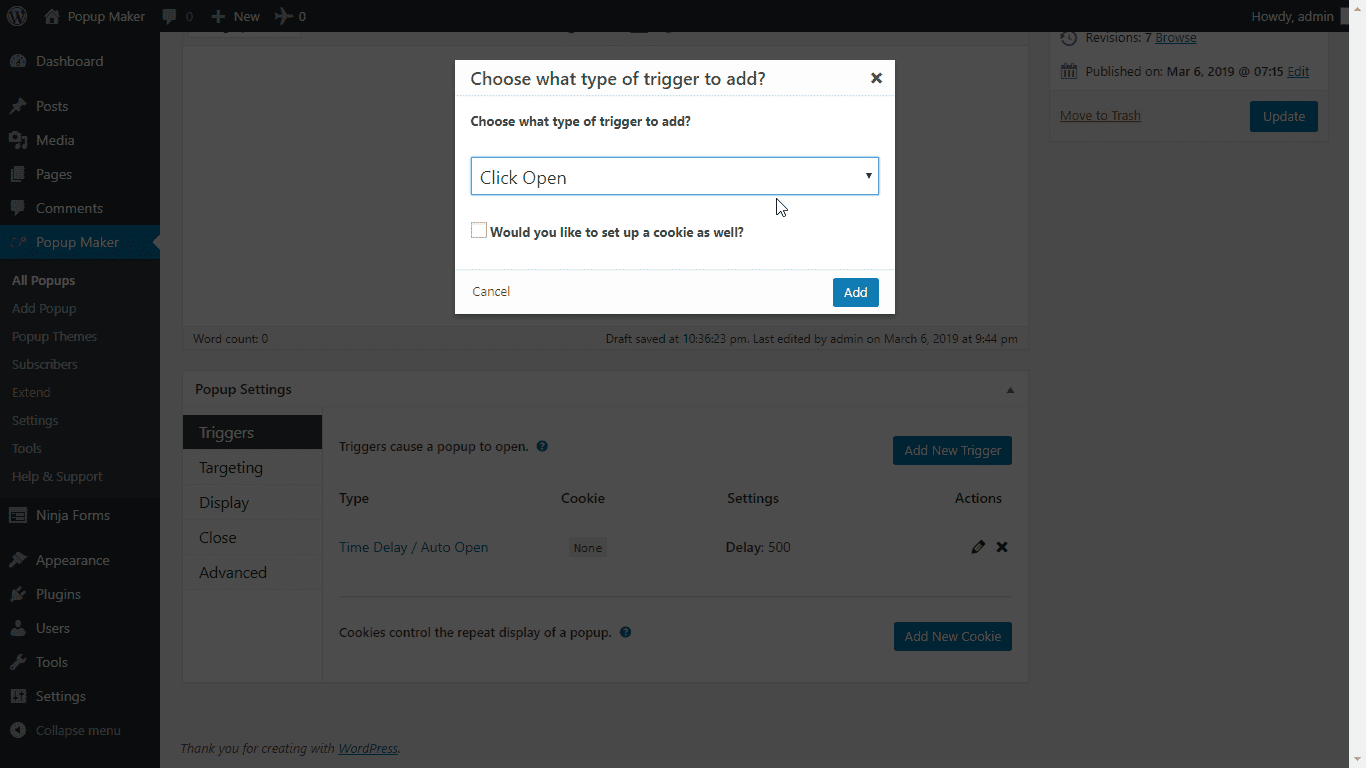
- Haz clic en el botón (o cualquier otro elemento) para abrir
- Envío de formulario (abre una ventana emergente cuando se envía un formulario)
- Open when someone is about to leave your site (requires Popup Maker Pro)
- Open when someone has scrolled down your page (requires Popup Maker Pro)
🎯 Smart Popup Targeting: Deliver the Perfect Message to Every Visitor
Never show irrelevant popups again! Our powerful targeting system ensures your messages reach exactly who needs to see them, when they need to see them. From basic page targeting to advanced user behavior conditions, you have complete control over your popup’s visibility.
Free Targeting Options:
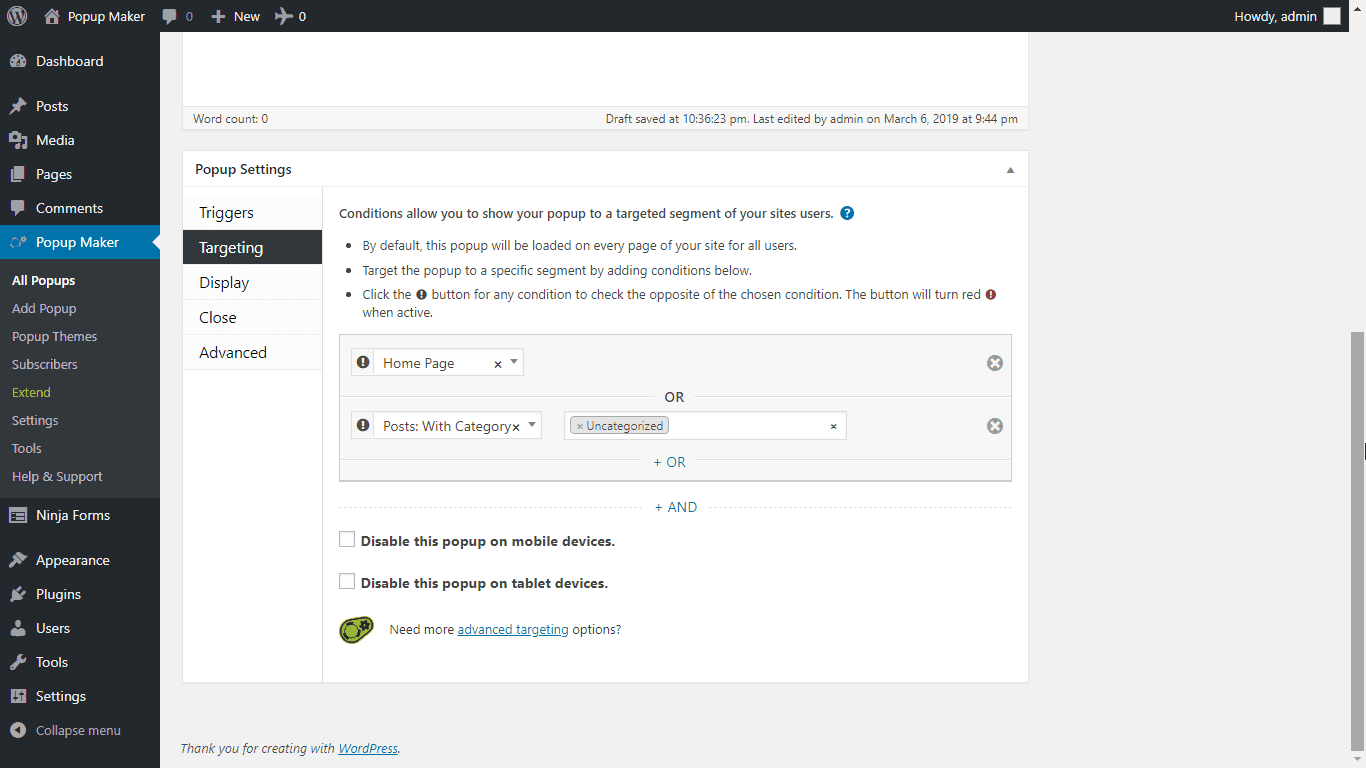
- Target specific posts, pages, or custom post types
- Target by post categories or tags, & custom taxonomies
- Front page vs blog page targeting
Premium Targeting Features:
- Advanced user behavior targeting
- Show on specific URLs or URL patterns
- Show/hide based on user roles
- Geolocation targeting
- Browser & OS targeting
- Time & date scheduling
- Page scroll depth targeting
- User login status
- Previous popup interactions
- Ecommerce purchasing & cart rules
- Advanced custom taxonomy targeting
- Referrer source targeting
🔑 Integrate with Your Favorite Form Plugins
Popup Maker se integra con todos los plugins de formulario más populares para permitirte abrir una ventana emergente cuando se envía un formulario o cerrar la ventana emergente cuando se envía un formulario dentro de la ventana emergente. Popup Maker se integra con:
Form Plugin Integrations:
- Ninja Forms – powerful drag & drop form builder
- Gravity Forms – advanced WordPress forms with conditional logic
- Contact Form 7 (CF7) – simple contact forms
- WPForms – beginner-friendly form plugin with templates
- WSForm – professional form builder with advanced features
- Fluent Forms – conversational forms with multi-step layouts
- Mailchimp for WordPress (MC4WP) – newsletter signup forms
- Formidable Forms – advanced form builder with database views
- Forminator – free form builder by WPMU DEV
- Elementor Pro Forms – native form builder for Elementor page builder
- HappyForms – free drag-and-drop form builder with live preview
- Kali Forms – Gutenberg-native form builder with block editor support
- Bit Form – lightweight form builder with custom post type storage
- HTML Forms – simple, lightweight form builder with no bloat
- Beaver Builder Forms – contact, subscribe, and login forms for Beaver Builder page builder
- Newsletter – thenewsletterplugin.com integration with AJAX submission support
- ¡y más!
Email Marketing & CRM Integrations:
¿Ya creaste un formulario en tu servicio de marketing por correo electrónico? Con nuestra versión gratuita, puedes copiar y pegar cualquier formulario creado por la mayoría de las plataformas de creación de listas, incluidos, entre otros:
- MailChimp
- AWeber
- InfusionSoft
- GetResponse
- ConvertKit
- Constant Contact
- Mail Poet
- Mad Mimi
- FluentCRM
- HubSpot
- Emma
- ¡y más!
⚙️ Advanced Popup Controls: Customize Every Aspect of Your Popups
Take complete control of your popups with our powerful customization features:
- Visual Popup Editor – Design beautiful popups with our intuitive drag & drop editor. Control sizing, positioning, animations, and more
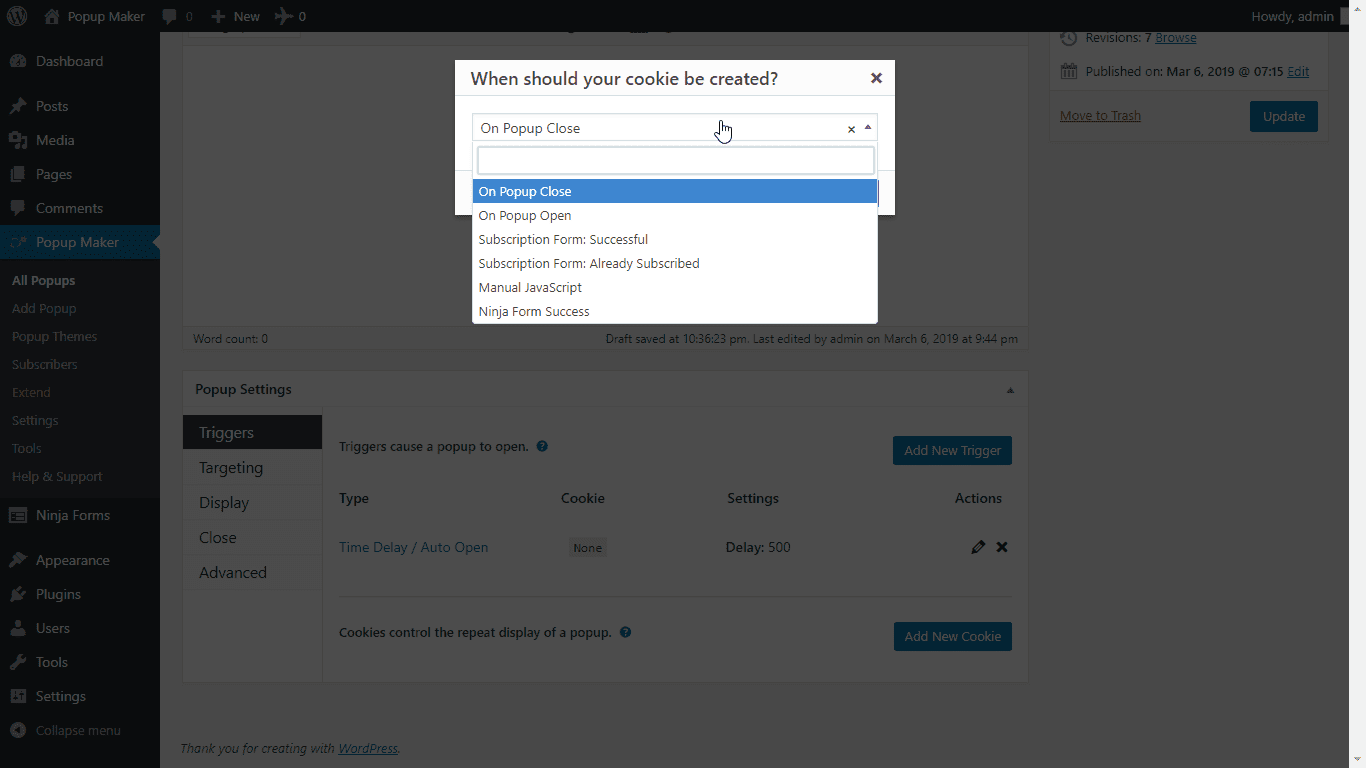
- Smart Display Rules – Set cookie-based display frequency to prevent popup fatigue and improve user experience
- Custom Animations – Choose from slide, fade, and other engaging entrance/exit animations
- Mobile-First Design – Every popup is fully responsive and looks great on all devices
- Custom Positioning – Place your popups exactly where you want them – centered, corners, or custom positions
- Cookie Controls – Fine-tune when and how often visitors see your popups with advanced cookie settings
👍 Trusted by many people just like you!
Popup Maker is used on over 780,000 websites and has received over 4,300 5-star reviews just like this one:
Excelente plugin, todo lo que necesitaba “Complemento realmente agradable, fácil de usar, adaptable ¡una buena captura!” @lemmmy
🚀 Go Further with Popup Maker Pro & Pro+
Stop settling for basic conversion tracking. Popup Maker is the only WordPress popup plugin with complete revenue attribution — see exactly how much money each popup generates, not just clicks and email captures.
No monthly fees. Your data stays on your server. No traffic limits. Ever.
Compare to the alternatives: OptinMonster starts at $108/year. Privy starts at $288/year. Justuno starts at $228/year. None of them give you complete revenue attribution or WordPress-native data ownership.
⚡ Popup Maker Pro — $99/year
Everything serious marketers need to drive and measure results:
- Exit Intent — Recover abandoning visitors with perfectly timed offers before they leave
- Popup Analytics — Track views, clicks, and conversions with a full reporting dashboard
- Advanced Targeting — Target by user behavior, referral source, scroll depth, geolocation, browser, OS, user role, login status, and more
- Scheduling — Display time-sensitive offers automatically at the perfect moment
- Forced Interaction — Ensure critical messages are acknowledged before users continue
- Call to Action Management — Create, track, and export unlimited trackable CTAs with conversion reporting
- Bulk Operations — Enable, disable, duplicate, and manage multiple popups at once
- Export / Import — Replicate winning campaigns across sites in seconds
- FluentCRM Integration — Tag contacts, add to lists, and trigger automations on popup conversion
- Scroll Trigger — Fire popups when visitors reach a specific scroll depth
🏆 Popup Maker Pro+ — $249/year
Everything in Pro, plus industry-specific power for ecommerce and education businesses:
- Complete Revenue Attribution — Track actual sales generated by each popup, from interaction through final purchase. See that a specific popup generated $5,000 in revenue this month.
- WooCommerce Integration — Add to cart, apply discounts, trigger upsells, cross-sells, and cart abandonment recovery, and track purchase revenue per popup campaign
- Easy Digital Downloads Integration — Add to cart, apply discounts, trigger upsells and cross-sells, and track purchase revenue per popup campaign — full feature parity with WooCommerce
- LifterLMS Integration — Enroll students, award achievements, apply discounts, and track enrollment revenue per popup
- Advanced Revenue Reporting — Attribution reports showing real dollars earned per campaign, popup, and CTA
🤝 Join Our Growing Community
We believe in making Popup Maker better together! Here’s how you can get involved:
- 📚 Read Our Documentation – Comprehensive guides and tutorials
- 💬 Get Premium Support – Our team is here to help
- 🌟 Join Our Community – Share strategies & learn from experts
- 💻 Contribute on GitHub – Help improve the code
- 🌍 Help with Translations – Make the best WordPress popup plugin accessible in your language
- ⭐ Leave a Review – Share your experience with others
Creado por Code Atlantic
Popup Maker is built by the Code Atlantic team. We create high-quality WordPress plugins that help you grow.
Echa un vistazo a algunos de nuestros plugins más populares:
- Content Control – Restrict Access to Pages and Posts
- User Menus – Show Or Hide Menu Items For Different Users
Capturas de pantalla


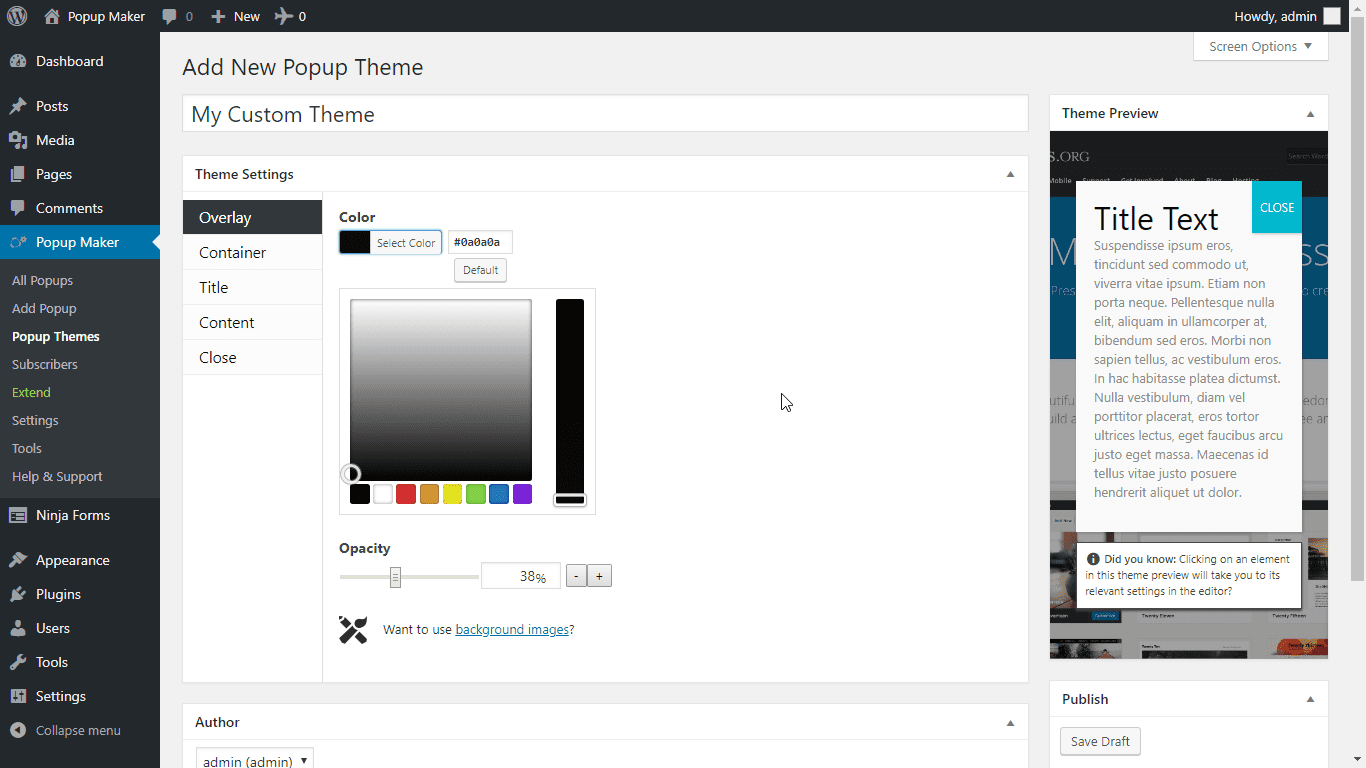
Bloques
Este plugin proporciona 1 bloque.
- Cta
FAQ
¿Cuáles son algunas de las formas en las que puedo usar las ventanas emergentes para hacer crecer mi lista de correo electrónico?
Las personas que usan Popup Maker para hacer crecer su lista de correo electrónico han encontrado muchas formas creativas de hacerlo. Algunas de las ventanas emergentes más comunes incluyen:
- Ventanas emergentes con opción de salida para solicitar una suscripción cuando alguien abandona tu sitio, algunas veces ofreciendo un descuento o PDF.
- Ventanas emergentes de actualización de contenido – Brinda más valor a las entradas de tu blog al brindar a los visitantes más recursos a cambio de su dirección de correo electrónico dentro de una ventana emergente de suscripción
- Ventanas emergentes de papel blanco: proporciona informes de la industria u otros documentos técnicos mediante formularios dentro de una ventana emergente
Aún mejor, Popup Maker se integra con todos los plugins de formularios más populares para que puedas incrustar fácilmente un formulario que ya has creado directamente en tus ventanas emergentes.
¿Cuáles son algunas de las formas en que las ventanas emergentes pueden aumentar las ventas y los ingresos de mi tienda WooCommerce?
Muchas personas no consideran las ventanas emergentes cuando intentan encontrar formas de aumentar las tasas de conversión y los ingresos en su sitio WooCommerce, pero en realidad son muy efectivas.
Algunas ventanas emergentes que hemos visto que funcionan bien para sitios de comercio electrónico incluyen:
- Ventanas emergentes de venta cruzada – recomiendan un producto complementario al ver o agregar un producto a su carrito.
- Ventanas emergentes de ventas dirigidas – recomendar un producto de nivel superior al ver o agregar un producto a su carrito
- Ventanas emergentes de abandono del carrito – ofrecer descuentos o asistencia cuando alguien está a punto de salir de la página de pago.
¿Dónde está tu documentación?
You can find our documentation over on our docs site
¿Cómo abro un mensaje emergente?
Using “triggers”, you can customize what makes each popup open. Review our triggers documentation here
¿Cómo puedo evitar que los mensajes emergentes se abran repetidamente?
Using “cookies”, you can set up how long until the popup opens again, if ever. Review our cookies documentation
¿Qué hago si quiero que una ventana emergente se muestre solo en una determinada página/entrada/etc?
Using “conditions”, you can specify where the popup will be shown. Check out our conditions documentation
¿Por qué mis ventanas emergentes no se abren / no funcionan?
There are several common causes for this, check this guide for help resolving it.
Reseñas


Colaboradores & Desarrolladores
“Popup Maker – Boost Sales, Conversions, Optins, Subscribers with the Ultimate WP Popup Builder” es software de código abierto. Las siguientes personas han contribuido a este plugin.
Colaboradores

“Popup Maker – Boost Sales, Conversions, Optins, Subscribers with the Ultimate WP Popup Builder” ha sido traducido en 12 idiomas. Gracias a los traductores por sus contribuciones.
¿Interesado en el desarrollo?
Revisa el código, echa un vistazo al repositorio SVN, o suscríbete al registro de desarrollo por RSS .
Historial de cambios
For the latest updates and release information:
- Join our community for important release announcements and discussions
- Visit our changelog for detailed version history
- View our complete development changelog
1.23.0 – 2026-06-28
Features
- Added a “Preview Popup” option to the block editor’s Preview menu, matching the classic editor. It opens the popup on the front end in a dedicated tab; clicking it again reuses that same tab, and saving the popup automatically refreshes the open preview so you always see your latest changes.
- Added “Disable URL tracking parameters” privacy setting. When enabled, popup links no longer get
?pid=appended — link clicks are tracked via browser beacons instead (less reliable but non-invasive to URLs).
Improvements
- The popup editor now remembers the last-open settings tab per popup instead of sharing a single tab across all popups, so each popup reopens to the tab you last used.
Fixes
- Fixed the “Preview” button in the classic editor not opening popups — a regression introduced in 1.22.0. You can once again preview popups directly from the editor without having to save and view the live page, now reliably regardless of how quickly the page finishes loading. Thanks to @marklchaves for the fix.
- Fixed missing styles for Popup Maker blocks on the front end in some installs — blocks now render with the correct styling without a console warning about a missing stylesheet.
- Fixed “Disable popup open tracking” privacy setting now disables link tracking parameters appended and click beacon tracking.
- Fixed PHP bug in
pum_get_asset_group_meta()where(array) file_exists()always evaluated as truthy, causing fatal errors when build artifacts were missing. - Fixed condition dropdowns (such as “Categories”, “Tags”, and other taxonomy selectors) showing duplicate entries and hiding some terms when you had more than ten — every term is now listed once and reachable as you scroll.
- Fixed popups taller than the browser window having their top cut off above the screen, which made the start of the content and the close button impossible to reach. Tall popups now keep their top edge in view.
- Fixed an invalid “Extra Selectors” value on a Click Open trigger breaking all popup triggers on the page. A malformed selector is now skipped (with a console notice) instead of stopping every trigger from working.
- Fixed ACF (Advanced Custom Fields) shortcodes not displaying their values inside popups since ACF 6.3.4, which stopped resolving
[acf]shortcodes on non-public content. ACF shortcodes now render in popup content again.
1.22.0 – 2026-03-31
Features
- Added link click conversion tracking for external and special links (mailto:, tel:, etc.) within popups. Clicks are tracked via analytics beacon and categorized by link type for conversion reporting.
- Added Beaver Builder Forms integration for form submission tracking and conversion analytics. Supports Contact, Subscribe, and Login form modules.
- Added Bit Form integration for form submission tracking and conversion analytics.
- Added Elementor Pro Forms integration for form submission tracking and conversion analytics with support for targeting specific forms.
- Added Forminator integration for form submission tracking and conversion analytics.
- Added HappyForms integration for form submission tracking and conversion analytics.
- Added HTML Forms integration for lightweight form submission tracking and conversion analytics.
- Added Kali Forms integration for form submission tracking and conversion analytics with native Gutenberg block support.
- Added Newsletter plugin (thenewsletterplugin.com) form integration for success detection and conversion tracking. Note: Newsletter forms must use
[newsletter_form ajax="true"]shortcode to enable AJAX submission mode for the integration to work.
Improvements
- Popup title field is now editable in the Block Editor sidebar, matching the classic editor experience.
- URL tracking parameter names (
pid,cta,notrack) are now filterable viapopup_maker/param_name/{key}, allowing site admins to resolve conflicts with other plugins. Example:add_filter( 'popup_maker/param_name/popup_id', function() { return 'pum_id'; } ); - Improved PID tracking reliability by firing template_redirect at priority 0, ensuring tracking occurs before other plugins that might redirect.
- Enhanced all Popup list views with sortable Enabled column and bulk enable/disable actions for easier management of multiple popups.
- Block library assets (CSS) loading unnecessarily on all front-end pages. WordPress now automatically loads these styles only when Popup Maker blocks are actually rendered.
- Enhanced ad-blocker bypass feature to obfuscate script and style element IDs (in addition to filenames) for improved bypass reliability. IDs now consistently use per site settings using either MD5 hashing or custom prefixes.
Fixes
- Fixed popup preview not opening due to admin_debug trigger firing before initialization completed. Closes #1181.
- Fixed animation speed field allowing negative and excessively large values via manual text input. Closes #1053.
- Fixed Gravity Forms integration fatal error when saving Close Popup or Open Popup settings. Closes #1084.
- Fixed CTA shortcode buttons rendering as plain links instead of styled buttons, with proper support for fill, outline, and text-only styles in both classic and block editor popups.
- Fixed mailto: and tel: links inside popups being incorrectly modified with tracking parameters, which broke email and phone links.
- Fixed Fluent Forms integration fatal error when using double opt-in. Closes #1094.
- Fixed Time Delay trigger settings tab displaying blank when switching from Click Trigger advanced tab. Closes #1109.
- Fixed trigger modal “Add” button label not displaying due to incorrect i18n function usage. Props to @DAnn2012.
- Fixed Divi 4 block editor compatibility issue where the popup editor would fail to load when the block editor was enabled. The classic editor is now automatically enforced for Divi 4 users.
- Fixed license key not deactivating properly.
- Fixed issue where license keys were being saved as asterisks instead of the actual key.
- Fixed issue where filter
replace_editorwas being used as an action without returning the value. - Fixed Subscribers page sort columns throwing 404 errors due to malformed URLs with double protocols (e.g.,
https://http//site.com). Closes #1092. - Fixed SQL syntax error on Subscribers page caused by using identifier placeholder instead of string placeholder in
SHOW TABLES LIKEquery.
1.21.5 – 2025-10-13
Improvements
- Optimized Google Fonts integration by eliminating database transients and API calls in favor of direct JSON loading with in-memory caching. This resolves reported database crashes from large font data and improves performance by 83% (file size reduced from 1.5MB to 255KB) while eliminating all database overhead.
Fixes
- Fixed accessibility tab trapping JavaScript error “trigger is not a function” when using keyboard navigation in popups.
- Fixed potential error when get_current_screen() is not available.
1.21.4 – 2025-09-25
Improvements
- Prevented misleading “Lite” messaging when extensions are active. Extension functionality will continue to work as expected.
Fixes
- Fixed Editor role users not being able to edit popups and themes, changing default permissions from
manage_optionstoedit_others_posts. - Fixed issue with conditions not working properly when advanced cookie rules were enabled in Advanced Targeting.
- Fixed popup titles being cleared when editing popups.
Developers
- Added
popup_maker/permissionsfilter to allow customization of user permissions for Popup Maker functionality.
1.21.3 – 2025-09-21
Fixes
- Fixed page builder compatibility issues by reverting popup preloading timing to wp_enqueue_scripts:11 (matching v1.20.6 behavior).
- Fixed delayed initialization of $.fn.popmake.triggers object for proper backward compatibility with legacy extensions.
- Fixed prevent popup init console notice when Debug Mode is not enabled.
1.21.2 – 2025-09-18
Fixes
- Fixed Beaver Builder compatibility issue that appeared in v1.21.0, special thanks to @robbymccullough at Beaver Buidler for the assist
- Fixed PHP warning “Undefined property: stdClass::$post_content” in Assets.php when post object lacks post_content property.
- Fixed Restore missing initialization of $.fn.popmake.conditions object for backward compatibility You with legacy extensions.
1.21.1 – 2025-09-16
Fixes
- PHP 7.4 errors due to strict function return types with union types that are not supported.
- Ensure bundled scripts & styles dependencies are properly loaded.
1.21.0 – 2025-09-15
This update begins the process of modernizing our codebase while polishing existing stuff & adding new features.
Minimum Requirements Change
- PHP: 7.4+
- WordPress: 6.6+
Features
- Trackable Call to Actions
- Create as many as you need.
- Track results, per link & per popup.
- Redirect to any page or url.
- Call To Action Button blocks for gutenberg to easily insert trackable links with style.
- CTA Shortcode to insert them without Gutenberg.
- Works with premium Popup Analytics.
- Upgrade to Popup Maker Pro or Pro+ to use them outside popups, for quick import/export, or to create WooCommerce add to cart & apply discount buttons.
- Conversion tracking for all internal popup links enabling better analysis of popup performance and user engagement.
- New
On Conversioncookie event to disable popups once they convert. - New Bricks Builder form integration for conversion tracking, form based cookies, closing popups after submission, and more.
Security
- Minor:Removed Easy Modal v2 [modal] shortcode compatibility mode as it has been deprecated for a long and was recently reported to include an unescaped title output.
Improvements
- Refactored core analytics to prevent duplicate conversion tracking when Pro is active.
- Block editor is now the default for new popups, replacing the previous opt-in beta approach for a more streamlined editing experience.
- Added “Use Classic Editor” setting for users who prefer the traditional popup editor interface.
- Existing users who previously disabled the block editor will see a one-time migration notice with options to continue using the block editor or switch to classic.
- Updated new user onboarding to include guidance about the classic editor option for users who prefer the traditional interface.
- Optimized popup
openfunctions to improve browser animation reliability and consistent user experience. This update aims to eliminate visual inconsistencies and resolve issues where popups occasionally failed to display. - Fixed settings page save notifications that previously only appeared after redirects, now displays success notice on all settings saves.
- Added plugin settings shortcut to the admin toolbar menu.
- Updated CSS selector generation tool with click-to-copy and improved selectors.
- Better grouping of Popup Maker extensions in the Plugins page.
- Updated build processes to rely on @wordpress/scripts & Webpack, as well as improved developer tooling. This should result in smaller JS & CSS file sizes, more reliable builds, and faster development cycles.
- Updated all branding to use SVGs and new marks/logos.
- Improve reliability of admin notice dismissals.
- Use
navigator.sendBeaconwhen available for more reliable analytics. - Better handling of version changes & migration processing during plugin updates.
- Added ability to search multiple post types in postselect fields.
- Added ability to search multiple taxonomies in taxonomyselect fields.
- Added validation for hex color conversion to prevent deprecated notices.
Fixes
- Fixed multicheck fields not properly saving when all options were unchecked, preventing users from clearing all selections in settings like analytics reporting permissions.
Close on overlay click&Close on ESC pressstopped working if 2 popups were open and one closed.- Potential error due to post object missing a post type.
- Prevent missing options data in DB from throwing errors on PHP 8.3+.
- Prevent error when Gravity Forms settings are not set.
Developers
- Optimized plugin loading & activation mechanisms.
- First stage of modernizing & reorganizing to use PHP namespaces & other PHP 7.4 optimizations.
- Updating frontend JavaScript to use hooks/filters system instead of global variables over time.
- Added new JS
popupMaker.triggersfilter to allow adding custom triggers.
- Added new JS
- Added new helper methods for registering Popup Maker custom scripts & styles that will be bundled with our plugin JS/CSS files automatically via AssetCache API.
- Lots of WPCS & TypeScript/PHP Type enforcement fixes.
1.20.6 – 2025-08-14
- Fix: WordPress 4.9 compatibility by checking has_blocks() function existence before calling it.
- Fix: WordPress 4.9 compatibility by checking wp_date() function existence before calling it.
1.20.5 – 2025-05-30
- Security: Fix potential XSS for custom HTML based popups.
1.20.4 – 2025-01-29
- Tweak: Updated documentation links to use new docs site.
- Fix: Popup title aria-labelledby attribute was being double-quoted. Thanks to the Equalize Digital team.