
Descripción
Usado por más de 300 000 sitios WordPress, valorado con 4,9 estrellas con más de 450 reseñas de cinco estrellas, desarrollado activamente durante más de 10 años y traducido a más de 15 idiomas.
Simple History es el registro de auditoría completo para WordPress. Registra todos los cambios importantes (ediciones de contenido, inicios de sesión de usuarios, actualizaciones de plugins, eventos de seguridad y más) para que los propietarios de sitios, equipos, agencias y desarrolladores sepan siempre quién hizo qué y cuándo. Solo instala y activa, no se necesita configuración.
Cada evento está redactado para que se lea: lenguaje sencillo como Página “Acerca de” actualizada, marcas de tiempo relativas como “hace 5 minutos”, y comparaciones antes/después en lugar de volcados de datos sin procesar.
🔍 Cómo ayuda Simple History en situaciones reales
Registra lo que ocurre en tu sitio
“¿Alguien ha hecho algo hoy? Ah, Sarah subió el nuevo comunicado de prensa y creó un artículo para él. Genial, ahora no tengo que hacerlo yo.”
Identifica problemas y depura más rápido
“El sitio va lento desde ayer. ¿Alguien ha hecho algo especial? … Ah, Steven activó “naughty-plugin-x”, debe ser eso.”
Mantén a los autónomos y agencias responsables
“Contraté a un desarrollador para optimizar mi sitio. Pero, ¿realmente hicieron algo? Un vistazo rápido a Simple History me muestra exactamente en qué trabajaron.”
Detecta actividad sospechosa a tiempo
“Veo tres inicios de sesión fallidos desde una dirección IP desconocida durante la noche. Voy a hacer clic en la IP para comprobar toda la actividad desde esa dirección, solo esos intentos, nada más. Bueno saberlo.”
✨ Lo que Simple History registra
Seguridad y monitorización
- Inicios de sesión fallidos con seguimiento de IP y filtrado por tipo (contraseña incorrecta frente a nombre de usuario inexistente)
- Comprobaciones de integridad de archivos del núcleo contra sumas de comprobación oficiales
- Actualizaciones automáticas de seguridad forzadas desde WordPress.org
- Cambios en el estado de salud del sitio
- Eventos de acceso denegado a páginas de administración
Contenido y usuarios
- Entradas, páginas y tipos de contenido personalizados: creación, edición, borrado y asignación como página de inicio
- Archivos adjuntos con detalles de edición de imagen (recortar, rotar, voltear, escalar) y vistas previas de miniaturas
- Taxonomías con diferencias detalladas de nombre, slug, descripción y principal
- Comentarios, menús (con detalle a nivel de elemento) y widgets
- Perfiles de usuario, inicios de sesión, cierres de sesión y cambios de perfil
- Notas: la función de colaboración en WordPress 6.9
Sistema y actualizaciones
- Ciclo de vida de los plugins: instalación, actualización, activación, desactivación, borrado y conmutación de actualización automática
- Instalación, actualización, activación, cambio y borrado de temas
- Actualizaciones del núcleo de WordPress (manuales y automáticas)
- Actualizaciones de traducciones y paquetes de idioma
- Avisos de actualizaciones disponibles
- Cambios en la pantalla de ajustes y opciones
Privacidad y cumplimiento normativo
- Exportación de datos de privacidad y solicitudes de supresión de datos de usuario
- Cambios en la página de privacidad
- IP addresses are masked by default: the last part is removed before storing
- Sets no cookies and loads no external fonts
- La actividad del plugin de IA de WordPress se registra sin almacenar nunca claves de API ni contenido de instrucciones.
🔌 Soporte integrado para plugins de terceros
Simple History incluye registro integrado para:
- Two Factor – Logins are logged when the two-factor code is accepted, with the method used, and wrong codes as failed logins
- Wordfence – Whether a login used two-factor authentication and which method, and wrong codes as failed logins
- Kadence Security (formerly Solid Security) – Wrong two-factor codes as failed logins
- WordPress AI plugin– conmutadores de características, cambios de proveedor y modelo de IA, y solicitudes de aprobación, concesiones y revocaciones de conectores.
- Jetpack: activaciones y desactivaciones de módulos
- Advanced Custom Fields (ACF): cambios en grupos de campos y campos
- User Switching: eventos de cambio de usuario
- WP Crontrol: cambios en eventos cron y horarios
- Enable Media Replace: detalles de reemplazo de archivos
- Limit Login Attempts: intentos de inicio de sesión, bloqueos y cambios de configuración
- Redirection: cambios en redirecciones y grupos, ajustes globales
- Duplicate Post: clonación de entradas y páginas
- Beaver Builder: guardados de diseños, plantillas y ajustes
Plugins that log to Simple History themselves include my CMS Tree Page View (page moves and new pages) and Simple SEO (SEO title and description changes, with before and after).
¿Falta tu plugin? Los autores de plugins pueden agregar soporte usando la API de registro.
💬 Lo que dicen los usuarios
Más de 450 reseñas de cinco estrellas en WordPress.org:
- “Hasta ahora, el mejor y más completo plugin de registro” – @herrschuessler
- “El mejor plugin de historial que he encontrado” – Rich Mehta
- “Fantástico plugin que uso en todos los sitios” – Duncan Michael-MacGregor
- “Es un plugin estándar para todos nuestros sitios” – Mr Tibbs
🚀 Consulta tu registro en cualquier lugar
Simple History comienza a registrar al instante después de la activación, sin necesidad de configuración. Incluso importa la actividad reciente para que tu registro no esté vacío el primer día. Accede a tu registro desde:
- Widget del Escritorio: resumen de estadísticas de actividad y eventos recientes
- Vista rápida en la barra de administración: menú desplegable con los últimos eventos en cualquier página de administración
- Paleta de comandos: escribe “Simple History” para saltar al registro de la entrada actual
- Página de administración dedicada: registro completo con búsqueda, filtros y barra lateral de perspectivas
- Informes por correo electrónico: resumen semanal entregado en tu bandeja de entrada
- Feed RSS: feed protegido por contraseña para tu lector favorito
- WP-CLI: acceso desde la línea de comandos para automatización y scripts
- API REST: acceso programático para integraciones personalizadas
📧 Informes semanales por correo electrónico: mantente informado sin iniciar sesión
Los informes semanales por correo electrónico envían un resumen de la actividad de tu sitio cada lunes por la mañana: actividad total, desglose diario, métricas clave (inicios de sesión, actualizaciones de contenido, cambios en plugins) y enlaces directos al registro completo.
Perfecto para propietarios de sitios, agencias que gestionan sitios de clientes y equipos que necesitan actualizaciones periódicas sin iniciar sesión. Actívalo en los ajustes y mira cómo es el correo electrónico antes de activarlo.
🛠️ Para desarrolladores y usuarios avanzados
- WP-CLI: lista, busca y exporta eventos desde la línea de comandos, perfecto para la automatización y la gestión de múltiples sitios
- API REST: acceso programático completo para consultar el registro y agregar eventos personalizados. Consulta la documentación
- API de registro: Registra tus propios eventos desde temas y plugins con una sola línea de código
- Feed RSS: suscríbete a los cambios usando cualquier lector de feeds
- Amigable para IA y agentes: la API REST y el feed RSS hacen que Simple History sea accesible para agentes de IA y flujos de trabajo automatizados como Claude Code
- Modo sigiloso: ejecuta Simple History completamente oculto de la interfaz de administración mediante código; Premium agrega una interfaz gráfica. Ideal para agencias y sitios de clientes
🔆 Amplía con complementos
Simple History Premium
Alertas y avisos: recibe avisos al instante por correo electrónico, Slack, Discord o Telegram cuando ocurran eventos importantes. Empieza rápidamente con reglas predefinidas para escenarios comunes o crea reglas personalizadas filtradas por tipo de evento, usuario, perfil y nivel de registro.
Reenvío de registros: envía eventos a destinos externos: archivos de registro locales, servidores syslog (UDP/TCP/TLS), Datadog, Splunk, webhooks o bases de datos externas MySQL/MariaDB. Perfecto para registro centralizado, cumplimiento normativo y copias de seguridad.
Controles mejorados: periodos de retención personalizados (o conservar los registros para siempre), exportación CSV/JSON de los resultados de búsqueda filtrados, panel de actividad de entradas en el editor de bloques, entradas de registro personalizadas para decisiones del equipo, interfaz de modo sigiloso, control de registradores para ajustar qué eventos se registran y una experiencia sin anuncios.
WooCommerce Logger
Registra la actividad de WooCommerce: pedidos, reembolsos, cambios de stock, actualizaciones de productos, ajustes de precios, modificaciones de ajustes y uso de cupones.
Debug and Monitor
Monitoriza las solicitudes HTTP salientes y los correos electrónicos, depura llamadas API y descubre lo que ocurre bajo el capó. Esencial para equipos de desarrollo y soporte.
💚 Patrocina este proyecto
Si te gusta este plugin, considera patrocinar el desarrollo del plugin gratuito. El plugin ha sido gratuito durante más de 10 años y seguirá siéndolo.
Capturas de pantalla
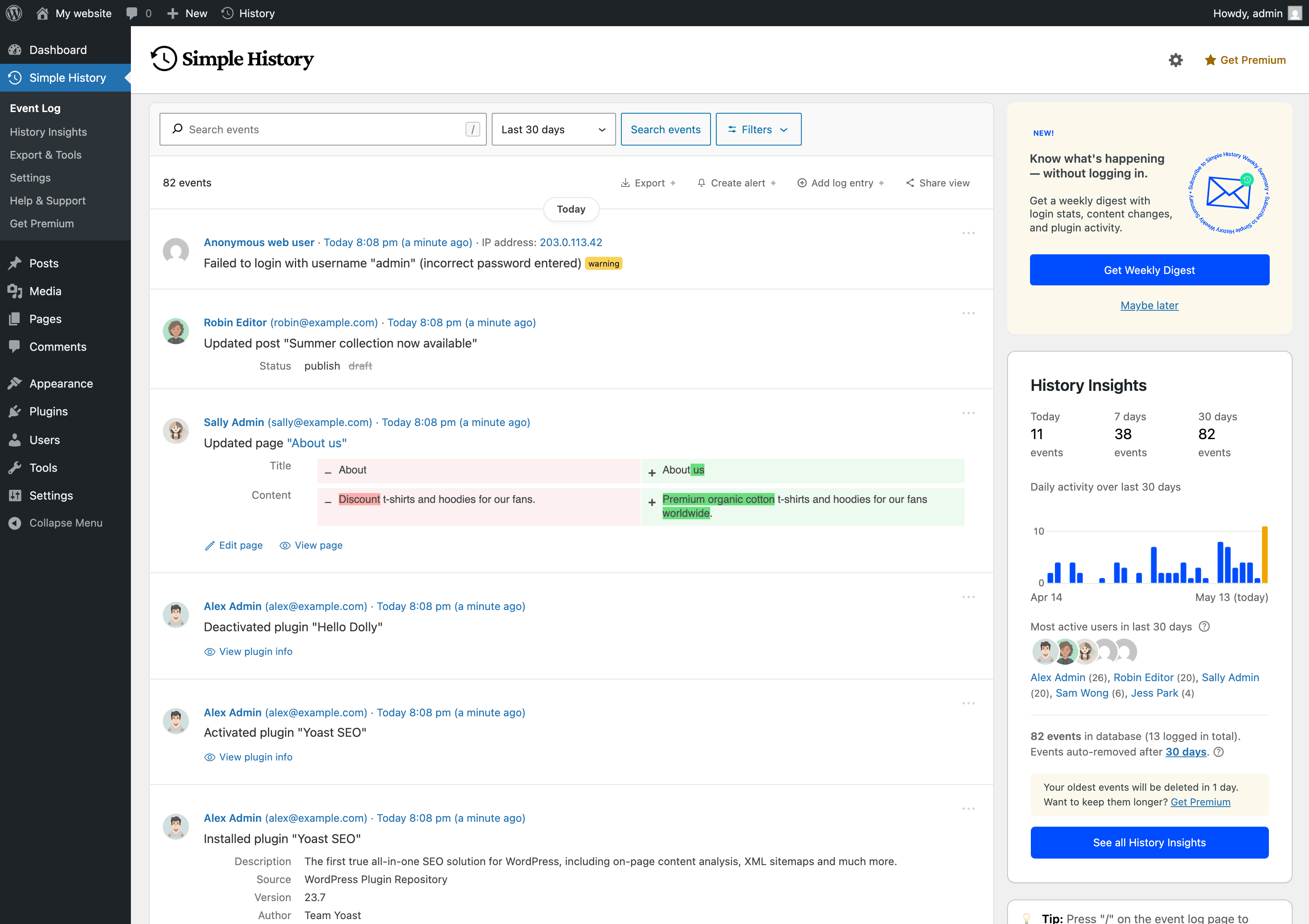
El registro de eventos principal: una línea temporal clara de quién hizo qué en tu sitio, cuándo y desde dónde, junto a una barra lateral con la actividad diaria y tus usuarios más activos.
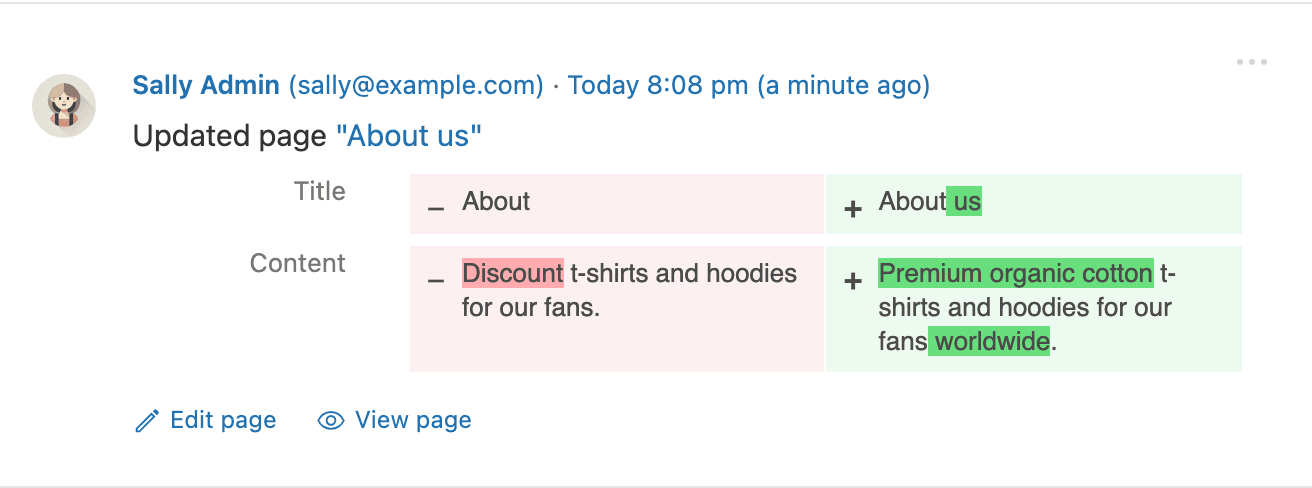
Los cambios de contenido muestran una diferencia completa entre el antes y el después, para que puedas ver exactamente qué palabras se editaron en una entrada o página, no solo que algo cambió.
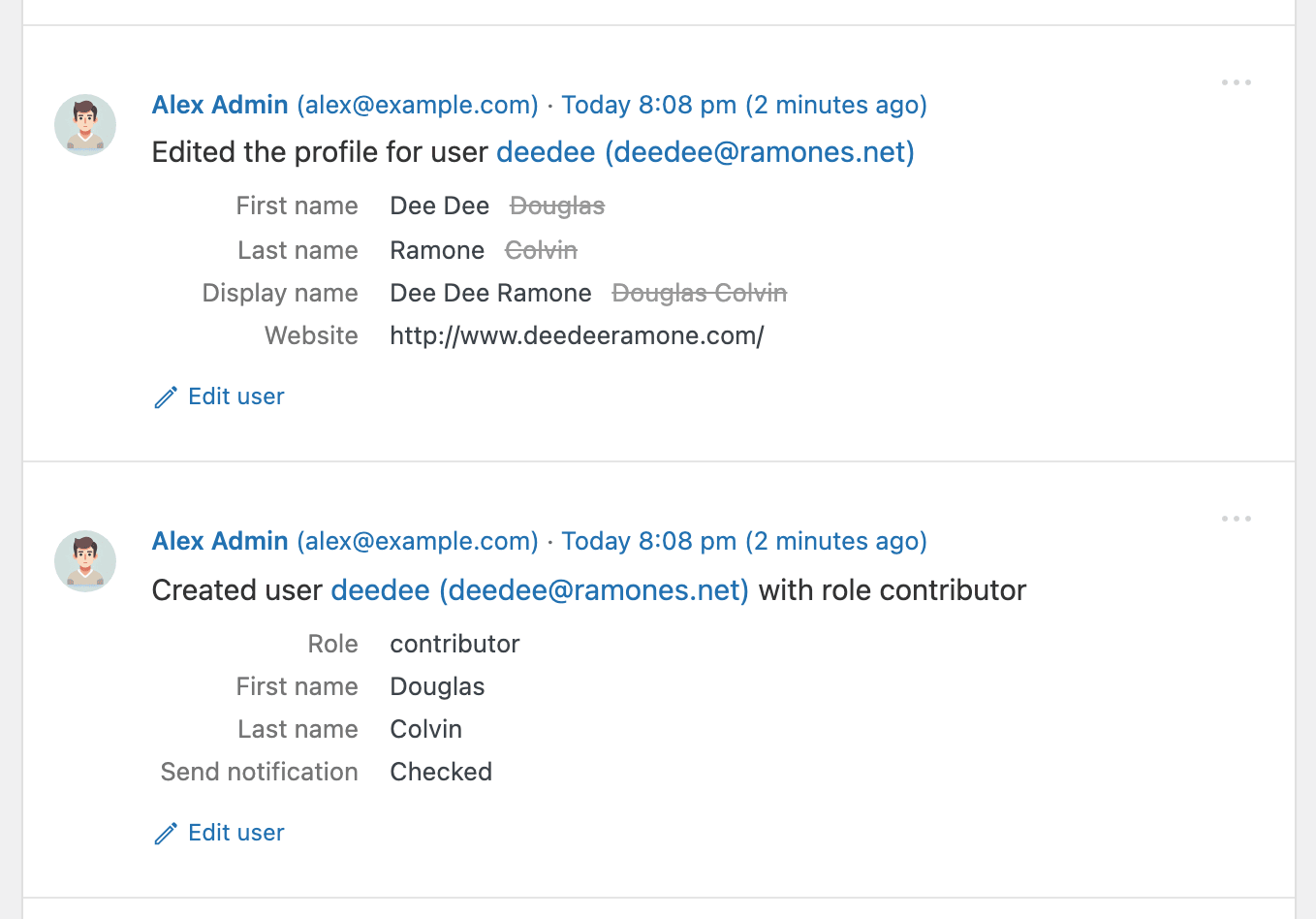
Los eventos de usuario capturan cada cambio en un perfil: nombre y apellidos, nombre para mostrar, sitio web, perfil y más, con el valor anterior conservado junto al nuevo.
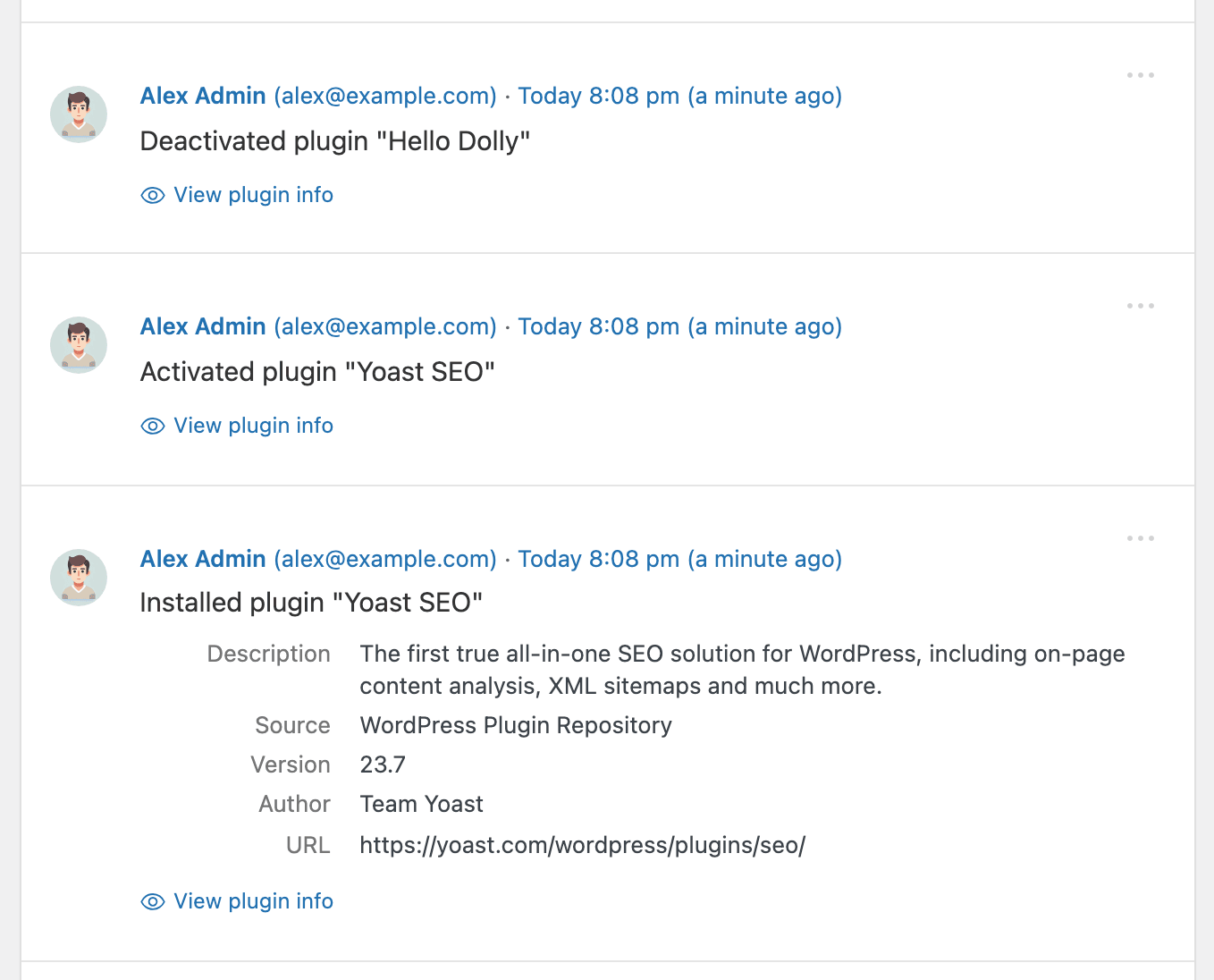
Cada instalación, activación y desactivación de plugin se registra con el autor, la versión, el origen y un enlace al plugin, para que siempre sepas qué se está ejecutando en tu sitio.
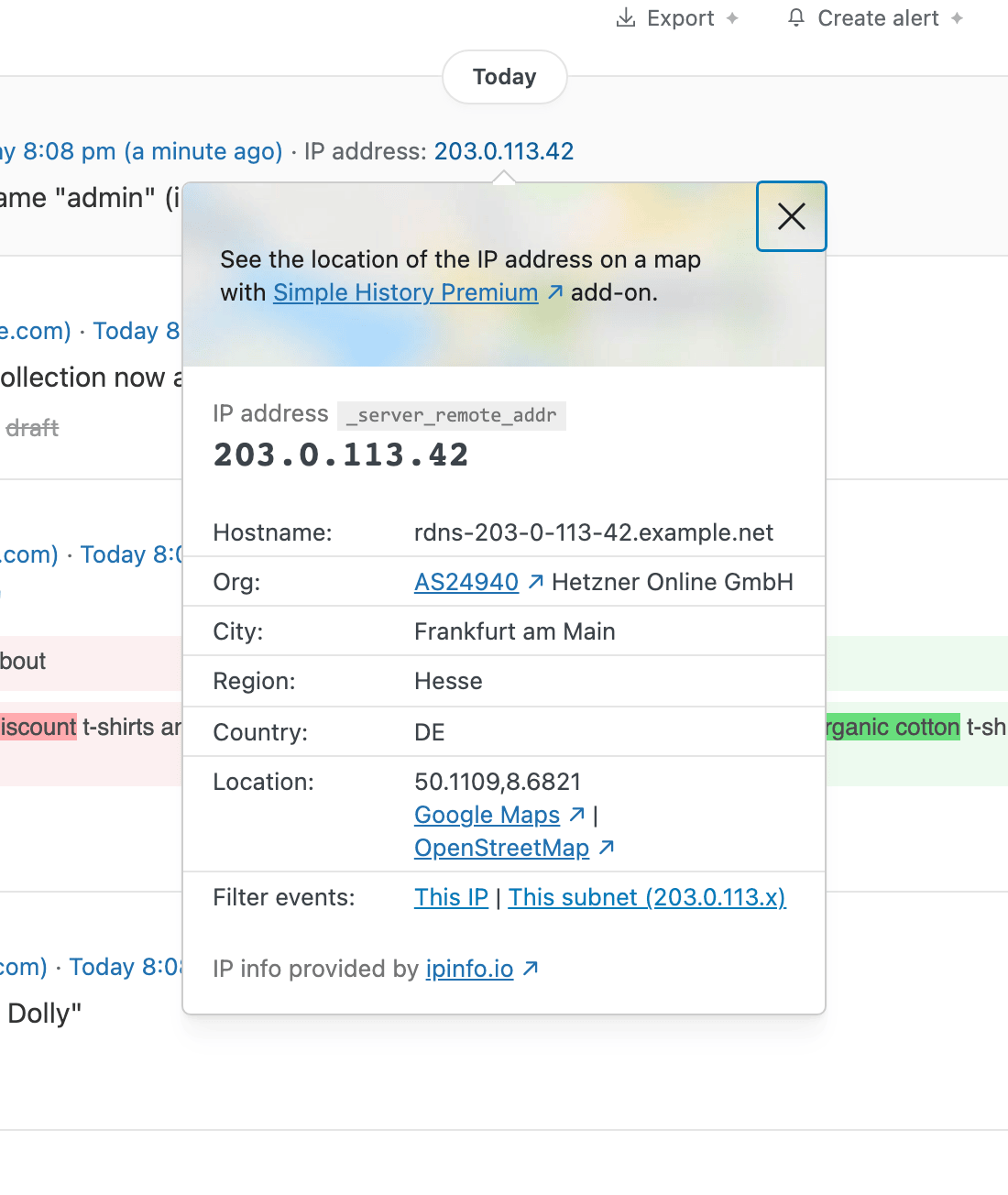
Haz clic en cualquier dirección IP para ver de dónde proviene (nombre de host, organización, ciudad y país) y luego filtra todos los eventos desde esa IP o subred con un solo clic. Ideal para investigar inicios de sesión fallidos.
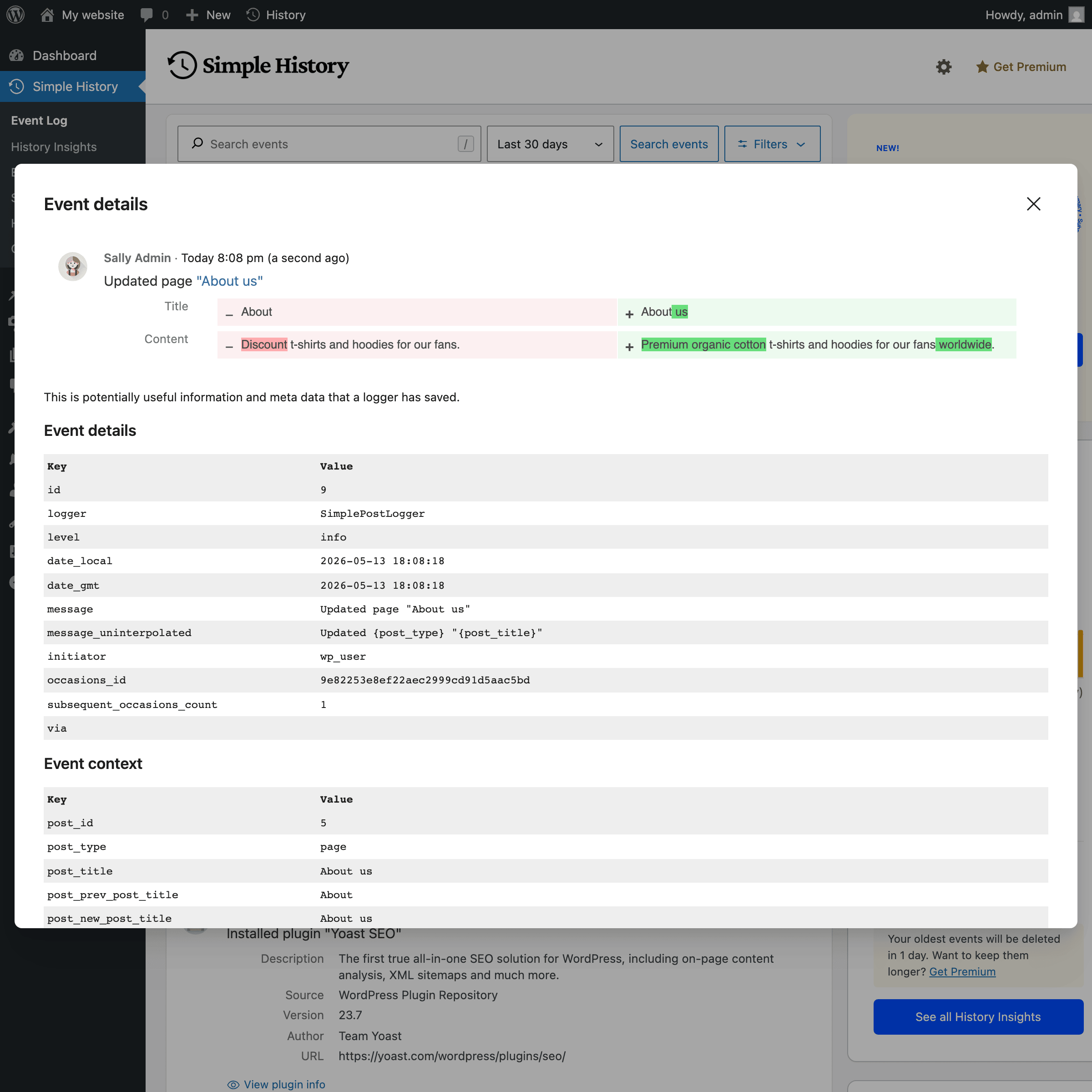
Abre cualquier evento para ver todos los detalles que Simple History almacena detrás: ID de entradas, ID de usuarios, valores antes/después y cualquier otro campo: el registro de auditoría completo para cada entrada.
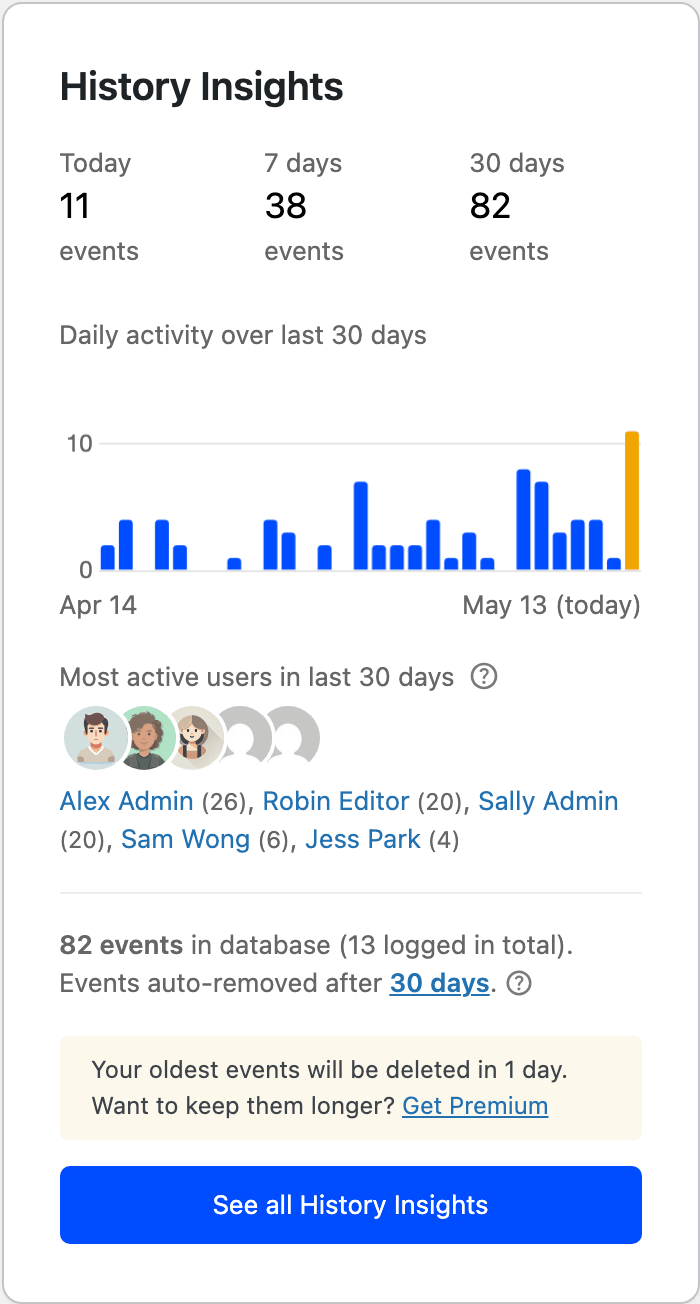
Perspectivas del historial muestra un gráfico de la actividad diaria, recuentos de eventos para hoy, esta semana y este mes, y tus usuarios más activos, todo junto al registro.
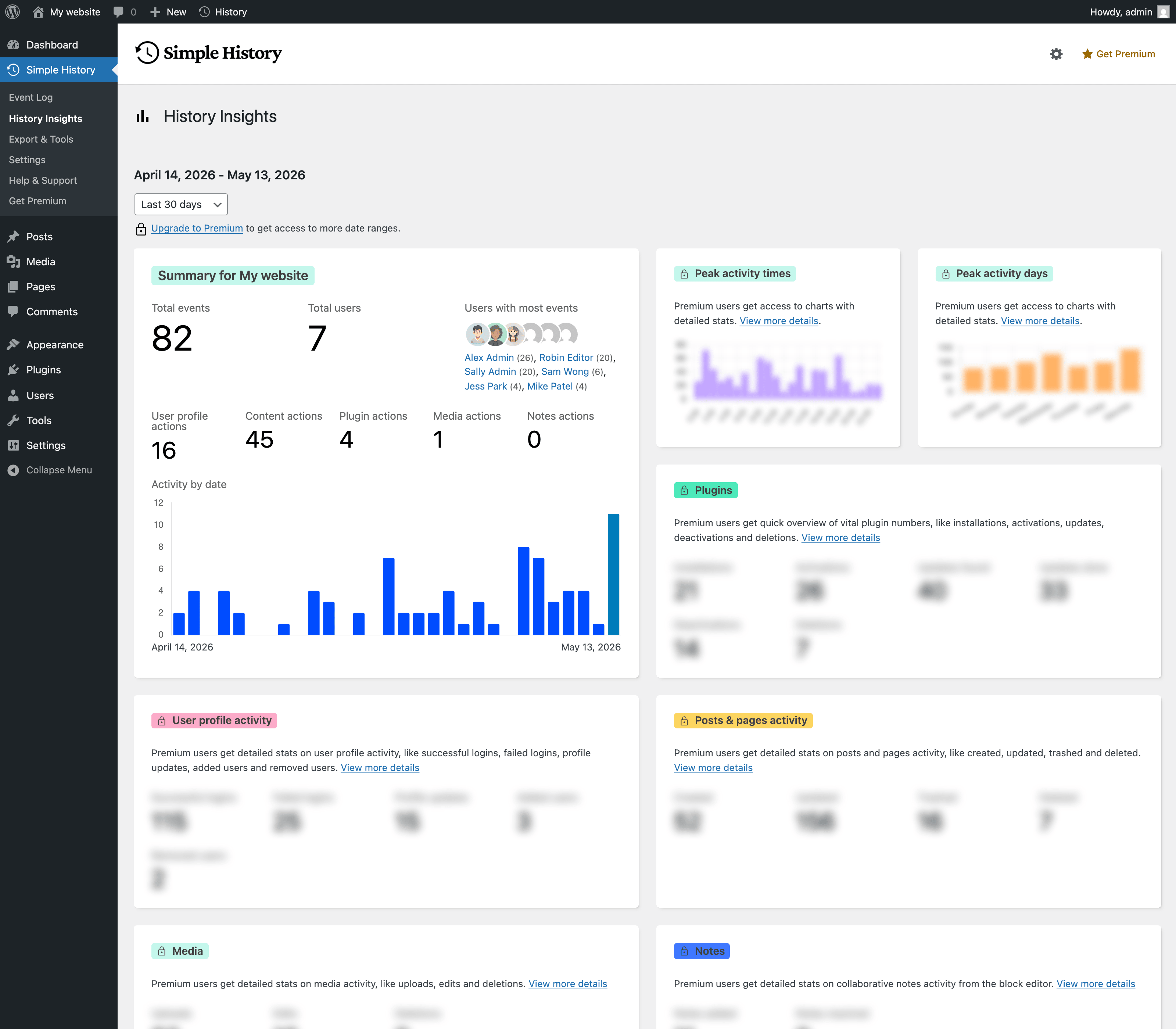
Estadísticas y resúmenes es un Escritorio de informes completo: desgloses de usuarios, entradas y páginas, plugins, medios y más, para cualquier intervalo de fechas que elijas.
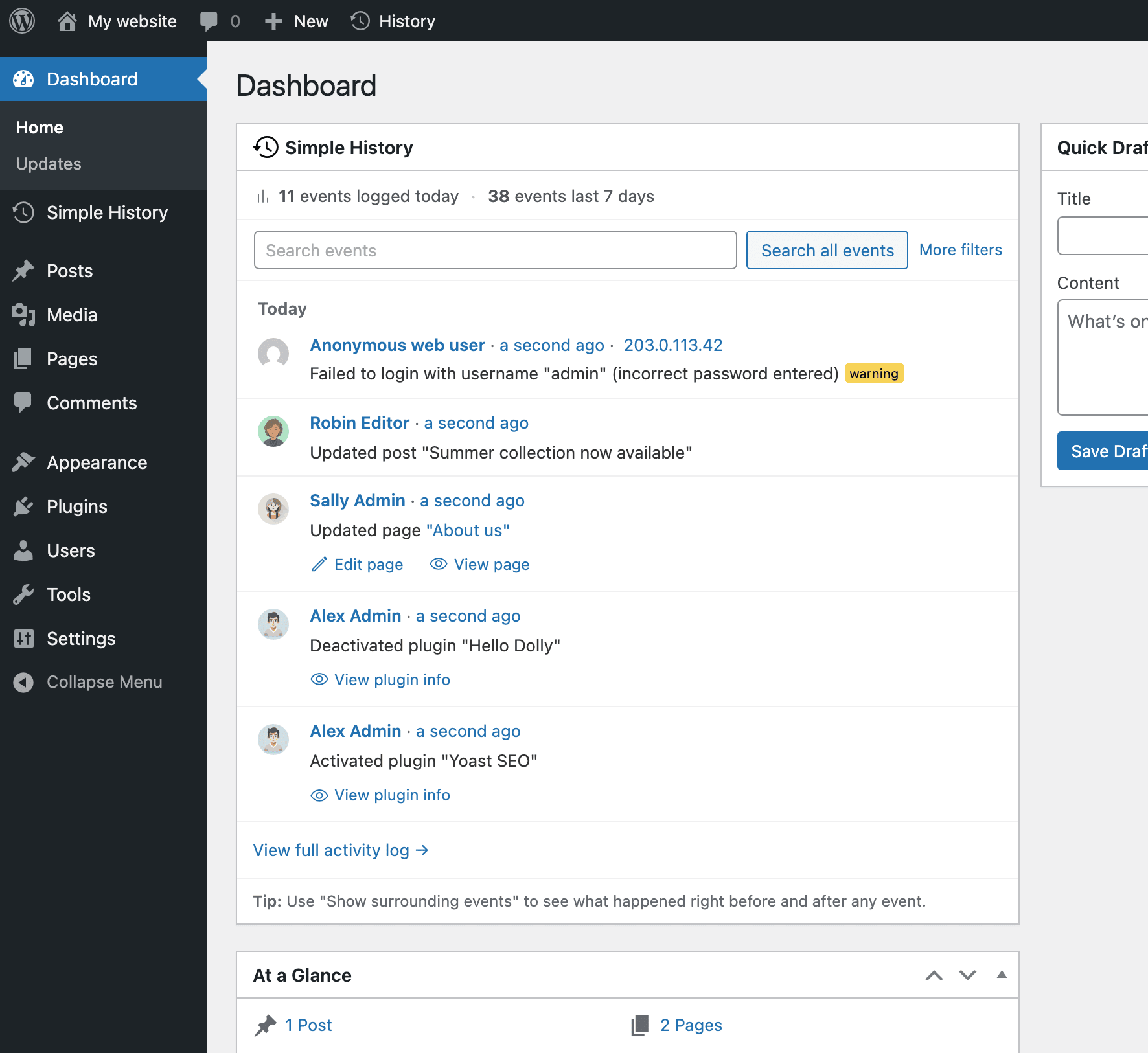
Widget del Escritorio: una vista compacta de la actividad reciente directamente en tu Escritorio de WordPress, para que veas lo que ha pasado en tu sitio sin salir de la página que ya revisas cada día.
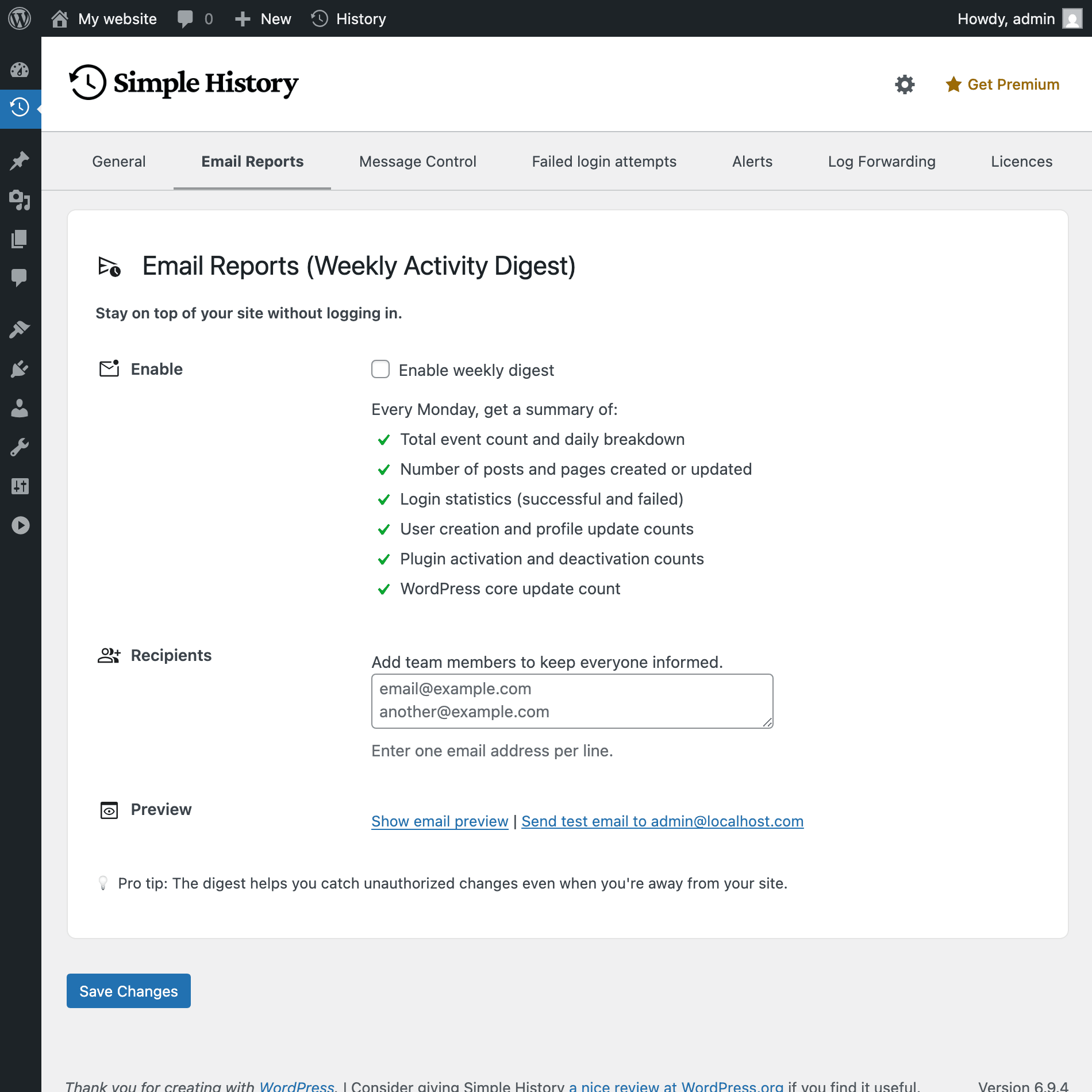
Los informes semanales por correo electrónico te mantienen informado sin necesidad de iniciar sesión. Elige quién recibe el resumen, previsualízalo o envía un correo de prueba, todo desde la página de ajustes.
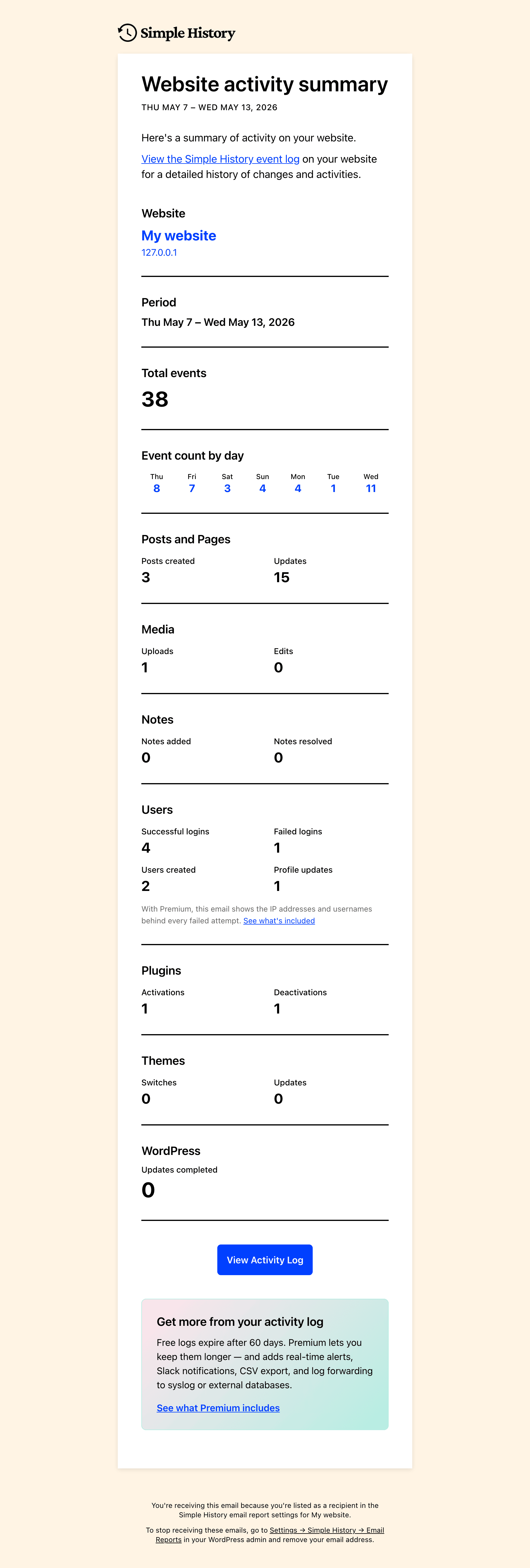
El resumen semanal en sí mismo: un resumen claro de entradas, usuarios, inicios de sesión, cambios en plugins y más, enviado directamente a tu bandeja de entrada.
FAQ
¿Es gratuito el plugin?
¡Sí! Simple History ha sido gratuito durante más de 10 años y seguirá siéndolo. Para apoyar el desarrollo y desbloquear funciones adicionales, puedes adquirir el complemento premium. Ver funciones premium.
¿Cómo veo el registro?
Puedes acceder al registro de varias formas:
- El widget del Escritorio con el resumen de estadísticas de actividad
- Una página de registro dedicada en el área de administración de WordPress
- El menú desplegable de vista rápida de la barra de administración en
- La paleta de comandos de WordPress: escribe “Simple History” para saltar al registro de la entrada actual
¡Sí! Puedes personalizar la posición del menú en los ajustes del plugin. Elige entre mostrar Simple History en la parte superior o inferior del menú principal, o dentro del menú del Escritorio o del menú de herramientas.
¿Necesito conocimientos de programación para usar el plugin?
¡No! Solo instala y activa el plugin, y empezará a recopilar registros de actividad automáticamente.
¿Dónde se almacena el registro?
El registro se almacena en tu base de datos de WordPress.
¿Puedo exportar el registro?
Sí, puedes exportar los registros en formato CSV o JSON para un análisis más detallado.
¿Es compatible con otros plugins?
¡Sí! Simple History es compatible con muchos plugins populares de serie. Además, los desarrolladores pueden integrarlo con cualquier plugin usando la API de registro.
¿Registra Simple History el plugin de IA de WordPress?
Sí. Cuando el plugin oficial de IA de WordPress está activo, Simple History registra cuándo se activan o desactivan las características de IA, cuándo cambia el proveedor o el modelo de IA de una característica, y cuándo los plugins o temas solicitan, obtienen o pierden acceso a un proveedor de IA en la pantalla de aprobaciones de conectores.
Las claves de API y el contenido de las indicaciones o respuestas de IA nunca se registran – se quedan en los ajustes propios del plugin de IA.
¿Ralentizará este plugin mi sitio web?
No, Simple History es ligero y está optimizado para el rendimiento. La mayor parte del registro se produce en el área de administración de WordPress cuando un usuario de WordPress realiza una acción.
Por defecto, no se registra nada en el frontend, lo que garantiza que los visitantes no experimenten ningún impacto en el rendimiento.
¿Quién puede ver el registro?
El acceso al registro depende del perfil del usuario:
- Los administradores pueden ver todos los eventos registrados.
- Los editores pueden ver los eventos relacionados con entradas y páginas.
¿Puedo excluir a ciertos usuarios del registro?
Sí, puedes excluir usuarios según su perfil o correo electrónico usando el filtro
simple_history/log/do_log.Para más detalles, consulta la documentación de hooks.
¿Durante cuánto tiempo se conserva el historial?
By default, logs are stored for 30 days. Sites that installed Simple History before version 5.25.0 keep 60 days.
Actualiza a Simple History Premium para cambiar esto mediante una interfaz gráfica.
¿Puedo hacer un seguimiento de los cambios realizados por usuarios específicos?
¡Sí! Puedes filtrar los registros por nombre de usuario, lo que facilita el seguimiento de la actividad individual.
¿Cumple este plugin con el RGPD?
El cumplimiento del RGPD depende de cómo uses el plugin y de cómo gestiones los datos recopilados. Las directrices de WordPress prohíben a los plugins hacer declaraciones de cumplimiento legal, por lo que debes revisar las políticas de datos de tu sitio para asegurar el cumplimiento.
What Simple History does by default:
- ❌ Loads no Google Fonts
- ❌ Sets no cookies
- ❌ Keeps no data in the browser’s local storage
- ✅ Masks IP addresses: the last part is removed before storing (192.168.1.x; IPv6 addresses keep only the first half)
- ✅ Looks up an IP address at ipinfo.io only when an administrator clicks it
The log can contain personal data (called personal information in some laws), such as usernames, email addresses and masked IP addresses. A masked IP address can still be linked to a person through the rest of the log entry. Which privacy laws apply, and what they require, depends on your site, so mention the activity log in your privacy policy. Simple History adds suggested text for this under Settings Privacy Policy Guide.
Para obtener más información, consulta nuestra página de soporte RGPD y privacidad: cómo se almacenan tus datos en Simple History.
Reseñas


Colaboradores & Desarrolladores
“Simple History – Track, Log, and Audit WordPress Changes” es software de código abierto. Las siguientes personas han contribuido a este plugin.
Colaboradores

“Simple History – Track, Log, and Audit WordPress Changes” ha sido traducido en 21 idiomas. Gracias a los traductores por sus contribuciones.
Traduce “Simple History – Track, Log, and Audit WordPress Changes” a tu idioma.
¿Interesado en el desarrollo?
Revisa el código, echa un vistazo al repositorio SVN, o suscríbete al registro de desarrollo por RSS .
Historial de cambios
✨ If you find Simple History useful ✨
- Sponsor the plugin to keep it free.
- Add a 5-star review so other users know it’s good.
- Get the premium add-on for more features.
Experimental entries are gated behind the “Experimental features” checkbox under Simple History Settings. Tick it to try them, then share feedback so we know what to ship for everyone.
5.35.0 (October 2026)
This release is about logins and privacy. Logins with two-factor authentication are logged when the code is accepted, IP addresses in the log are only shown to administrators, and there is suggested text about the log for your privacy policy. The weekly email settings got simpler too.
Read more about it in the release post
Added
- Suggested privacy policy text for the activity log, under Settings Privacy Policy Guide.
- Support for the Two Factor plugin: logins are logged when the two-factor code is accepted, not when the password is entered, and show whether two-factor authentication was used.
- Logins on sites using Wordfence show whether two-factor authentication was used, and how: authenticator app, recovery code, passkey or remembered device.
- Experimental — Emails that WordPress fails to send are logged as errors, and a notice in the sidebar and email settings shows how many failed in the last 30 days.
- Experimental — WP-CLI events store the command, the server user and, for commands run over SSH, the masked IP address they came from. Nothing is shown in the log yet.
Changed
- Weekly email settings have a “Site admin” checkbox that sends the email to the site’s admin address and follows it when it changes, and adding more recipients no longer stops the email to the admin.
- IP addresses in the log are shown only to administrators. Editors and other roles that can read the log no longer see them in events, event details, exports or search. The secret RSS feed still shows them.
- IP addresses are described as masked instead of anonymized, since a masked address can still be linked to a person through the rest of the log entry.
- XML export events say what was exported (all content or a post type) and show the author, category, date and status filters used, also for past exports.
- Experimental — Role logger: removing capabilities from a role is a notice instead of a warning, and granting a capability that controls the site (such as
manage_optionsorinstall_plugins), or creating a role with one, is now a warning.
Fixed
- The IP address of people who comment is now masked like every other IP address in the log, and only administrators can see it. Earlier comment events keep the full address but are hidden from other roles.
- Core files check no longer reports official WordPress files in the site’s language or in English as modified, such as a German
wp-config-sample.phpon a site installed in English. - Image changes in event details, such as a new featured image, line up with the text changes above them.
- Event details are easier to read on phones: each label sits above its value, and image thumbnails fit inside their column.
- Wrong two-factor codes from the Two Factor, Kadence Security (formerly Solid Security) and Wordfence plugins are logged as failed logins.
5.34.0 (September 2026)
Too many events in your log to get an overview? The new compact view may come in handy then. And Premium users get an even more compact view with the new table view, for digging into your events. There is also a new button that hides the sidebar, to give you full focus on the log with less distraction. Read more about this and more in the release post .
Added
- Table view for research and debugging sessions: sort, filter, compare two events side by side, and export (Premium).
- “Hide sidebar” button next to the view switcher, so the event log can use the full width of the page. Each view remembers its own choice: the table view starts without the sidebar, the detailed and compact views with it.
- Events can now be sorted by date, id, level, logger or event type through the REST API (
orderbyandorder) and on the command line (wp simple-history event list --orderby=id --order=asc). - Events can be counted instead of listed through the REST API (
/events/aggregate), grouped by date, level, logger or initiator. The same filters apply, so it counts exactly what the list would have shown. - Thumbnail on “Edited attachment” events, so you can see which image the event is about.
- Links on tips in the sidebar and dashboard widget, pointing to the documentation or feature page for what the tip describes.
Changed
- The compact event log view is no longer experimental. The Detailed/Compact switch is now available to everyone from the event log page.
- Custom field changes on posts name the fields that changed instead of only counting them.
- Custom field and term changes on posts are included in event details from the REST API and WP-CLI.
- New installs get a notice a few days before their oldest events are cleared out for the first time. It explains why, mentions that you can export your log, and stays until you close it.
Fixed
- Sorting the event log oldest first now works.
order=ascwas accepted and then ignored on the default event listing, which returned newest first anyway. - The “new events” count above the log now respects your filters. With “Hide my own events” on, or event types hidden, it counted events the list would never show — so it could announce new activity and then show you nothing when you clicked it.
- Changed post excerpts are labelled “Excerpt” instead of the raw field name.
- Custom field changes made in the block editor’s meta boxes, like the Custom Fields panel, are now logged.
- Empty custom fields that some plugins create when a post is first saved are no longer listed as added.
- Internal keys from Advanced Custom Fields no longer clutter the list of changed custom fields.
- Tips that mention Premium are hidden on sites that have turned promotional messages off.
- Image thumbnails on media events name the image for screen reader users.
- Weekly email with no recipients set was never sent. It now goes to the site admin email until you add recipients, and the settings page tells you so.
- Test email is sent to the weekly email’s recipients instead of to you, and the button says who that is.
- Experimental — Role and capability changes a plugin makes on its own, such as after an update, are credited to WordPress instead of whoever was logged in, and name the plugin that made them.
Security
- Database errors from the event log no longer include the database’s own error message in the API response. Reading the log needs a lower capability than most things in WordPress, and a MySQL error names tables and columns.
5.33.0 (September 2026)
The weekly email is redesigned. It opens with a summary of your week, and every number links to its events. Events by WordPress and visitors are no longer credited to the logged-in admin, and Redirection logging works again with Redirection 5.10. And some minor fixes here and there.
Read more about it in the release post
Added
- Weekly email can now be turned on with one click from the welcome notice, the welcome log entry and the log sidebar (yup, we really like the weekly email, and we think you will too!).
- Experimental: Compact view for the event log, which fits more events on the screen.
Changed
- Weekly email design updated:
- wider layout, section icons, clickable numbers linking to matching events, shorter captions and a single “Nothing to report” line for empty sections.
- now includes a plain-text version, so it’s less likely to end up in spam.
- opens with a short summary of the week: event count, change from last week, failed logins and most active user.
- …and closes with a tip.
- WordPress, WP-CLI, anonymous user and “other” cards link to their events for all users.
- Repeated edits of the same Simple History setting are grouped into one row.
- “Similar events” link is now an expand/collapse control that keeps keyboard focus.
- Event details line up with the event text, and long labels wrap instead of pushing values off-screen.
Fixed
- Redirection plugin events are logged again with Redirection 5.10.0 and later.
- Events by WordPress or visitors (update checks, failed logins, scheduled tasks) are no longer attributed to the logged-in administrator.
- Event log loads its first page faster (fixed debounce effect).
- Loading placeholders and the date dropdown no longer shift while the log loads.
- Admin bar quick view shows a message when events can’t be loaded.
Security
- Redirection events can no longer be added to the log by users without permission to manage redirects.
5.32.0 (September 2026)
Expandable diffs, a “View revision” link that opens the exact revision a change created, and a fix for failed application password logins flooding the log.
Read more about it in the release post
Added
- Long diffs can be expanded in place with an “Expand diff” button.
- Note events carry the same action links as the page or post the note belongs to.
- Experimental — “Hide events of this type” in an event’s actions menu removes that event type from the current list. Hidden types show as removable chips above the list and never change what gets logged.
Changed
- Post and page events link to the revision the change created, labelled “View revision”. On WordPress 7.1 and later it opens the editor’s visual revision view.
- Site icon changes show the old and new icon as images, side by side, instead of attachment IDs.
- Action links below events are grey until the event is hovered or focused, and separated by a dot in the dashboard widget.
- When a license key has reached its activation limit, the settings page explains why and how to free it up from the Lemon Squeezy “My orders” page.
- Experimental — Event fields sent to AI tools through the WordPress Abilities API carry readable labels and descriptions, following the output schema conventions added in WordPress 7.1.
Fixed
- Relative times (“2 minutes ago”) could be off by the site’s UTC offset.
- “Copy event message” and “Copy as Markdown” copied the site’s time instead of the time shown in the log.
- Content diffs use the same green and red as WordPress core’s revision screen. Some events used a different set.
- “Edited your profile” events no longer appear when nothing changed. The block editor saves editor preferences to your user record, and each save was logged as a profile edit.
- Notes inside a block (WordPress 7.1) no longer show a literal
<br>tag, and a note starting with an @mention no longer has it glued to the next word. - Reaction emoji no longer show as broken images when the site’s emoji image host is unreachable.
- Failed application password logins are throttled, grouped, filtered and counted like other failed logins. A brute-force attack against the REST API could previously flood the log.
- Featured image changes on posts no longer show raw “thumb_id” and “thumb_title” rows, show “None” on the empty side, load small thumbnails, and are included in the structured event details.
- Uploading a zip over an installed theme or plugin is logged as an update, downgrade or reinstall, instead of as a new install.
Security
- Misc security hardening.
5.31.0 (August 2026)
🎨 Site Editor changes are now logged — templates, template parts, site-wide styles, patterns, navigation menus and fonts. This release also adds support for the official WordPress AI plugin, so you can see which plugins and themes have been granted access to which AI providers, plus a round of security hardening and the usual fixes.
Read more about all changes in the release post
Added
- Site Editor changes are now logged: templates, template parts, site-wide styles, patterns, navigation menus and fonts, including changes made outside the block editor. Resetting a template to the theme default is logged as a reset, not a deletion.
- Support for the official WordPress AI plugin: Simple History now logs when AI features are enabled or disabled, when a feature’s AI provider or model is changed, and when plugins or themes request, are granted, or lose access to AI providers on the Connector Approvals screen. API keys and AI prompt content are never stored in the log.
--format=jsonand--format=yamlonwp simple-history info, so a deploy or CI script can check that Premium is active and licensed.- Experimental — Activity log is now available to AI tools and automation through the WordPress Abilities API (WordPress 6.9+). Read-only — nothing exposed can change or delete log entries.
Changed
- Tested on WordPress 7.1.
- Theme update events now name the version the theme went from and to, the way plugin update events already did.
- Experimental — Role events no longer list every capability in the details panel when there are more than 10; the count stays in the event message and the full list in the event context.
Fixed
- “Deleted user” events showed a blank id, email and login instead of the details of the removed user.
- Personal data export requests were logged whatever their status, not only when newly requested.
wp simple-history infonever showed the license line on sites with Premium active.- Event counts are now grouped for your locale — “187 304 events” rather than “187304 events” — in the log header, the stats bar, pagination and grouped-event counts.
- Backfill notice showed a stray
in its item counts on locales that separate thousands with a space. - “Today” and “Yesterday” date dividers, and the “Today” label on each event, switched over at UTC midnight instead of your own midnight, so recent events could show the wrong day.
- Welcome notice shown after install no longer appears on the history page it links to, so its “Take a look” link always goes somewhere.
- Log now shows the real reason it failed to load instead of “Unknown error” — on most sites every error detail was being discarded before it reached the screen.
- Database errors while loading the log now name the problem, so you can act on it or pass it to your host.
Security
- Comment content is escaped before it reaches the event details panel, so a comment can no longer put markup into the log.
- RSS feed no longer breaks when logged content contains the
]]>character sequence, which anyone able to leave a comment could trigger. - Colour values from the theme customizer are validated before being drawn as a swatch, so a theme with a permissive colour setting cannot inject CSS into the log.
- CSV exports treat tab and carriage return as formula triggers, alongside the
=,+,-and@already covered. - Additional escaping and input validation across the options, theme and media loggers.
- Referring URL stored with every event now has secret-looking query string values masked, the way Detective Mode already masked the URLs it stores.
- Masking now also covers session, bearer, credentials and private key field names.
5.30.0 (August 2026)
👍 Two experimental features graduate in this release: event reactions and the header status bar, which shows the status of your current settings at a glance — how long history is kept, whether email reports and alerts are on, and where logs are forwarded. This release also includes a round of security hardening and some miscellaneous fixes.
Read more about all changes in the release post
Added
- “Plugin info” action link on plugin update-available events, so you can quickly check what an unfamiliar plugin is without leaving the log.
- “Find events from the same IP address” in an event’s actions menu, alongside the existing user and event-type filters.
- Changes to more Simple History settings are now logged: Email Reports, the Experimental features toggle, and add-on license keys (key values are never stored in the log). (And yes – it was a bit funny that the plugin that logs changes to other plugins didn’t log its own settings changes!)
- WP-CLI:
--metadata_searchand--ai_onlyoptions onwp simple-history list, matching the metadata search and AI filter in the GUI. - WP-CLI: AI attribution columns (
ai_agent,ai_detected_via,ai_application) onwp simple-history list, showing which AI tool made a change and how it was detected. - Header now shows “Stealth mode: on” while stealth mode is hiding Simple History from other users, including other administrators.
Changed
- Reactions graduated from experimental and are now on by default — react to events with a 👍 (disable in Settings General). Premium adds ❤️ 🎉 🚀 and more reaction types.
- Header settings/info bar is graduated from experimental and now shows for all admins — a glance at how long history is kept, whether email reports and alerts are on, and where logs are forwarded, with each one linking straight to its setting.
- Checkbox settings now show as On/Off (instead of 1/0) in the “Modified settings” log details.
- Settings changes are now detected across all save mechanisms (Settings API, direct option updates, and REST) and recorded as a single event.
- Large or structured settings are now logged as “changed” without storing their full value, keeping the log readable.
- Developers:
simple_history/user_can_clear_lognow defaults to whether the user can manage settings, instead of always allowing it. The “Clear log” button is unaffected for administrators. - Exporting the log as HTML is faster on sites with large activity logs.
Deprecated
- WP-CLI:
wp simple-history event search— usewp simple-history event list --search=<term>instead. The old command still works but will be removed in a future version.
Fixed
- WP-CLI:
wp simple-history event searchalways returned zero results. - WP-CLI:
--fieldsonwp simple-history listignored column names written with a space after the comma. - PHP 8 fatal error when a setting was changed by a request without a referrer, such as from the REST API or WP-CLI. #649
- Untranslatable strings in the statistics view and the weekly email report. #672
- Invalid date or month filter values now return a clear error (HTTP 400 in the REST API, a friendly message in WP-CLI) instead of a server error.
- RSS feed no longer breaks when its address contains a date filter it can’t read — for example an older feed URL saved in a feed reader. It now returns an empty feed instead of an error.
- Removed an unnecessary database query on every admin page load (a leftover from the one-time history backfill check).
- Dashboard widget now shows an error message with details when the log can’t be loaded (for example when the REST API is blocked), instead of loading placeholders forever.
- Fatal error on WordPress 6.3 when saving a post that creates a revision.
- Post update events now link to the revision they created. (The link had been missing since the feature was added in 5.16.0!)
- PHP warning when logging a comment whose post has been deleted. Such events now read “a comment to (deleted)” instead of showing an empty title.
- “Filter events: This IP” in the IP address popover did nothing when used from the dashboard widget — it now opens the event log filtered to that address.
- Filtering by IP address now finds events by any address recorded for them, not just the one the web server saw. On sites behind a proxy or load balancer the visitor’s real address is read from a forwarding header, and filtering by it previously returned nothing.
- Experimental — Failed XML-RPC logins no longer create a duplicate “failed application password” entry alongside the regular failed-login entry.
Security
- Looking up a person’s username, email address and roles from the user card now follows WordPress’s own rule and requires permission to list users. Who performed an event is still shown to everyone who can read that event.
- REST API endpoints now require the same permission as opening the history page.
- Detective Mode masks more field names — passwords, tokens, secrets and card numbers — and now also covers nested values, query strings and command line arguments.
- Clearing the log, exporting it and regenerating the RSS feed address now also require permission to manage settings.
- Event text escaping is now consistent across the media, categories, user and comments loggers, and in exported HTML files.
See CHANGELOG.md for the full changelog.