
Descripción
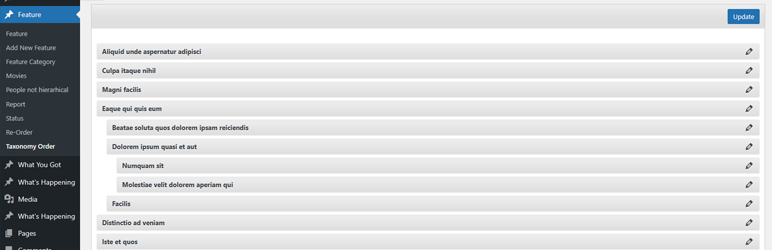
Easily control the order of Categories and any hierarchical taxonomy with a simple drag-and-drop interface. Reorder parent and child terms visually in the admin and choose whether the plugin automatically applies your custom term order to front-end queries.
Key features
- Intuitive drag-and-drop reordering for Categories and all hierarchical taxonomies.
- Option to auto-apply the custom term order to front-end queries (no theme/plugin edits required).
- Keep the admin term lists in your new order (makes management and editorial workflows consistent).
- Works with multiple taxonomies per post type — switch between taxonomies from the same interface.
- Multisite aware and regularly updated for modern WordPress and PHP versions (see changelog for compatibility notes).
How it works
After activating the plugin, a new Taxonomy Order page becomes available under the custom post type menu. Simply open it and drag terms into the exact order you want — including parent/child hierarchy.
Use the plugin’s Taxonomy Order screen to drag terms into the order you want. To apply the custom order automatically across your site, enable the Autosort option — the plugin will adjust term queries on the fly so your chosen order shows without template changes. If you prefer to control ordering in code, include orderby => ‘term_order’ when calling get_terms() to use the plugin’s order programmatically.
This plugin is developed by Nsp-Code
See the Advanced Taxonomy Terms Order for advanced features.
Localization
Available in Catalan, Chinese (China), Chinese (Taiwan), Czech, Dutch, Dutch (Belgium), English (Australia), English (Canada), English (New Zealand), English (UK), English (US), French (France), Galician, German, Italian, Japanese, Norwegian (Bokmål), Polish, Portuguese (Portugal), Russian, Spanish (Chile), Spanish (Spain), Spanish (Venezuela), Swedish, and Turkish.
Whant to contribute with a translation to your language? Please check at https://translate.wordpress.org/projects/wp-plugins/taxonomy-terms-order
There isn’t any Editors for your native language on plugin Contributors? You can help to moderate! https://translate.wordpress.org/projects/wp-plugins/taxonomy-terms-order/contributors
Capturas de pantalla
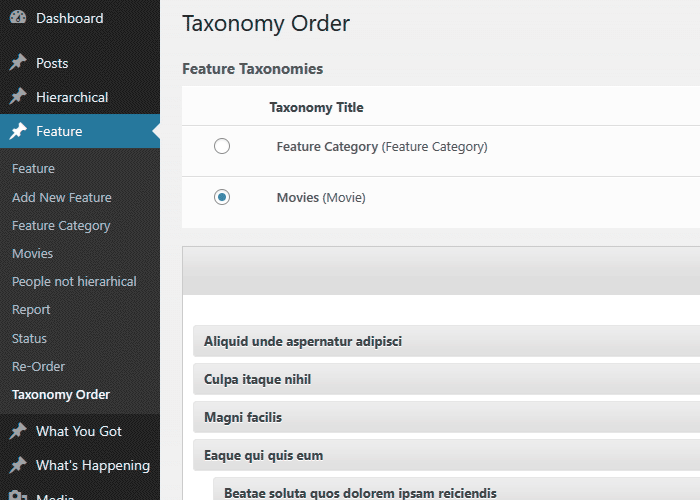
Category Order Interface. 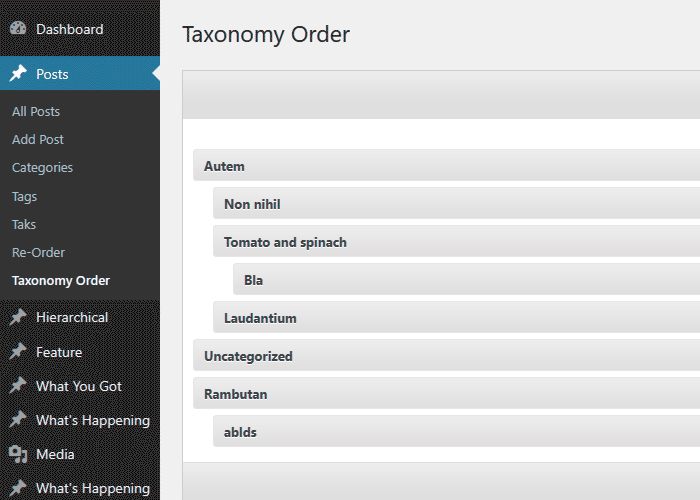
Multiple Taxonomies Interface.
Instalación
- Upload
taxonomy-terms-orderfolder to your/wp-content/plugins/directory. - Activate the plugin from Admin > Plugins menu.
- Once activated you should check with Settings > Taxonomy Terms Order
- Use Taxonomy Order link which appears into each post type section to make your sort.
FAQ
Feel free to contact me at electronice_delphi@yahoo.com
-
Since I have no PHP knowledge at all, is this plugin for me?
-
Absolutely, you can!
Unlike many other plugins, you don’t have to do any code changes to make your post order to apply, accordingly to custom-defined order. There is an option to auto-update the WordPress queries so the posts will be returned in customised order. This can be turned off (Autosort) to allow customized code usage. -
I prefer to apply the sort through code, how can be done?
-
Include a ‘orderby’ => ‘term_order’ within your get_terms() arguments.
-
What taxonomies will allow me to sort?
-
You can sort ALL taxonomies ( hierarhically active ), including the default Categories.
-
Is there any way i can get my admin interface to use the custom terms order?
-
Absolutely, the plugin can do that. In fact you can configure so only the admin will update and the front side template will display the terms as before.
-
There is a feature that i want it implemented, can you do something about it?
-
All ideas are welcome and i put them on my list to be implemented into the new versions. Anyway this may take time, but if you are in a rush, please consider a small donation and we can arrange something.
-
I still need more features
-
Consider upgrading to our advanced version of this plugin at a very resonable price Advanced Taxonomy Terms Order Order
Reseñas


Colaboradores & Desarrolladores
“Category Order and Taxonomy Terms Order” es software de código abierto. Las siguientes personas han contribuido a este plugin.
Colaboradores
“Category Order and Taxonomy Terms Order” ha sido traducido en 25 idiomas. Gracias a los traductores por sus contribuciones.
Traduce “Category Order and Taxonomy Terms Order” a tu idioma.
¿Interesado en el desarrollo?
Revisa el código, echa un vistazo al repositorio SVN, o suscríbete al registro de desarrollo por RSS .
Historial de cambios
1.9.5
- Add a Settings link for the plugin in the Plugins area to make it easier for users to access and get started.
- Implement minor code improvements.
1.9.4
- On Rest Request, evaluate the admin sort settings to apply or not the customized order.
1.9.3
- Improved plugin page description
- Use sanitize_text_field and wp_unslash for the options form
- Include FALSE argument in the wp_register_script
- WordPress 6.9 compatibility check
- WordPress 6.9 tag update
1.9.1
- Replace all _e with escaping function esc_html_e
- Use esc_url when output an image url
- Use esc_attr when output html attribute value
- Use isset before using an array argument.
- Minor CSS enhancements
- Other Minor code changes
1.9
- Style and layout updates for the re-order interface.
- Add version to the CSS/JavaScript files to ensure latest data is loaded instead cached.
- WordPress 6.8.2 compatibility tag
1.8.8
- PHP 8.3.4 compatibility check
- Slight CSS and layout adjustments.
- WordPress 6.8 compatibility tag
1.8.7
- CSS adjustments for span action section.
- Option for term edit link.
- Include the term edit link on the ReOrder interface.
- WordPress 6.7 compatibility check and tag update.
1.8.6
- Fix: TTO_addons class not loaded which makes the compatibility routines not triggering.
1.8.5
- Temporary placeholder function to prevent fatal errors when using the Uncode theme.
1.8.4
- Code structure improvements.
- New option “Show / Hide re-order interface” – Display the Taxonomy Order interface for the specified post types
- WordPress 6.6.1 compatibility check and tag update
1.8.2
- Polylang fix – Ignore the ‘language’ to avoid unnecessarily sorting.
- Set-up the Live Preview for the plugin.
- WordPress 6.5.4 compatibility check and tag update
1.8.1
- WordPress 6.5 compatibility check and tag update
1.8
- Check if the terms table still includ the custom column, to avoid errors ( mainly when upgrading WordPress )
- Code improvements
- WordPress 6.4.2 compatibility check and tag update
1.7.9
- Trigger wp_cache_flush when saving the order to clear the internal caches
- WordPress 6.3 compatibility tag
1.7.7
- Use term name for admin queries, when the admin sort is active, to avoid “random” returns on certain servers, when term order are empty.
- WordPress 6.2.2 compatibility tag
1.7.5
- New filter tto/admin/plugin_options/capability to add custom roles and capabilities.
- Compatibility tag update for WordPress 6.2
1.7.4
- Compatibility tag update for WordPress 6.1.1
1.7.3
- Use esc_html to escape the ajax response message, to avoid single quotes which will break the code.
1.7.1
- Add the required column when create a new site, when running under MultiSite environment.
1.7
- Create the required columns for all sites, when running under MultiSite environment.
- Compatibility tag update for WordPress 6.0.1
1.6.1
- Compatibility tag update for WordPress 6.0
1.6
- Readme file updates, typos fixes.
- Compatibility tag update for WordPress 5.9.1
1.5.9
- Remove Twitter button
- Compatibility tag update for WordPress 5.8.2
1.5.7.7
- Minor code updates
- Code cleanup
- Compatibility tag update for WordPress 5.8.1
1.5.7.6
- Clear the term cache to ensure the updated order reflect for certain caches
1.5.7.5
- Apply the order within admin if ignore_term_order argument is set and not true
- Compatibility tag update for WordPress 5.7
1.5.7.4
- Fix: Call to undefined function wc_get_attribute_taxonomies()
- Compatibility tag update for WordPress 5.6
1.5.7.3
- Compatibility tag update for WordPress 5.5
1.5.7.2
- Compatibility tag update for WordPress 5.4
1.5.7.1
- Compatibility tag update for WordPress 5.3
1.5.7
- Ignore WooCOmmerce Attributes order as being changed through default interface
1.5.6
- Rely on ‘terms_clauses’ filter than ‘get_terms_orderby’ as producing issues with the $maybe_orderby_meta backward compatibility.
- Fix WooCommerce category order apply
1.5.5
- Ignore admin sort when using columns order within Taxonomy interface
1.5.4
- Replaced serialize with JSON when saving terms order
- New filter to/get_terms_orderby/ignore to allow sort ignore when Autosort is turned On
- Addon code to ignore term_order sorting when Co-Authors plugin term query
1.5.3.2
- Add nonce field for AJAX sort update
1.5.3.1
- Removed Google Plus share button which triggered some JavaScript errors
1.5.3
- Use JSON instead serialize method when sending order through AJAX
- Updated PO language file
1.5.2.2
- Default admin capability changed from install_plugins to manage_options to prevent DISALLOW_FILE_MODS issue. https://wordpress.org/support/topic/plugin-breaks-when-disallow_file_mods-is-set-to-true/
- Prepare plugin for Composer package
- Interface table th elements titles left align
- Interface Taxonomy terms count fix
1.5
- Included ‘ignore_term_order’ to force menu_order ignore when autosort active.
- Translations issues update
1.4.9
- Remove translations from the package
- Removed donate banner
- PHP 7 fix
- Unused action remove
1.4.8
- textdomain folder fix
- Translation fix for user roles
- the_title filter replaced with terms_walker
- Add Nonce for admin settings
1.4.7
- Texdomain change to taxonomy-terms-order to allow translations through translate.wordpress.org
- WordPress 4.4 compatibility update
- Css updates
1.4.6.1
- Security bug fix
1.4.5
- Translation textdomain fix – thanks to Pedro Mendonça
- Portuguese localization update – Pedro Mendonça
1.4.4
- User role switch from deprecated user_level to capabilities
- Taxonomy sort for media
- Admin Options update
1.4.2
- Iranian Language (eydaaad@gmail.com)
- Admin css updates.
1.4.1
- Polish Language(Pozdrawiam – www.difreo.pl/ ; Mateusz – www.czar-net.com )
1.4.0
- Hungarian Language(Adam Laki – http://codeguide.hu/)
- Ukrainian translation (Michael Yunat – http://getvoip.com)
- Czech translation
1.3.7
- Brazilian Portuguese Language (Rafael Forcadell – www.rafaelforcadell.com.br)
1.3.6
- Traditional Chinese Language (Danny – http://sofree.cc)
- Minor admin styling
1.3.4
- Menu walker update
- Translations load fix
- Japanese language
1.3.0
- Headers already sent bug fix
- Slovak Language (Branco Slovak http://webhostinggeeks.com/user-reviews/)
1.2.9
- Small updates
- German and French languages.
1.2.7
- Localization implement, Dutch and Romanian.
- Many thanks to Anja Fokker http://www.werkgroepen.net/