

Descripción
Maximum Quantity for WooCommerce Shops es una sencilla extensión para WooCommerce que solamente hace una cosa: te permite establecer un máximo de unidades que pueden ser agregadas al carrito, por cada producto o por pedido.
Es como uno de esos letreros de las tiendas que dicen “¡2 UNIDADES MÁXIMO POR CLIENTE!” Este plugin no agregará un cartel como ese, pero el campo de entrada de cantidad tendrá un límite.
Puedes establecer un límite global que afecte a todos los productos en tu tienda WooCommerce. Si lo prefieres, puedes establecer un límite diferente para cada producto individualmente. El límite individual de un producto siempre anulará el límite global.
Funciona para todos los productos en tu tienda WooCommerce: productos simples y variables.
Los clientes no necesita estar conectados para que funcione. Funciona tanto para compradores anónimos como para los conectados.
Este plugin fue desarrollado inicialmente por Isabel Castillo y adoptado posteriormente por Marco Almeida | Webdados / Naked Cat Plugins.
Foto de cabecera por Mick Haupt.
Other (premium) plugins
Already know our other WooCommerce (premium) plugins?
- Simple Checkout Fields Manager for WooCommerce – Add custom fields and manage (remove, make required or optional) core fields on the new WooCommerce Block-based Checkout
- Simple WooCommerce Order Approval – The hassle-free solution for WooCommerce order approval before payment
- Shop as Client for WooCommerce – Quickly create orders on behalf of your customers
- DPD / SEUR / Geopost Pickup and Lockers network for WooCommerce – Deliver your WooCommerce orders on the DPD and SEUR Pickup network of Parcelshops and Lockers in 21 European countries
- Taxonomy/Term and Role based Discounts for WooCommerce – Easily create bulk discount rules for products based on any taxonomy terms (built-in or custom).
Capturas de pantalla
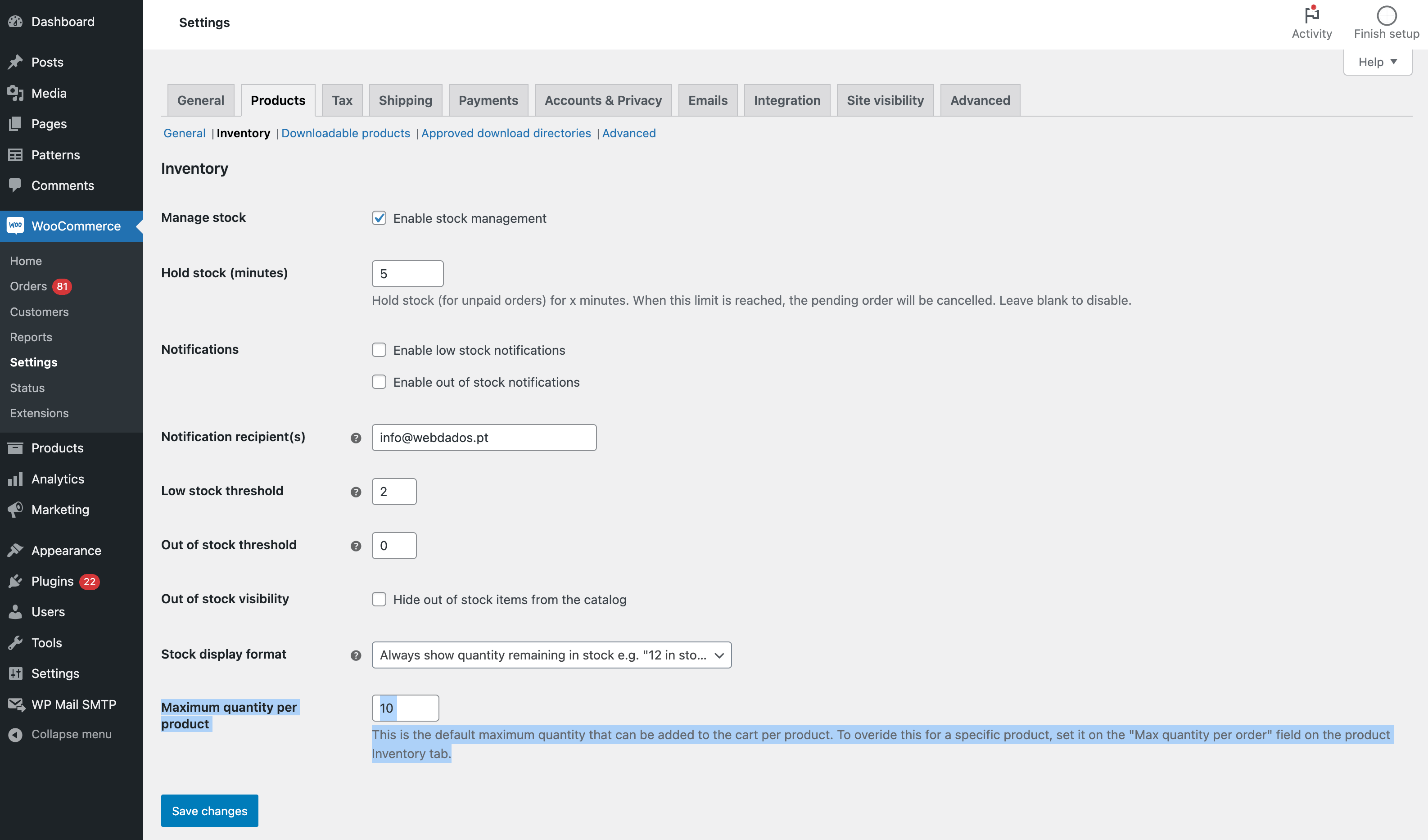
El ajuste global. Está etiquetado como “Cantidad máxima por producto” Se encuentra en WooCommerce -> Ajustes -> Pestaña de productos -> Enlace a “Inventario”
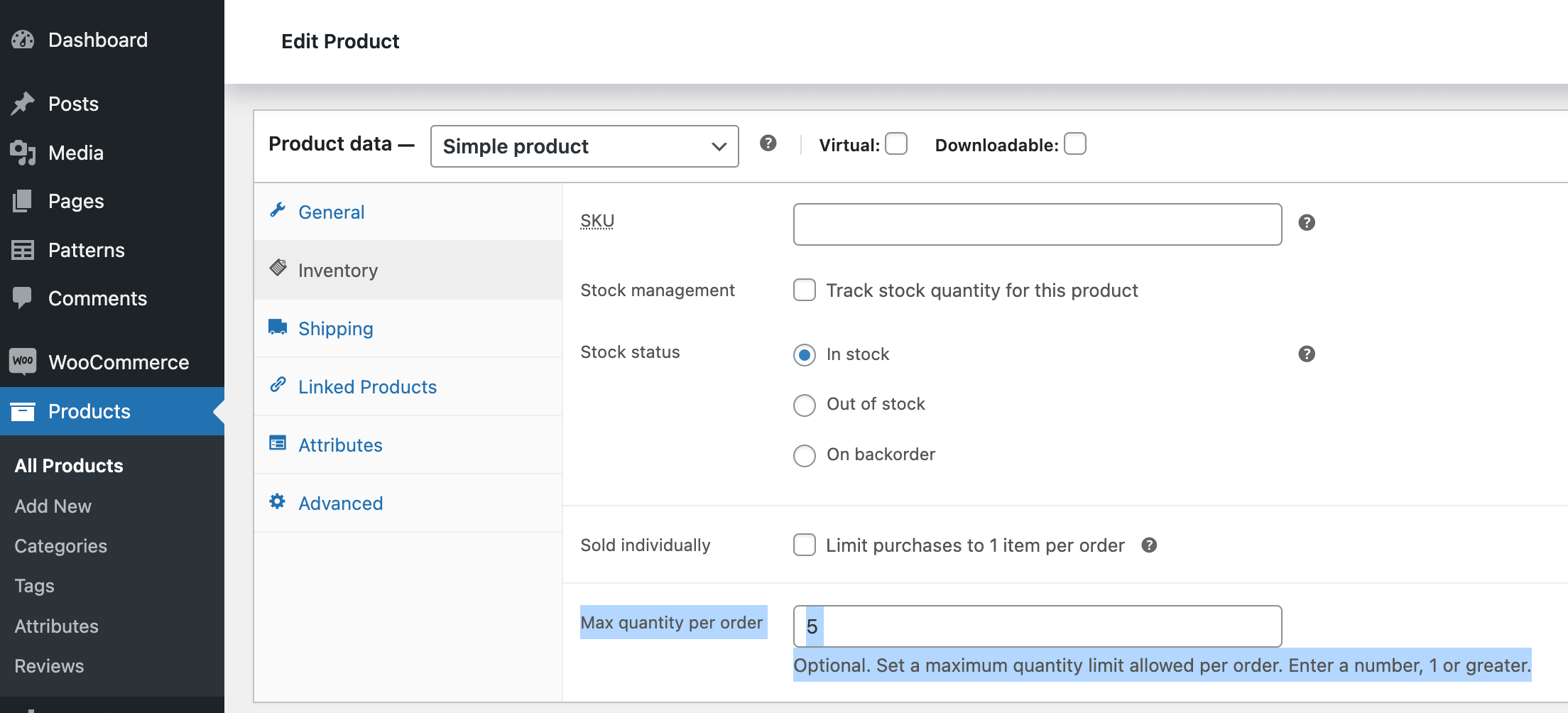
El ajuste del producto individual: Se denomina “Cantidad máxima por pedido” y se encuentra en la pantalla de edición del producto individual, en el cuadro “Datos del producto”, en la pestaña “Inventario”.
Instalación
Instalar y activar
- En tu escritorio de WordPress, ve a “Plugins –> Agregar nuevo”.
- Busca “Maximum Quantity for WooCommerce Shops” para encontrar el plugin.
- Cuando veas “Maximum Quantity for WooCommerce Shops”, haz clic en “Instalar ahora” para instalar el plugin.
- Haz clic en “Activar” para activar el plugin.
Configuración
El plugin solo tiene 2 ajustes. Puedes utilizar estos ajustes de diversas formas para lograr los objetivos exclusivos de tu tienda. Consulta la documentación para conocer formas específicas de utilizar estos ajustes:
- Para establecer un límite global que afecte a todos los productos, navega a WooCommerce -> Ajustes -> pestaña Productos. Haz clic en “Inventario”. Baja hasta la sección de “Cantidad máxima por producto”. Establece ahí el límite que quieres.
- Para establecer un límite individual para un solo producto, ve a la página de edición del producto. Desplázate hasta la sección de “Datos del producto”. Haz clic en la pestaña de inventario. Allí verás un ajuste llamado “Cantidad máxima por pedido”, donde puedes establecer el límite máximo que desees para ese producto.
FAQ
-
¿Funciona este plugin con productos con variaciones (productos variables)?
-
Sí, desde la versión 1.4.
-
¿Puedo establecer un límite diferente para cada producto?
-
Sí, desde la versión 1.4.
-
Is this plugin compatible with the new WooCommerce High-Performance Order Storage?
-
Yes, since version 2.0.
-
Is this plugin compatible with the new WooCommerce block-based Cart and Checkout?
-
Yes, since version 2.0.
-
I need help, can I get technical support?
-
This is a free plugin. It’s our way of giving back to the wonderful WordPress community.
There’s a support tab on the top of this page, where you can ask the community for help. We’ll try to keep an eye on the forums but we cannot promise to answer support tickets.
If you reach us by email or any other direct contact means, we’ll assume you need, premium, and of course, paid-for support.
-
Where do I report security vulnerabilities found in this plugin?
-
You can report any security bugs found in the source code of this plugin through the Patchstack Vulnerability Disclosure Program. The Patchstack team will assist you with verification, CVE assignment and take care of notifying the developers of this plugin.
-
Can I contribute with a translation?
-
Sure. Go to GlotPress and help us out.
Reseñas


Colaboradores & Desarrolladores
“Maximum Quantity for WooCommerce Shops” es software de código abierto. Las siguientes personas han contribuido a este plugin.
Colaboradores

“Maximum Quantity for WooCommerce Shops” ha sido traducido en 10 idiomas. Gracias a los traductores por sus contribuciones.
Traduce “Maximum Quantity for WooCommerce Shops” a tu idioma.
¿Interesado en el desarrollo?
Revisa el código, echa un vistazo al repositorio SVN, o suscríbete al registro de desarrollo por RSS .
Historial de cambios
2.3 – 2025-04-14
- [NEW] We are now called Naked Cat Plugins 😻
- [DEV] Requires WordPress 5.8, WooCommerce 7.1, and PHP 7.2
- [DEV] Tested with WordPress 6.8-RC3-60146 and WooCommerce 9.8.1
2.2.1 – 2024-10-08
- [FIX] Load text domain at the right time to avoid PHP notices on WordPress 6.7 and above
- [DEV] Tested with WordPress 6.7-beta1-59184 and WooCommerce 9.4.0-beta.2
2.1 – 2024-06-30
- [NEW] Rename plugin to a more understandable title
- [TWEAK] Main plugin file header adjustments
- [TWEAK] Remove .pot file from repository
- [TWEAK] readme.txt adjustments
2.0 – 2024-06-27
- Plugin adopted by Marco Almeida | Webdados
- Rename plugin main file and textdomain to the same as the folder name to follow the plugin development guidelines (the plugin will deactivate on update, and should be manually activated again)
- Code refactor – Use namespacing, apply coding standards, better logic
- Use WooCommerce CRUD functions instead of
get_post_metaandupdate_post_meta - Fix maximum quantity on the WooCommerce block-based Cart
- Test and declare WooCommerce High-Performance Order Storage compatibility
- Test and declare WooCommerce block-based Cart and Checkout compatibility
- Requires WooCommerce 5.0 and WordPress 5.6
- Probado con WooCommerce 8.9.0 y WordPress 6.6-alpha-58011
1.6
- Fixed – Can no longer use WC’s name in plugin.
1.5.2
- Corregido – Corregido un fallo que ignoraba el máximo de algunos productos variables.
1.5.1
- Corregido – Prevalece el ajuste de “Vendido individualmente” sobre el límite que establece este plugin.
1.5
- Nuevo – Agregados filtros para las cadenas de error.
- Corregido – El máximo no se estaba aplicando en el caso de los productos variables.
- Corregido – El máximo funciona ahora incluso cuando las reservas están activadas.
1.4.3
- Corregido – El límite máximo también funciona con productos variables siempre que las reservas no están activas.
1.4.2
- Corregido un error fatal que se originaba sobre get_parent_data().
1.4.1
- Nuevo – Para productos variables, la cantidad de existencias restantes se ha restaurado. Anteriormente la cantidad de productos en existencia se ocultaba para productos con variaciones. Solo afecta a aquellas webs que mostraban la cantidad de existencia en la página de producto.
- Corregidas varias notificaciones de PHP. Gracias a @brettmhoffman.
- Internacionalización – Ahora se carga load_plugin_textdomain en el inicio en vez de plugins_loaded, como debe ser.
1.4
- New – Support for different limits for individual products. See the version 1.4 release post for details.
- Nuevo – Da soporte a productos variables (productos con variaciones). Ahora el plugin funciona con todos los productos, simples y variables.
- Reprogramación del código – Se renombraron algunas funciones:
isa_get_qty_alread_in_cart se renombró comoisa_wc_max_qty_get_cart_qty
isa_max_item_quantity_validation se renombró comoisa_wc_max_qty_add_to_cart_validation
add_isa_max_quantity_options se renombró comoisa_wc_max_qty_options
isa_woo_max_qty_load_textdomain se renombró comoisa_wc_max_qty_load_textdomain
isa_woo_max_qty_update_cart_validation se renombró comoisa_wc_max_qty_update_cart_validation
isa_woocommerce_quantity_input_args se renombró comoisa_wc_max_qty_input_args - Reprogramación del código – Se eliminó una función:
isa_woocommerce_available_variation, que usaba el ganchowoocommerce_available_variation, fue eliminada.
1.3
- Nuevo – Agregado la comptabilidad con el plugin WooCommerce Direct Checkout
1.2.4
- Corregido – La configuración ha desaparecido en la última actualización de WC.
1.2.3
- Nuevo – Agregado la traducción al danés. Gracias a Martijn Heesters.
1.2.2
- Nuevo – Agregado la traducción al alemán. Gracias a @tofuSCHNITZEL.
1.2.1
- Corregido – No se calcula correctamente la cantidad si actualizas la cantidad en la página del carrito. Esto hace que los usuarios no puedan incrementar o decrementar la cantidad de unidades de un producto mientras estén en la página del carrito.
- Mantenimiento – Probada la compatibilidad con WP 4.0.
1.2.0
- Nuevo – Se agrega el fichero de traducción .pot
- Nuevo – Se agrega la traducción para los idiomas francés, hindi y español.
- New – Changed textdomain to plugin slug.
- Mantenimiento – Probada la compatibilidad con WP 3.9.
1.1.9
- Corregido: Se agrega _update_cart_validation para evitar la sobreescritura manual en la actualización del carrito previo al checkout.
- Retoque: Se elimina passed=true en la comprobación, se usa el parámetro pasado en su lugar.
- Mantimiento: se cambia woocommerce_add_error por wc_add_notice
1.1.8
- Corregido: Ahora comprueba la cantidad introducida a mano porque el límite máximo se podría sobreescribir escribiendo un número.
- Corregido: Se ignoraba el límite cuando un producto estaba agregado previamente en el carrito, se agreguéa otro producto y se volvía a agregar el producto inicial al carrito.
- Mantenimiento: Actualizada la descripción para reflejar que el plugin aun no es compatible con productos variables.
1.1.6
- Corregido: El límite máximo se sobreescribía cuando se agreguéa un nuevo producto en la página de carrito.
- Corregido: El límite máximo se sobreescribía cuando se actualizaba la cantidad de unidades en la página de carrito.
1.1.5
- Probada la compatibilidad con WP 3.8.
1.1.4
- Probada la compatibilidad con WP 3.7.1.
1.1.3
- Corrección de errores relacionados con la sincronización con Git.
1.1.2
- Corrección de errores relacionados con la sincronización con Git.
1.1.1
- Corrección de errores relacionados con la sincronización con Git.
1.1
- Probada la compatibilidad con WP 3.6.1.
1.0
- Versión inicial.