

Descripción
WCPOS turns any device into a point of sale for your WooCommerce store. Same catalog, same stock, same prices — at the counter, on the road, or over the phone. Run it in a browser or as a native desktop, iOS or Android app, with offline product browsing and cart building during connection drops. (WCPOS was formerly known as WooCommerce POS.)
🕒 Instala y empieza a coger pedidos en menos de 2 minutos.
🎥 DEMO
You can see a demo of the WCPOS plugin in action by going to demo.wcpos.com/pos with 🔑login/pass : demo/demo
Desktop Apps:
⬇️ Windows
⬇️ Mac (Intel)
⬇️ Mac (Apple Silicon)
Mobile Apps (Beta):
📱 iOS (TestFlight)
📱 Android (Google Play)
✨ CARACTERÍSTICAS
- Cross-platform: Accessible via browser, desktop, iOS & Android (mobile apps in beta)
- Offline Storage: Fast product search and order processing
- Flexible Cart: Add products not listed in WooCommerce
- Barcode Support: Scan products directly into the cart
- Receipt Templates: Pick from a built-in gallery — receipts, invoices, quotes, packing slips, gift receipts, kitchen tickets — or design your own
- Thermal Printing: Print directly to 58mm and 80mm thermal printers over network, Bluetooth, or USB
- Customer Tax IDs: Built-in field for VAT, ABN, GST, and other regional tax numbers
- Multilingual: Available in most major languages
- Built-in Support: Access live chat for instant help
🔓 PRO FEATURES
- Stock Management: quickly adjust stock levels, pricing and more
- Order Management: re-open and print receipts for older orders
- Customer Management: create new customers and edit customer details
- Payment Terminals: take in-person card payments with Stripe Terminal and SumUp readers
- Payment Gateways: check out with any WooCommerce gateway — Stripe, PayPal, Square, Mollie and more
- Coupons: apply coupons at the POS with search, coupon pills, and sequential discounts
- Refunds: refund POS orders directly from the till
- End of Day Reports: summarise daily sales, transactions, and cash flow for reconciliation
- Stores: Manage locations with unique tax settings, pricing and receipts
- Priority Discord support: one-on-one support via private chat
Discover all PRO features at wcpos.com/pro
📋 REQUISITOS
- WordPress >= 5.6
- WooCommerce >= 5.3
- PHP >= 7,4
Capturas de pantalla
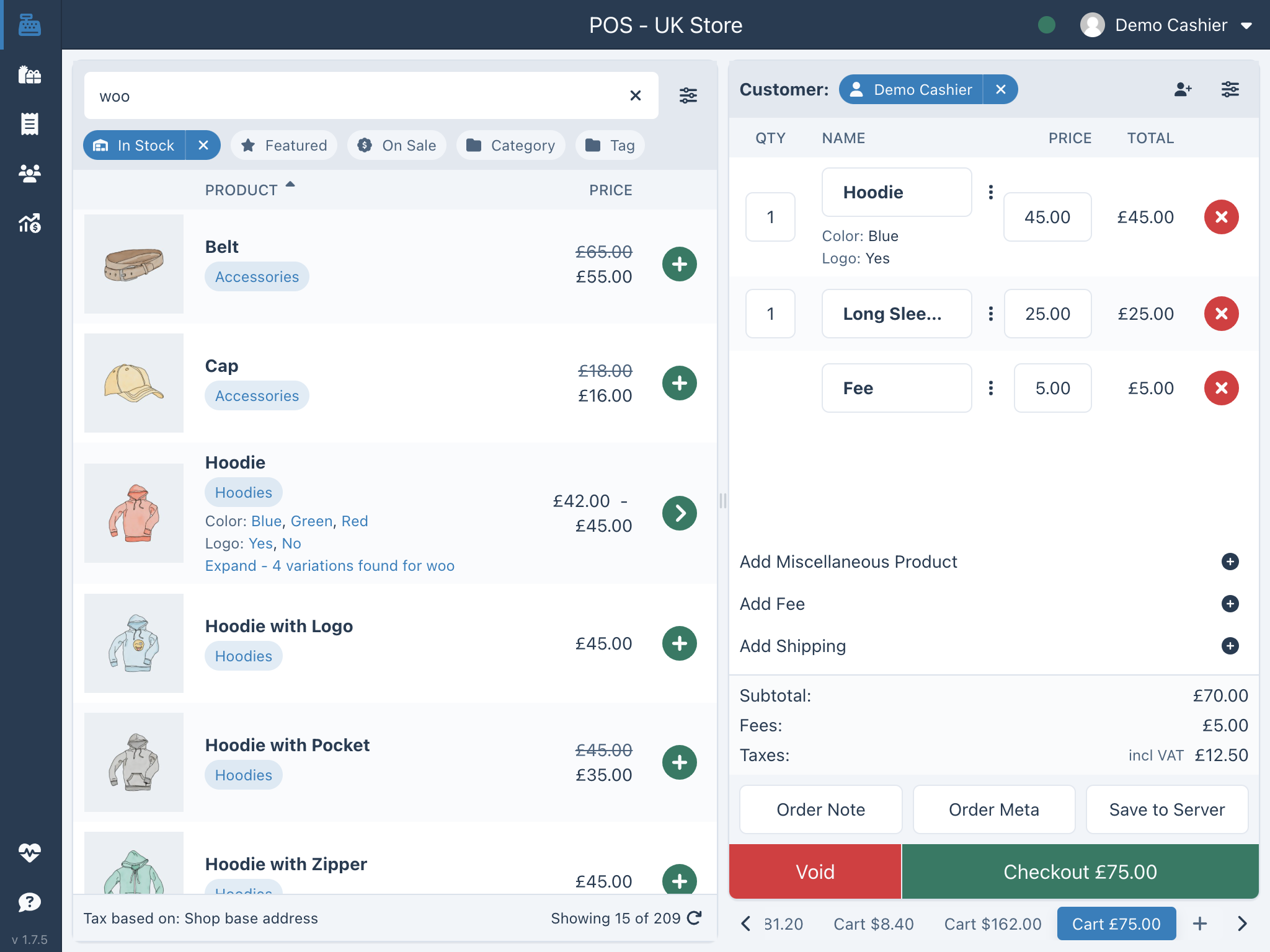
Instalación
Instalación automática
- Ve a la pantalla de plugins y selecciona “Agregar nuevo”.
- Search for “WCPOS” in the WordPress Plugin Directory.
- Instala el plugin
- Haz clic en Activar plugin para activarlo.
Instalación Pro
If you have purchased a license for WCPOS Pro please follow the steps below to install and activate the plugin:
- Ve a: http://wcpos.com/my-account/
- En My Downloads, haz clic en el enlace de descarga y guarda el plugin en tu escritorio.
- Luego ve a tu sitio, accede y ve a la página de Agregar nuevo plugin, p. ej.: http://<yourstore.com>/wp-admin/plugin-install.php?tab=upload
- Sube el archivo zip del plugin desde tu escritorio y actívalo.
- Luego ve a la página de ajustes del TPV e introduce tu clave de licencia y correo electrónico de tu licencia para completar la activación.
Instalación manual
Para instalar el plugin de forma manual:
- Download the WCPOS plugin to your desktop.
- Si te lo has descargado como fichero zip, extrae la carpeta del plugin en tu escritorio.
- Con tu programa FTP, sube la carpeta del plugin al directorio wp-content/plugins de tu directorio WordPress online.
- Ve a la página de Plugins y encuentra en la lista el que acabas de subir.
- Haz clic en Activar plugin para activarlo.
FAQ
-
Is WCPOS really free?
-
Yes. The free plugin is a complete point of sale — unlimited products, orders and customers, with no transaction fees and no per-register charges. Pro adds advanced tools (see below), but you never need it to start selling.
-
Do I need anything besides WooCommerce?
-
No. If you have a WooCommerce store, install WCPOS and you’re taking orders in under two minutes — same catalog, same stock, same prices, at the counter.
-
Which devices does it run on?
-
Any modern browser, plus native desktop apps (Windows, macOS) and iOS & Android apps (mobile in beta). One login, everything stays in sync.
-
Does it work offline?
-
Yes. Products are stored locally for instant search, so you can keep browsing products and building carts during a connection drop. Reconnect before completing checkout so the order can be created in WooCommerce.
-
What hardware do I need?
-
Whatever you already have. WCPOS works with standard barcode scanners, 58mm and 80mm thermal receipt printers (network, Bluetooth or USB), and cash drawers — no proprietary equipment and no lock-in.
-
Can I take card payments?
-
Cash and manual card payments are built in. WCPOS Pro adds integrated payment terminals (Stripe Terminal, SumUp) so you can take chip-and-PIN payments right from the register.
-
What’s the difference between free and Pro?
-
Free is a full POS for taking orders. Pro lets you run your whole store from the register without opening wp-admin: adjust stock and prices, manage orders and customers, apply coupons and refunds, use supported payment gateways and integrated terminals such as Stripe Terminal and SumUp, and print end-of-day reports. See wcpos.com/pro.
-
Can I try it before installing?
-
Yes — there’s a live demo at demo.wcpos.com/pos (login
demo/demo). -
Where do I get help?
-
Browse the documentation at docs.wcpos.com, or reach the community and Pro priority support on Discord.
-
What data does WCPOS send outside my site?
-
WCPOS keeps your data in your own WooCommerce database and only contacts outside services to: load translations from a CDN (jsDelivr); send anonymous usage analytics to wcpos.com if you opt in (withdraw any time in settings); and validate your license key, site identifier (
site_uuid), and anonymous identifier (anon_id) with wcpos.com when you activate Pro. Full details are in our privacy policy.
Reseñas


Colaboradores & Desarrolladores
“WCPOS – Point of Sale (POS) plugin for WooCommerce” es software de código abierto. Las siguientes personas han contribuido a este plugin.
Colaboradores
“WCPOS – Point of Sale (POS) plugin for WooCommerce” ha sido traducido en 12 idiomas. Gracias a los traductores por sus contribuciones.
Traduce “WCPOS – Point of Sale (POS) plugin for WooCommerce” a tu idioma.
¿Interesado en el desarrollo?
Revisa el código, echa un vistazo al repositorio SVN, o suscríbete al registro de desarrollo por RSS .
Historial de cambios
1.9.9 – 2026/07/18
- Security: hardened receipt/report template file resolution — the templates REST endpoint now strictly validates the requested template type and confirms that resolved template files stay inside the plugin’s trusted template directories, closing a path-traversal issue. All stores should update.
- Fixed payment links blocked by trailing-slash rewrite rules — POS checkout, receipt and login URLs now follow your site’s permalink trailing-slash style, so rewrite rules that force a trailing slash no longer redirect these links to an http target and get blocked as mixed content.
- Updated translations.
1.9.8 – 2026/07/17
- Fixed blocked payment and receipt links on https stores — checkout payment, receipt and login links now respect the Force SSL setting, so the order-pay popup is no longer blocked as mixed content on stores served over https while the WordPress home URL is still http (eg: behind Cloudflare Flexible SSL or other SSL-terminating proxies).
- Force SSL toggle restored — the Force SSL setting is back in the WCPOS settings under a new Advanced section, so stores that intentionally run over http can turn it off.
1.9.7 – 2026/07/15
- Receipts can now show savings — receipt templates can display regular prices, per-line savings and a Total Saved line, with correct right-to-left (RTL) previews and localized labels.
- Better black & white printing — gallery receipt templates now print safely on B&W receipt printers, while PDF receipts keep their colours.
- Resizable template editor panel — drag to resize the fields panel in the receipt template editor.
- Improved welcome-screen analytics — consented admin landing payloads now include hostname-only site and admin domains so WCPOS can understand where opted-in stores come from without sending full URLs or paths.
- Fixes — order version stamping now only happens when the POS creates an order; safer file-permission fallback when WCPOS writes files.
- Updated translations.
1.9.6 – 2026/06/17
- Cash drawer support — open a connected cash drawer automatically after payment or on demand with a new Open Drawer button. Choose a drawer connector per printer, with support for thermal/ESC-POS printers, Epson, PrintNode, and cloud/remote print jobs.
- Fixed an analytics event firing too often — the upgrade prompt “viewed” event no longer fires on every admin page load.
- Updated translations.
1.9.5 – 2026/06/15
- Fixed a payment gateways API crash — the POS payment-gateways endpoint no longer initialises every gateway’s admin settings, which could cause a fatal error (HTTP 500) on stores using certain third-party payment gateways (e.g. ToyyibPay) that only register their settings in the WordPress admin.
1.9.4 – 2026/06/13
- Redesigned Bluetooth printer setup — a managed Bluetooth chooser with connection timeouts, paired-device discovery on macOS and Linux, clearer scan feedback, and guidance to add a printer manually when none are found.
- Added serial printing — OS-paired Bluetooth Classic printers can now print over a serial connection.
- Improved Windows printing — raw printing routes through the Windows print spooler, with a dedicated installed-printers section for Windows.
- Improved USB printer flow — the USB printer list loads automatically when you open the tab, and the Scan button becomes Refresh.
- Clearer network printer scans — empty network scans now explain how to add a printer by manual IP entry, and a crash when closing network printer connections was fixed.
- Improved PDF receipts for legacy templates — the legacy receipt template renders through the PDF preprocessor with inline layout styles so downloaded PDFs match previews, and the receipt logo uses the correct image type.
- Fixed template syncing — stopped an infinite sync loop affecting receipt templates.
- Added an anonymous analytics identifier — a random, consent-gated identifier (
wcpos_anon_id) used only on the plugin’s admin welcome screen to keep its first-party analytics consistent; it contains no store data, can be rotated or removed via WP-CLI, and is deleted on uninstall (see the Privacy section). - Updated translations — latest POT and translation metadata through 2026.6.4.
1.9.3 – 2026/06/12
- Improved web printer setup — network printer scans now explain browser limitations, show structured connection diagnostics, and give protocol-aware error guidance for web printing.
- Added Local Network Access support — web print requests and printer probes opt into Chrome’s Local Network Access permission so printers on your LAN keep working in newer browsers.
- Fixed Star WebPRNT connections — the print protocol is now derived from the printer port instead of the page origin, and scanned printer ports are preserved when switching vendors.
- Improved product sorting settings — expanded sort options with a more compact sort settings row in POS product settings.
- Fixed stale variation images — product variations no longer briefly show a previous variation’s image.
- Fixed receipt tax breakdown — client-rendered receipts keep the tax breakdown, and the tax summary stays hidden when taxes are hidden.
- Fixed PDF receipt rendering — receipt markup rewritten for Dompdf so downloaded PDFs match previews, with fixed image and column rendering and aligned status-chip dots.
- Fixed order date syncing — bare GMT order creation dates are accepted and legacy order date validation retries, fixing failed order syncs for some stores.
- Added WooCommerce 10.9 compatibility — accepts the new variation gallery field in the WooCommerce 10.9 REST API.
- Updated translations — includes the latest POT and translation metadata through 2026.6.2.
1.9.2 – 2026/06/09
- Added Star Online cloud printing support — connect Star Online printers, fetch registered devices, validate printer settings, and submit cloud print jobs from WCPOS.
- Redesigned printer settings — refreshed the printer setup screens with shared tabs, clearer printer profile fields, improved select styling, and better vendor/provider handling.
- Improved responsive controls — tabs can collapse into a select control on smaller screens, and native comboboxes scroll and search more reliably on Android and other native layouts.
- Improved printer discovery UI — network scans show progress, collapse candidate printer lists, and keep web network scanning focused on the Add Printer flow.
- Added product sorting controls — POS product grid and list views now support Sort By controls and Meta Data Key selection for custom catalog ordering.
- Improved cloud print setup — the Add Printer wizard no longer pre-selects a provider, shows clearer Star Online permission messages, and supports explicit encoding settings.
- Added server-side PDF receipt downloads — receipt PDFs now use native WP Overnight PDF bytes where available and render flex/grid layouts and barcodes more reliably.
- Fixed cloud printer access — POS clients can read configured cloud printers without requiring broader admin permissions.
- Fixed blank template titles — POS templates now get fallback names when the saved title is empty.
- Updated translations — includes the latest POT and translation metadata through 2026.6.0.
1.9.1 – 2026/05/19
- Improved session recovery — expired POS sessions now refresh or ask for login correctly, while real permission errors no longer look like login problems.
- Fixed theme display issues — web navigation backgrounds now update correctly after changing themes.
- Fixed printer setup navigation — printer vendor tabs now respond correctly after the 1.9.0 printer flow changes.
- Updated translations — includes the latest translation metadata for improved app language support.
1.9.0 – 2026/05/15
Almost three months of work — here are the highlights:
- New receipt template gallery — pick from ready-made receipt, invoice, quote, packing slip, gift receipt, kitchen ticket, and right-to-left templates, and switch between them in settings.
- Multiple receipt templates — install and enable several templates side by side instead of being stuck with one.
- Thermal printer support — print receipts directly to thermal printers (58mm and 80mm) over network, Bluetooth, or USB, with a guided setup wizard in the WCPOS apps.
- Customer Tax IDs — a new Tax ID field on the customer form, ready for VAT, ABN, GST, and other regional tax numbers.
- Pro: Coupons at the POS — search for and apply coupons at checkout, with coupon pills in the cart and support for sequential discounts.
- Pro: Refunds at the POS — refund POS orders directly from the till, with a full audit trail.
- Pro: Per-store receipt templates — assign different templates to different stores, and drag-and-drop to reorder them.
- Plus lots of smaller fixes — tax and coupon calculations, third-party plugin compatibility, faster syncs, and better translations.
1.8.14 – 2026/02/19
- Hardened DB migration locking — upgrade now uses the WordPress core upgrader lock (
WP_Upgrading) with an atomic acquisition check and a shutdown fallback, preventing concurrent migrations on high-traffic sites (#540) - Fixed offline gateway ignoring POS checkout status — orders placed with the Cash or Card gateway while offline now respect the configured POS checkout status instead of defaulting to “processing” (#544)
- Fixed i18n locale fallback and caching — translation lookups no longer retry locales that returned a definitive 404, reducing unnecessary network requests on every page load (#543)
- Fixed settings page clipping on some WordPress themes — the left side of the settings panel was being cut off on sites where
#wpcontenthas extra padding (#545) - Reduced extensions catalog cache TTL — the extension directory now refreshes every hour instead of daily, so newly published extensions appear faster (#546)
- Allowed php-jwt advisory on PHP 7.4 — resolved a PHP Scoper install failure caused by a security advisory that only affects newer PHP versions (#541)
1.8.13 – 2026/02/17
- Fixed root cause of duplicate product metadata — POS order processing no longer clones product objects in the stock/coupon path, preventing repeated meta rows from being re-saved on each stock update (#537)
- Added a safer duplicate-meta repair migration — a new one-time cleanup removes only exact duplicate
(post_id, meta_key, meta_value)rows for POS-touched products/variations, reducing API payload size and memory pressure without deleting distinct meta values (#537) - Expanded regression coverage for discount and stock edge cases — added tests for coupon recalculation behavior, variation pricing paths, and stock-reduction lifecycle to prevent regressions (#537)
- Reduced diagnostic log noise — high-volume top-meta-key context is now opt-in so normal logs stay readable while deep diagnostics remain available when needed (#537)
1.8.12 – 2026/02/13
- One-time cleanup of duplicate metadata — a migration automatically removes thousands of junk meta rows that accumulated on POS-touched products and orders, resolving memory exhaustion and slow API responses on affected stores (#532)
- Reduced redundant order saves in payment gateways — Card and Cash gateways no longer call
$order->save()beforepayment_complete()/update_status(), which already save internally (#532)
1.8.11 – 2026/02/13
- Fixed critical memory exhaustion on large stores — API responses were re-reading all metadata from the database on every request, causing extreme memory usage on stores with large catalogs (#519)
- Fixed O(n²) loop in order tax calculation — variable shadowing caused quadratic iteration over line item meta (#519)
- New meta data monitoring — REST API responses now detect resources with excessive metadata and fall back to a safe response mode, preventing out-of-memory crashes (#521)
- Security hardening — masked auth tokens in test endpoint, added directory protection for temp receipt templates (#519)
- Updated all JS and PHP dependencies to latest stable versions (#521, #526)
- Pro: Redesigned Edit Store page with modern React/Tailwind UI
- Pro: Fixed SQL injection vulnerability in analytics and store authorization bypass
1.8.9 – 2026/02/11
- Completely rebuilt settings page — new modern architecture with Vite, TanStack Router, headless UI components, zustand state management, and responsive layout with grouped sidebar navigation (#495, #498, #505)
- New Extensions directory — browse, discover, and manage extensions directly from POS settings, with Pro integration hooks, GitHub links, and new-extension badges (#497, #500, #510)
- New Logs page — view, filter, and paginate log entries from file and database sources with expandable details and unread counts (#504, #511)
- Redesigned email settings — granular per-email toggles replace the old on/off switch, with new cashier notification options (#502, #508)
- Fixed POS prices persisting to product database — price modifications made at the POS no longer overwrite the stored product price (#509)
- Fixed coupon calculations ignoring tax — coupon subtotal filters are now tax-aware, preventing incorrect discount amounts (#507)
- Fixed security plugin conflicts — CSP headers are now stripped on POS pages so Content-Security-Policy rules from security plugins no longer break the interface (#503)
- Fixed WordPress 6.7+ compatibility — deferred translation calls in the Activator to avoid the “too early” notice (#498)
1.8.8 – 2026/02/06
- Completely rebuilt translation system — switched to i18next with proper plural handling and regional locale fallback, loaded on-demand from jsDelivr and decoupled from plugin version updates (#37, #75, #76, #438, #439, #474)
- Fixed conflict with REST API caching plugins — POS requests could break entirely when a REST API caching plugin was active, this is now resolved (#421)
- Fixed expired JWT overriding valid authentication — an expired token could silently override a valid cookie session, locking users out unnecessarily (#472)
- POS discounts no longer wiped by coupons — applying a coupon to an order with POS-discounted items no longer resets those discounts back to the original price (#464)
- Fixed misc products showing $0 on receipts — miscellaneous products now display the correct price on receipts and order emails (#436)
- Fixed checkout-to-receipt navigation — no more crashes or lost order links when completing a sale (#77)
- Fixed token refresh on 403 errors — sessions that appeared “stuck” requiring a re-login should now refresh automatically (#74)
- Fixed store switching issues — switching between stores no longer causes errors or blank screens (da8c05d)
- Fixed missing data in received template — the order received page was missing link data, now restored (#476)
- Tightened permission checks — capability checks now properly match what’s configured on the Access settings page (#467)
- Improved performance during large syncs — the UI stays responsive while syncing large product catalogs (8657e1f)
- Fixed web hydration in standalone mode — the web app loads correctly when accessed directly without the desktop wrapper (#19)