
Descripción
Retroceso sencillo y rápido de cualquier tema o plugin de WordPress.org a cualquier versión anterior (o posterior) sin los problemas de hacerlo manualmente. Funciona igual que el actualizador de plugins, excepto que estás retrocediendo (o avanzando) a una versión específica. No es necesario descargar manualmente los archivos y acceder por FTP o aprender Subversion. Este plugin se ocupa del problema por ti.
🔙 Retrocede plugins y temas de WordPress.org
Aunque se considera una buena práctica tener siempre actualizados tus plugins y temas de WordPress, entendemos que hay veces que necesitas retrocederlos rápidamente a una versión anterior. Este plugin hace ese proceso tan sencillo como solo hacer unos pocos clics. Simplemente, elige la versión del plugin o tema a la que te gustaría retroceder, confirma y, en unos momentos, estarás usando la versión solicitada. Sin tener que investigar para encontrar la versión, descargarla, descomprimirla, subirla por FTP, aprender Subversion o tirarte de los pelos.
Para funciones avanzadas, incluyendo soporte de reversión para plugins y temas premium que ya tienes con licencia e instalados (Elementor Pro, Gravity Forms, extensiones de WooCommerce, Kadence Pro, Astra Pro, GeneratePress Premium, Divi, productos de Envato/ThemeForest y más), registro de actividad completo, gestión de redes multisitio y soporte prioritario, considera actualizar a WP Rollback Pro.
Muy importante: Siempre haz pruebas y copias de seguridad
Aclaración importante: Este plugin no está pensado para usarlo sin que primero tomes las precauciones adecuadas para asegurar que no se pierda ningún dato o que caiga el sitio. Siempre, asegúrate de que primero has probado el retroceso en un sitio de pruebas o de desarrollo antes de usar WP Rollback en un sitio en producción.
No ofrecemos ninguna (cero) seguridad o garantía de que la versión del plugin, tema o WordPress que estés descargando funcione como esperas. Usa este plugin bajo tu propia responsabilidad.
Preparado para traducción
¿Hablas otro idioma? ¿Quieres contribuir de forma significativa a WP Rollback? No hay mejor manera que ayudarnos a traducir el plugin. Este plugin está preparado para ser traducido. Simplemente, visita el proyecto de traducción de WP Rollback, alimentado por los traductores voluntarios de WordPress.org. Allí puedes contrubuir a la traducción del plugin a tu idioma.
Soporte y documentación
Respondemos a todas las solicitudes de soporte de usuarios gratuitos en el foro de soporte de WordPress.org. Para los usuarios de Pro, envía tus preguntas al soporte de WP Rollback Pro.
WP Rollback se creó para ser lo más intuitivo posible para la experiencia natural de WordPress. Creemos que una vez que actives WP Rollback, descubrirás rápidamente exactamente cómo funciona sin dudas.
¡PERO!
Tenemos documentación en nuestro sitio web. Consulta la documentación de WP Rollback.
Capturas de pantalla
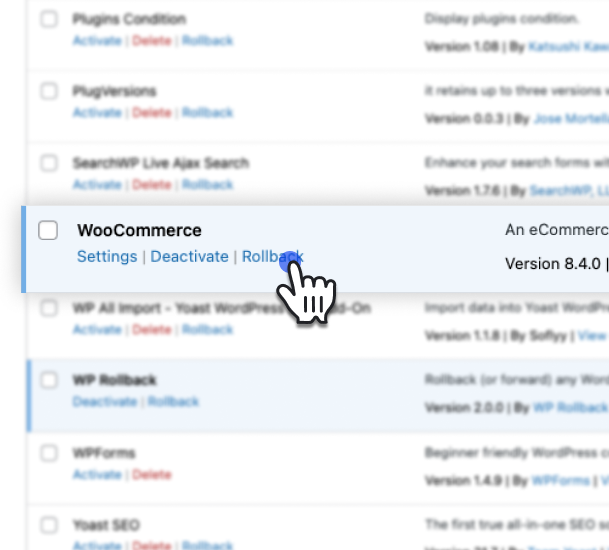
Haz clic en el enlace Revertir en la página de plugins para iniciar una reversión de plugin.
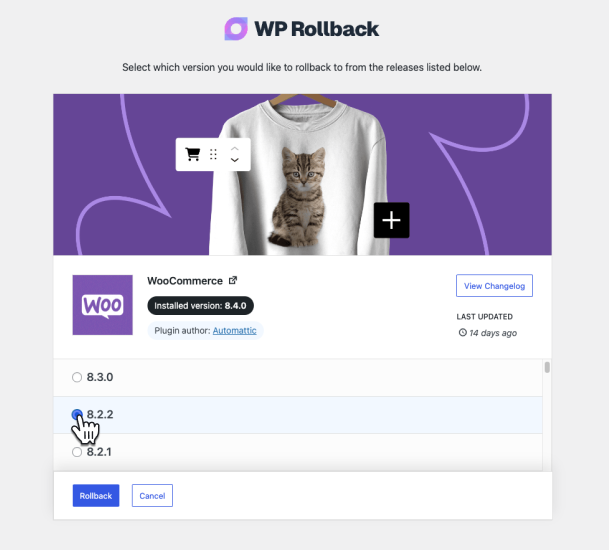
Selecciona la versión a la que deseas cambiar en la página de selección de versión.
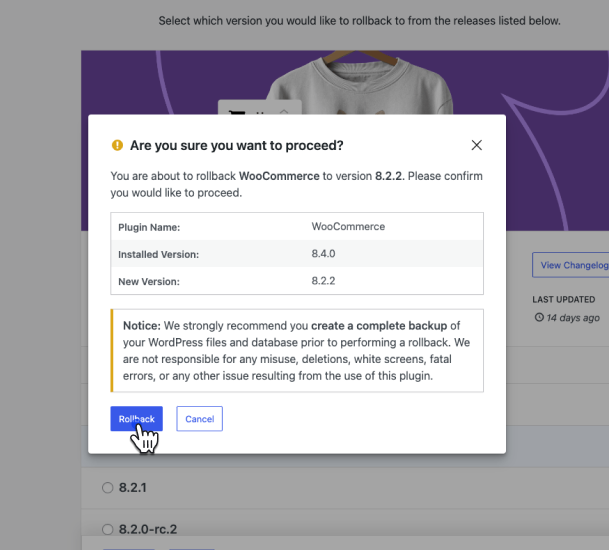
Confirma que deseas continuar con la reversión.
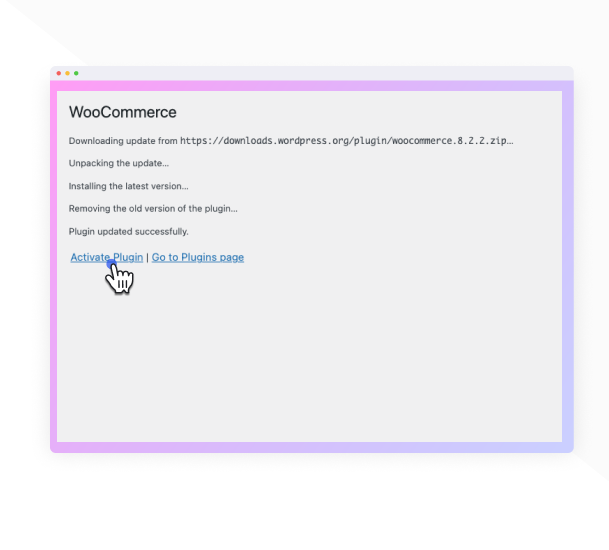
El plugin se actualizará a la versión seleccionada.
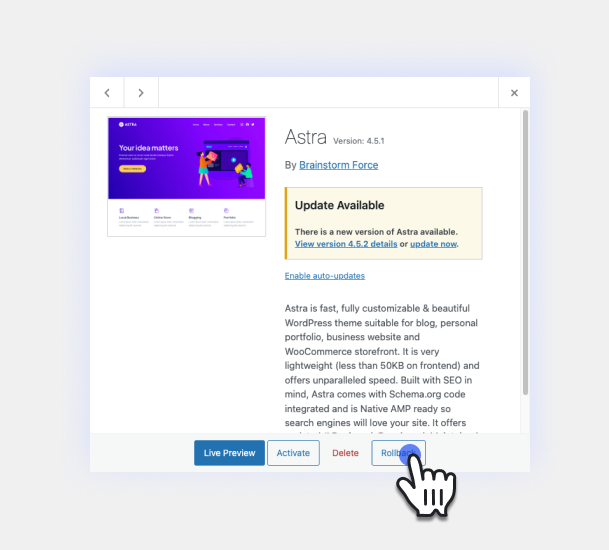
Haz clic en el botón Revertir en la pantalla de detalles del tema para iniciar una reversión de tema.
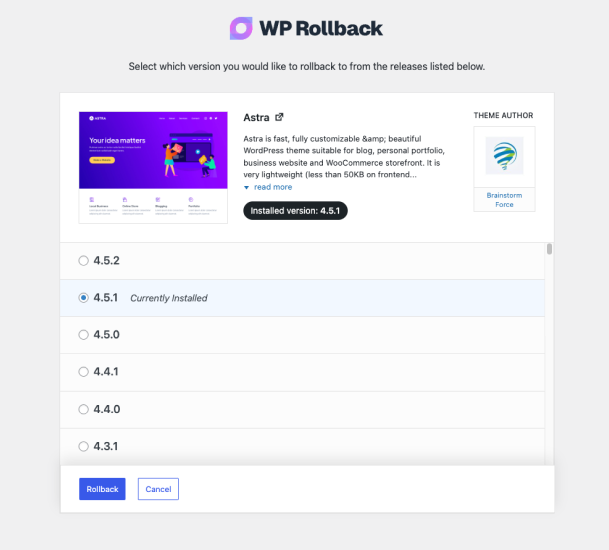
La página de selección de versión de reversión de temas funciona exactamente igual que la página de plugins.
Instalación
Requisitos mínimos
- WordPress 6.5 o superior
- PHP versión 5.3 o superior
- MySQL version 5.0 o superior
Instalación automática
La instalación automática es la opción más sencilla, ya que WordPress se encarga de las transferencias de archivos y no necesitas salir de tu navegador. Para hacer una instalación automática de WP Rollback, inicia sesión en tu Escritorio de WordPress, ve al menú Plugins y haz clic en Agregar nuevo.
En el campo de búsqueda escribe “WP Rollback” y haz clic en Buscar plugins. Una vez que hayas encontrado el plugin, puedes ver detalles como la versión, la valoración y la descripción. Lo más importante, por supuesto, es que puedes instalarlo simplemente haciendo clic en “Instalar ahora”.
Instalación manual
El método de instalación manual consiste en descargar nuestro plugin y subirlo a tu servidor mediante tu aplicación FTP favorita. El codex de WordPress contiene instrucciones sobre cómo hacerlo aquí.
Actualizando
Las actualizaciones automáticas deberían funcionar sin problemas; pero, como siempre, haz antes una copia de seguridad, solo por asegurar.
FAQ
-
¿Es seguro usar este plugin?
-
Respuesta corta = Sí. Respuesta más larga = Depende de cómo lo uses.
WP Rollback es completamente seguro porque todo lo que haces es coger las versiones disponibles públicamente de los plugins que ya tienes en tu sitio y e instalar la versión que tú decidas. No hay ningún tripo de truco ni llamadas externas raras ni nada. ¡¡PERO!!
La seguridad depende de ti: el administrador de la web WordPress. NO recomendamos en absoluto retroceder plugins o temas en sitios activos. Prueba primero localmente el retroceso, haz copias de seguridad, usa todas las herramientas y buenas prácticas de que dispongas. Esto sirve para hacer más fácil el retroceso, nada más.
-
WP Rollback (gratuito) solo funciona con plugins o temas alojados en el repositorio de WordPress.org. Si no ves el enlace de reversión, ese plugin o tema no está disponible en WordPress.org y no se puede revertir con la versión gratuita.
Si necesitas revertir un plugin o tema premium que tienes licencia para usar, WP Rollback Pro es compatible con ese caso de uso.
-
He retrocedido mi [pon aquí el nombre del plugin] a la versión X.X y ahora mi sitio está roto. Es por culpa tuya.
-
Para nada. Te lo hemos advertido en negrita varias veces en muchos lugares. Y nuestro plugin hace exactamente lo que dice que hace. Que los dioses de Internet se apiaden del alma de tu sitio roto.
-
¿Dónde se encuentra la documentación completa?
-
La documentación de este plugin se encuentra en nuestro sitio de WP Rollback. Es donde publicamos las actualizaciones periódicas.
-
¿Cuál es la diferencia entre WP Rollback gratuito y Pro?
-
WP Rollback Free proporciona funcionalidad de reversión para cualquier plugin o tema alojado en el repositorio de WordPress.org.
WP Rollback Pro te permite revertir a versiones anteriores de plugins y temas premium de los que ya tengas una licencia válida y que tengas instalados en tu sitio web. Esto se gestiona a través de Plugin Vault, una biblioteca compartida de archivos de versiones verificadas aportados por usuarios Pro. La versión Pro también incluye un registro exhaustivo de actividades, gestión de redes multisitio y asistencia prioritaria. Más información sobre las funciones de la versión Pro.
-
¿Se puede traducir este plugin?
-
¡Sí! Todas las cadenas están internacionalizadas y listas para ser traducidas. Puedes usar tu plugin de traducción favorito o ayudar a traducir el plugin en WordPress.org.
Reseñas


Colaboradores & Desarrolladores
“WP Rollback – Rollback Plugins and Themes” es software de código abierto. Las siguientes personas han contribuido a este plugin.
Colaboradores


“WP Rollback – Rollback Plugins and Themes” ha sido traducido en 28 idiomas. Gracias a los traductores por sus contribuciones.
Traduce “WP Rollback – Rollback Plugins and Themes” a tu idioma.
¿Interesado en el desarrollo?
Revisa el código, echa un vistazo al repositorio SVN, o suscríbete al registro de desarrollo por RSS .
Historial de cambios
3.1.2
- Fix: Resolved a fatal
TypeErrorthrown from theadmin_footer_textfilter when another plugin or theme passes a non-string value (such asnull) into the footer text chain. This affected sites running Classic Editor and other admin-customizing plugins, where the WP Rollback admin footer hook could blank out or partially break admin screens. The footer filter callbacks now safely accept and normalize any input type.
3.1.1
- New: WordPress Command Palette integration — press Cmd+K (Mac) or Ctrl+K (Windows) from any admin page and type “Rollback” to instantly find and navigate to any installed plugin or theme rollback. Type “Rollback plugin” to filter to plugins only, or “Rollback theme” for themes only.
- Enhancement: The default WordPress admin footer is now replaced with subtle WP Rollback branding on all WP Rollback pages — the left side shows “Thank you for using WP Rollback” and the right side shows the current plugin version.
3.1.0
- Enhancement: Redesigned rollback confirmation modal — replaced the generic admin table with a visual version comparison showing the installed version and target version side by side, making the rollback action immediately clear at a glance.
- Enhancement: Redesigned rollback progress modal — steps now display a shimmer skeleton before loading to prevent layout jump, running step messages appear in real-time, and the spinning header icon switches to a checkmark once all steps complete.
- Enhancement: Duplicate step message text is no longer shown while a step is actively running; the detail message now only appears on completion with meaningful server-side feedback.
- Enhancement: Added Lottie success animation to the rollback complete screen (Pro) along with redesigned “What’s next?” step cards featuring contextual icons.
- Fix: Rollback complete modal no longer shows a spurious scrollbar on the complete screen at typical viewport heights.
3.0.13
- New: Added “Rollback Plugins” and “Rollback Themes” quick-access links to the native WordPress plugins.php and themes.php page headers, appearing alongside the existing “Add New Plugin” / “Add New Theme” buttons for faster navigation to WP Rollback.
- Fix: “Return to Plugin/Theme Screen” button after a completed rollback now redirects correctly when WordPress is installed in a subdirectory. The URL is now generated server-side via
admin_url()instead of being constructed fromwindow.location.origin, which omits the subdirectory path.
3.0.12
- Enhancement: Users can now reinstall the currently installed version of a plugin or theme. The rollback button now adapts its label based on the selected version — “Reinstall” when selecting the current version, “Rollback” when selecting an older version, and “Update” when selecting a newer version. Confirmation messaging updates accordingly for each action type.
- Fix: Resolved critical issue where rolling back a plugin with an uninstall.php file or registered uninstall hook would trigger the plugin’s uninstall routine, potentially deleting database tables, options, and other user data. Rollbacks now use direct filesystem deletion matching WordPress Core’s Plugin_Upgrader behavior.
3.0.11
- Fix: Resolved fatal error that occurred on servers without the PHP ZipArchive extension when any plugin or theme was updated. The plugin now automatically uses WordPress Core’s PclZip library as a fallback, ensuring backups work on all server configurations and updates never fail.
- Fix: Column sorting now works correctly for Version and Status columns in plugin and theme lists.
- Enhancement: Added PclZip fallback for backup creation when ZipArchive extension is unavailable, ensuring universal compatibility across all hosting environments.
- Enhancement: Improved error handling throughout the backup system to catch both Exceptions and PHP Errors, preventing any interruption to plugin/theme updates.
- Enhancement: Optimized DataView components with reusable hooks and improved performance.
3.0.10
- Fix: Resolved fatal error when Visual Composer page builder is active. The plugin now properly validates screen IDs to handle cases where page builders return non-standard screen ID values.
3.0.9
- New: Re-added “Trunk” as an available rollback version option for testing development versions.
- New: Added support for pre-release versions including beta, alpha, and RC versions (e.g., 15.1-beta.2, 15.2-a.7, 2.5.0-RC1).
- Enhancement: Improved version sorting algorithm to properly order pre-release versions alongside stable releases.
- Tweak: Added smooth rotating animation to loading indicators for better visual feedback.
- Tweak: Updated compatibility to WordPress 6.9.
3.0.8
- Fix: Changed the filesystem type in BackupService from WP_Filesystem_Direct to WP_Filesystem_Base to allow for broader compatibility with different filesystem implementations.
3.0.7
- Fix: Updated the WP_Filesystem call in BackupService to set $allow_relaxed_file_ownership to true, enabling support for Group/World writable files. This change aims to prevent potential issues with file permissions during backup operations. Thanks to @hanno from WP.org support forums.
3.0.6
- Enhancement: Premium plugin and theme archives are no longer recreated if an archive already exists for the current version. This improves performance during updates and rollbacks by skipping unnecessary backup operations.
- Fix: Resolved critical issue where WooCommerce and other plugins with autoloaders would cause fatal errors during rollback. The plugin is now properly deactivated before deletion to prevent PHP errors when files are removed.
3.0.5
- Fix: Resolved conflict where maintenance mode was interfering with external monitoring tools like Nagios, WP-CLI, and automated WordPress update checks. The maintenance page is now only shown to regular site visitors, allowing monitoring tools and admin processes to function normally.
- Fix: Maintenance mode now only activates when rolling back active plugins or themes. Inactive plugins and themes no longer trigger maintenance mode unnecessarily.
- Fix: Corrected an issue where the maintenance mode step wasn’t displaying in the Free version’s rollback progress UI due to incorrect service provider load order.
- Improvement: Refactored rollback step registration for better code maintainability across Free and Pro versions, ensuring consistent behavior.
3.0.4
- New: Added maintenance mode support during rollback operations to prevent site access while files are being replaced, following WordPress Core update patterns.
- Improvement: Enhanced rollback safety with automatic maintenance mode cleanup that ensures your site never gets stuck in maintenance mode, even if a rollback fails.
- Fix: Removed overly restrictive package validation that required plugin main files to match the plugin slug. This fix allows plugins like Visual Composer (with main file “plugin-wordpress.php”) and other legitimate plugins with non-standard main file names to be rolled back successfully.
- Fix: Resolved fatal error when using WP CLI bulk updates (
wp plugin update --all) due to missing string type check. The backup service now properly handles cases where the package parameter is boolean instead of a string during bulk operations. - Fix: WordPress Multisite network admin pages now properly load rollback scripts and styles.
- Fix: Resolved package validation errors on multisite installations where ZIP files were incorrectly flagged as invalid.
- Fix: Fixed multisite upload size restrictions that prevented rollbacks due to the default 1MB limit.
3.0.3
- Fix: Resolved fatal error when attempting to rollback plugins that return boolean false for requires_php field instead of a string value. This fix ensures proper type validation for WordPress requirement fields.
- Fix: Plugin and theme names containing HTML entities (like &, <, etc.) now display correctly in rollback modals instead of showing raw HTML characters.
3.0.2
- Improvement: Simplified theme rollback button display functionality – all themes now display rollback buttons without checking WordPress.org availability.
- Improvement: Consolidated theme rollback JavaScript handlers between free and pro versions for better code maintainability.
- Improvement: Removed visual distinction between WordPress.org and premium plugin rollback links for a more consistent UI.
- Fix: Resolved fatal error on themes.php page caused by incorrect namespace references.
3.0.1
- Fix: Resolved an error with JetPack Sync and potentially other plugins that modify plugin data and return null.
3.0.0
- New: Added additional “WP Rollback” menu item under WP-Admin > Tools.
- New: Added new “Plugin” and “Themes” list views to select a rollback more easily.
- New: WP Rollback now stores premium assets locally on your server for easy future access.
- New: Added upsells to the new WP Rollback Pro.
- New: Updated plugin to support PHP versions 7.4 – 8.4.
2.0.7
- Fix: Resolved a bug with plain permalink websites which caused a
rest_no_routeerror when trying to rollback a plugin or theme. Thanks, @afizesan for helping pinpoint the issue. - Fix: Update the way the React app is loaded to suppress React 18+ warnings.
- Tweak: Bumped the plugin’s minimum required WordPress version to 6.0+ for best compatibility with new React components in UI.
2.0.6
Fix: The release corrects the paths used in plugin file includes and requires. The unnecessary forward slashes at the start of each file path have been removed. This change ensures proper file inclusion and requirement, avoiding potential issues with file not found errors.
2.0.5
- New: In this version we’ve brought back the “trunk” option to rollback to. This allows plugin or theme developers who use trunk for beta testing to rollback to the latest trunk version. Thanks, @megamenu for suggesting this be brought back.
- Fix: Refactored how plugin avatar images are checked so that all available image types and sizes are checked. This resolves an issue where some plugins would not display an avatar image.
- Fix: On the final rollback confirmation screen, the plugin name field was outputting raw HTML. This has been fixed to properly display the plugin name, even if it contains some html characters.
2.0.4
- Fix: Resolved issue REST route not including proper permission callback which created a PHP notice. Thanks, @rom1our for submitting the issue.
- Fix: Resolve issue with REST API and multisite installs not being able to properly communicate with the endpoint.
2.0.3
- Fix: A few additional strings in JavaScript needed to be internationalized. Thanks, @pedro-mendonca for contributing the fix.
2.0.2
- Fix: Resolves an issue with WP Rollback not being able to communicate to its REST API on WordPress subdirectory installs. Thanks, @emaralive for reporting the issue.
2.0.1
- Fix: Resolved an issue with the POT file not properly being generated at release. This resolves the issue with the new UI not being able to be translated.
2.0.0
- New: Introducing version 2.0! In this new version the UI is now better looking and snappier than ever. The branding has also been updated to look and feel more modern.
1.7.3
- Fix: Resolved an issue with plugin rollbacks not correctly setting a filepath for the plugin being rolled back. Props to WP.org user @itmesteren for the fix.
1.7.2
- Fix: Ensure that the “Rollback” button displays properly when a WordPress site only has a single theme installed. Thanks @eldertech for your help uncovering this bug.
- Fix: Minor CSS fixes for the Rollback page.
- Tweak: Update the WordPress.org readme.txt file to have better instructions for translating the plugin. We also fixed a few typos.
1.7.1
- Corregido: Evitar el aviso de PHP cuando se vuelve a la versión anterior de un plugin o tema en PHP 7.4.
1.7.0
- Tweak: Removed the WP Time Capsule staging button and banner.
1.6.0
- New: You now have the ability to rollback to the trunk for plugins. This is useful for beta testing releases and more. Thanks to karpstrucking for making this happen. #45
- New: Add actions “wpr_plugin_success”, “wpr_plugin_failure”, “wpr_theme_success”, and “wpr_theme_failure” for developers.
- New: If a plugin or theme does not have any tagged releases to select from then then an informative notice appears rather than empty space for a better user experience. #42
- Tweak: Use the WP.org API to retrieve plugin release version information for more reliable results. #35
1.5.1
- Tweak: Added additional information about the importance of Staging and Backups and links to our preferred plugin.
1.5
- New: You can now view plugin changelogs within the rollback screen. #7
- New: Added support for WordPress Multisite rollbacks for themes and plugins. #22
- Nuevo: el botón de reversión ahora está fijo en la parte inferior de la página para evitar desplazamientos largos para reversiones con muchas versiones. #23
- New: Updated the WP.org plugin header graphic. #37
1.4
- New: Updated plugin’s text domain to the plugin’s slug of ‘wp-rollback’ to support WordPress’ GlotPress translations. #28
- Nuevo: generación automática de archivos POT de Gulp y verificador de dominios de texto. #28
- Fix: Check the WP install’s themes transient is present, if not fetch it to see if a theme can be rolled back. Allows rollbacks for new WP installs or in a case where the transient is not set properly.#27
1.3
- Compatibilidad probada con WordPress 4.4 y verificado que funciona; Compatibilidad mejorada
- Fix: Trying to get property of non-object warning. #20
- Improvement: Better version sorting now using usort & version_compare. #16
1.2.4
- Nuevo: Traducciones al portugués agregadas.
- Fix: Limit HTTP requests to Plugin page only. Report 1 Report 2
1.2.3
- Corregido: refuerzo XSS. Gracias, @secupress
- Corregido: parche CSRF con respecto a los nonces faltantes. Gracias @secupress
- Mejora: escapar de todas las cosas.
1.2.2
- Nuevo: traducciones al ruso de @Flector – ¡gracias!
- Solución: se reemplazó el uso de wp_json_encode para admitir versiones anteriores de WordPress. Informe
1.2.1
- Fix: Rollback link appears on non wp.org plugins – thanks @scottopolis. #14
- Se eliminó la constante WP_ROLLBACK_VERSION innecesaria.
1.2
- Nuevo: archivos de traducción al sueco – Gracias @WPDailyThemes.
1.1
- Corregido el botón de “Cancelar” que estaba enviando equivocadamente el formulario.
1.0
- Versión inicial del plugin ¡Yupi!
- Adds “Rollback” link to all plugins from the WordPress repo on the plugin screen.
- Adds “Rollback” link to all themes from the WordPress repo inside the modal details screen.
- The “Rollback” page allows you to choose which version you want to rollback to.