

Descripción
Este plugin se integra con la API de WPVulnerability para proporcionar evaluaciones de vulnerabilidad en tiempo real para el núcleo de tu WordPress, plugins, temas, versión de PHP, Apache HTTPD, nginx, MariaDB, MySQL, ImageMagick, curl, memcached, Redis y SQLite
Entrega informes detallados directamente en tu escritorio de WordPress, ayudándote a estar al tanto de posibles riesgos de seguridad. Configura el plugin para enviar avisos periódicos acerca del estado de seguridad de tu sitio, asegurando que te mantengas informado sin sentirte abrumado. Diseñado para ser fácil de usar, es compatible con medidas de seguridad proactivas sin almacenar ni recuperar ningún dato personal de tu sitio.
Fiabilidad de los datos
La información proporcionada por la base de datos de información proviene de diferentes fuentes que han sido revisadas por terceros. No existe ningún tipo de responsabilidad sobre la información. Actúa por tu cuenta y riesgo.
Utilizando el plugin
WP-CLI
Puedes usar los siguientes comandos de WP-CLI para gestionar y comprobar vulnerabilidades.
- Núcleo:
wp wpvulnerability core - Plugins:
wp wpvulnerability plugins - Temas:
wp wpvulnerability themes - PHP:
wp wpvulnerability php - Apache HTTPD:
wp wpvulnerability apache - nginx:
wp wpvulnerability nginx - MariaDB:
wp wpvulnerability mariadb - MySQL:
wp wpvulnerability mysql - ImageMagick:
wp wpvulnerability imagemagick - curl:
wp wpvulnerability curl - memcached:
wp wpvulnerability memcached - Redis:
wp wpvulnerability redis - SQLite:
wp wpvulnerability sqlite
Para configurar el plugin puedes usar:
- Ocultar componente:
wp wpvulnerability config hide <component> [on|off] - Avisos por correo electrónico:
wp wpvulnerability config email <emails>(separado por comas) - Periodo de avisos:
wp wpvulnerability config period <never|daily|weekly> - Retención de registros:
wp wpvulnerability config log-retention <0|1|7|14|28>(en días) - Duración de la caché:
wp wpvulnerability config cache <1|6|12|24>(en horas)
Todos los comandos dan soporte a la opción --format para especificar el formato de salida.
--format=table: Muestra los resultados en formato de tabla (por defecto).--format=json: Muestra los resultados en formato JSON.
¿Necesitas ayuda?
wp wpvulnerability --help: Muestra información de ayuda para los comandos de WPVulnerability.wp wpvulnerability [comando] --help: Muestra información de ayuda para un comando WPVulnerability.
REST API
El plugin WPVulnerability proporciona varias rutas finales de la API REST para obtener información sobre vulnerabilidades de diferentes componentes de tu sitio WordPress.
- Core:
/wpvulnerability/v1/core - Plugins:
/wpvulnerability/v1/plugins - Themes:
/wpvulnerability/v1/themes - PHP:
/wpvulnerability/v1/php - Apache HTTPD:
/wpvulnerability/v1/apache - nginx:
/wpvulnerability/v1/nginx - MariaDB:
/wpvulnerability/v1/mariadb - MySQL:
/wpvulnerability/v1/mysql - ImageMagick:
/wpvulnerability/v1/imagemagick - curl:
/wpvulnerability/v1/curl - memcached:
/wpvulnerability/v1/memcached - Redis:
/wpvulnerability/v1/redis - SQLite:
/wpvulnerability/v1/sqlite
La API REST de WPVulnerability utiliza contraseñas de aplicación para identificación. Necesitas incluir una contraseña de aplicación válida en la cabecera de autorización de tus peticiones.
Ejemplo de solicitud con identificación
curl -X GET https://example.com/wp-json/wpvulnerability/v1/plugins -u username:application_password
Reemplaza nombre de usuario con tu username de WordPress y application_password con tu Contraseña de Aplicación.
Configuraciones Extra
“From:” de correo (desde: 3.2.2)
Si, por alguna razón, necesitas que los correos electrónicos enviados por el plugin tengan un From diferente al administrador del sitio, puedes cambiarlo desde el wp-config.php agregando una constante:
define( 'WPVULNERABILITY_MAIL', 'sender@example.com' );
Si la constante está activa, será visible en la pantalla de configuración
Forzar ocultación de comprobaciones (desde: 4.1.0)
Si quieres ocultar siempre un componente concreto, puedes definir una constante en wp-config.php. Si se establece en true, la opción se marcará automáticamente en la pantalla de configuración y se omitirá el análisis correspondiente.
Ejemplo:
define( 'WPVULNERABILITY_HIDE_APACHE', true );
Constantes disponibles: WPVULNERABILITY_HIDE_CORE, WPVULNERABILITY_HIDE_PLUGINS, WPVULNERABILITY_HIDE_THEMES, WPVULNERABILITY_HIDE_PHP, WPVULNERABILITY_HIDE_APACHE, WPVULNERABILITY_HIDE_NGINX, WPVULNERABILITY_HIDE_MARIADB, WPVULNERABILITY_HIDE_MYSQL, WPVULNERABILITY_HIDE_IMAGEMAGICK, WPVULNERABILITY_HIDE_CURL, WPVULNERABILITY_HIDE_MEMCACHED, WPVULNERABILITY_HIDE_REDIS, WPVULNERABILITY_HIDE_SQLITE.
Duración de la caché (desde: 4.1.0)
Por defecto, los datos de la API se almacenan en caché durante 12 horas. Para cambiar esto, define WPVULNERABILITY_CACHE_HOURS en wp-config.php con uno de estos 1, 6, 12 o 24. Este valor anula la pantalla de configuración y el comando WP-CLI.
define( 'WPVULNERABILITY_CACHE_HOURS', 24 );
Rotación de registros (desde: 4.2.0)
WPVulnerability almacena las respuestas más recientes de la API para que puedas revisar las llamadas recientes desde la nueva pestaña de registros. Define WPVULNERABILITY_LOG_RETENTION_DAYS en wp-config.php para controlar cuántos días de entradas se conservan. Los valores admitidos son 0, 1, 7, 14 o 28; usar 0 desactiva el registro por completo.
define( 'WPVULNERABILITY_LOG_RETENTION_DAYS', 14 );
Cuando la constante está presente, su valor se aplica en la interfaz de configuración y a través de WP-CLI, garantizando una rotación de registros coherente en todos los entornos.
Configuración de seguridad (desde: 4.3.0)
WPVulnerability utiliza un enfoque de detección híbrido para el software del servidor (ImageMagick, Redis, Memcached, SQLite): extensiones PHP primero (más seguro), y comandos de shell como alternativa (más preciso). Puedes controlar este comportamiento mediante constantes de configuración de seguridad en wp-config.php.
Desactivación global de comandos de shell:
define( 'WPVULNERABILITY_DISABLE_SHELL_EXEC', true );
Desactiva por completo el uso de comandos de shell. Recurre únicamente a extensiones PHP. Úsalo para obtener la máxima seguridad cuando la pérdida de precisión sea aceptable.
Modo de seguridad (standard/strict/disabled):
define( 'WPVULNERABILITY_SECURITY_MODE', 'strict' );
standard– Detección híbrida: extensiones PHP primero, comandos de shell como alternativa (por defecto, mayor precisión)strict– Solo extensiones PHP, sin comandos de shell (alta seguridad, menor precisión)disabled– Sin detección de software en absoluto (máxima seguridad)
Lista blanca de componentes:
define( 'WPVULNERABILITY_SHELL_EXEC_WHITELIST', 'imagemagick,redis' );
Permite comandos de shell solo para los componentes especificados. Componentes disponibles: imagemagick, redis, memcached, sqlite. Úsalo para un control granular.
Ejemplos:
Máxima seguridad (sin comandos de shell):
define( 'WPVULNERABILITY_SECURITY_MODE', 'strict' );
Permitir solo la detección de shell de ImageMagick:
define( 'WPVULNERABILITY_SHELL_EXEC_WHITELIST', 'imagemagick' );
Desactivación completa:
define( 'WPVULNERABILITY_DISABLE_SHELL_EXEC', true );
Todos los comandos de shell están predefinidos y validados; no interviene ninguna entrada del usuario. Los comandos se registran para auditoría de seguridad.
Compatibilidad
- WordPress: 4.7 – 7.1
- PHP: 7.0 – 8.5
- WP-CLI: 2.3.0 – 2.12.0
Seguridad
Este plugin se adhiere a las siguientes medidas de seguridad y protocolos de revisión para cada versión:
- Manual de plugins WordPress
- Seguridad de los plugins de WordPress
- Seguridad de las APIs de WordPress
- Normas de codificación de WordPress
- Plugin Check (PCP)
Privacidad
- Este plugin o la WordPress Vulnerability Database API no recoge ninguna información sobre tu sitio, tu identidad, los plugins, temas o contenidos que tiene el sitio.
Vulnerabilidades
- Se encontró y corrigió una vulnerabilidad de seguridad en la versión 4.2.2.1. Todas las versiones anteriores (3.3.0 – 4.2.1) están afectadas. Actualiza a la versión 4.2.2.1 o posterior.
¿Has encontrado una vulnerabilidad de seguridad? Por favor, comunícanosla de forma privada a ROBOTSTXT.
Colaboradores
Puedes contribuir a este plugin desde el repositorio de WPVulnerability.
Capturas de pantalla

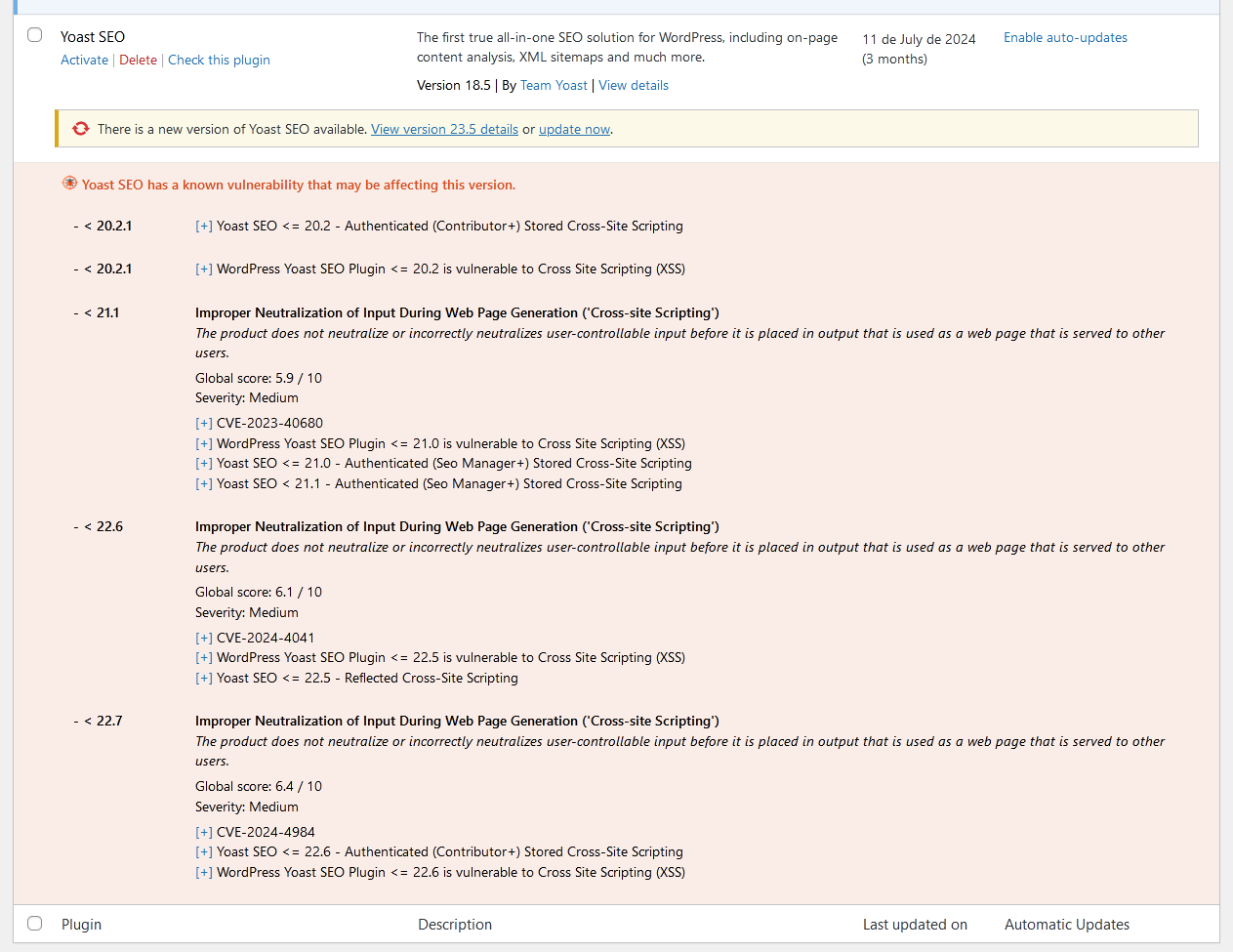

Instalación
Descarga automática
Visita la sección de plugins en tu WordPress, busca [wpvulnerability]; descarga e instala el plugin.
Descarga manual
Extrae el contenido del ZIP y sube el contenido al directorio /wp-content/plugins/wpvulnerability/. Una vez subido, aparecerá en tu lista de plugins.
FAQ
-
¿De dónde procede la información sobre la vulnerabilidad?
-
El origen está en la API de WPVulnerability.com. Las vulnerabilidades que aparecen en esta API provienen de diferentes fuentes, como los CVE.
-
¿Se envían los datos de mi sitio a alguna parte?
-
No. Nunca. Tu privacidad es muy importante para nosotros. No comercializamos con tus datos.
-
¿Qué vulnerabilidades voy a encontrar?
-
Se documentan vulnerabilidades en el núcleo de WordPress, plugins, temas, PHP, Apache HTTPD, nginx, MariaDB, MySQL, ImageMagick, curl, memcached, Redis y SQLite
-
¿Qué hago si mi sitio tiene una vulnerabilidad?
-
Primero que nada, tranquilidad. Investiga cuál es la vulnerabilidad y, sobre todo, comprueba que tienes la última versión del elemento comprometido. Te recomendamos activamente que mantengas todo tu WordPress y sus plugins actualizados. Contacta a tu proveedor de alojamiento para parchear vulnerabilidades que no son de WordPress (como el servidor web, bases de datos y otro software).
Reseñas


Colaboradores & Desarrolladores
“WPVulnerability” es software de código abierto. Las siguientes personas han contribuido a este plugin.
Colaboradores


“WPVulnerability” ha sido traducido en 14 idiomas. Gracias a los traductores por sus contribuciones.
Traduce “WPVulnerability” a tu idioma.
¿Interesado en el desarrollo?
Revisa el código, echa un vistazo al repositorio SVN, o suscríbete al registro de desarrollo por RSS .
Historial de cambios
[5.1.6] – 2026-08-22
Corregido
- Saving the “Delete all plugin data on uninstall” preference no longer triggers a fatal error (
add_settings_error()was called before the WordPress admin API was loaded). - Notification channels can now be disabled entirely: unchecking every channel and saving previously kept the old channels active, because unchecked checkboxes are never submitted.
- “Reset Plugin” and “Delete all logs” now purge both log stores (API request logs and shell execution audit logs). Previously the shell audit store was never cleaned, and both deletions silently did nothing because the log post types were not registered yet when the actions ran.
- The Debug tab API connectivity tests now use the real API routes: WordPress core collapses pre-release versions (e.g. 7.1-alpha) to their stable milestone, and plugins/themes are tested against their actual slug routes instead of nonexistent plural ones (HTTP 404).
- Component icons now carry explicit width/height attributes and a meaningful alt text. The same icons are embedded in notification emails and Site Health, where the plugin CSS is not loaded and unsized SVGs rendered at their intrinsic 800×800 size.
Modificado
languages/wpvulnerability.potregenerated with the new strings.
Compatibilidad
- WordPress: 4.7 – 7.1
- PHP: 7.0 – 8.5
- WP-CLI: 2.3.0 – 2.12.0
Pruebas
- PHP Coding Standards: 3.13.6 (0 errors)
- WordPress Coding Standards 3.4.1
- PHPStan: 2.2.9 (nivel 9, 0 errores)
- PHPUnit: 9.6.36 (54 pruebas)
[5.1.5] – 2026-08-22
Modificado
- The contributor list now leads with the ROBOTSTXT organization account, followed by Javier Casares; the remaining contributors are unchanged.
- Regenerated
languages/wpvulnerability.potso its source references match the current code. The string set is unchanged (450 strings); all shipped translations were verified against it and remain fully up to date.
Compatibilidad
- WordPress: 4.7 – 7.1
- PHP: 7.0 – 8.5
- WP-CLI: 2.3.0 – 2.12.0
Pruebas
- PHP Coding Standards: 3.13.6
- WordPress Coding Standards 3.4.1
- PHPStan: 2.2.9 (nivel 9, 0 errores)
- PHPUnit: 9.6.36 (45 tests)
[5.1.4] – 2026-08-22
Aspectos destacados
- The Site Health vulnerability tests work again on every WordPress version: they were silently disabled everywhere by an availability gate that could never pass. Secrets are now masked in the admin forms, and compatibility was verified against real PHP interpreters from 5.6 to 8.5.
Corregido
- The Site Health integration registered its tests behind
class_exists( 'WP_Site_Health' ), but core loads that class lazily, afterinit, where the plugin loads its modules — so the guard always evaluated to false and none of the 13 vulnerability tests ever appeared in Site Health. The filter is now registered unconditionally; below WordPress 5.2 it simply never fires. - “Clear all caches” in the debug tools now also deletes the
wpvulnerability-plugins-cache-datatimestamp option, so the plugins dataset is fully refreshed afterwards. - The notification email “From:” address is now sanitized with
sanitize_email()on all code paths. - The plugins list table “Last updated” column decoded the whole plugins dataset for every table row; it is now decoded once per request.
- Removed a duplicated
json_decode()call when reading the vulnerable-themes count. - The
wp_date()compatibility polyfill no longer fatals on WordPress 4.7–5.3: core callswp_maybe_decline_date()unconditionally, but that function only exists since 5.4; the call is now availability-guarded. - The core and software JSON getters return
'[]'instead of an empty string when encoding fails, matching the plugins and themes getters.
Seguridad
- Webhook URLs (Slack, Teams, Discord) and the Telegram bot token are masked in the admin settings forms (single-site and network), showing only their last 4 characters — previously they were rendered in full into the page HTML. The inputs are plain text fields, so masked values never trigger browser URL validation. Saving a form with unchanged masked values keeps the stored secret; clearing a field still removes it.
- Removed the dead
register_uninstall_hook()registration:uninstall.phpsupersedes it and the registration added a stray autoloaded option row. - Single-site settings registrations now explicitly set
show_in_rest => false, matching the multisite configuration.
Modificado
- Admin CSS/JS assets load only on the WPVulnerability settings pages, the dashboard and the plugins/themes list tables instead of on every wp-admin screen.
- The shell availability probe (
wpvulnerability_can_shell_exec()) result is cached per request instead of spawning a process on every call.
Compatibilidad
- WordPress: 4.7 – 7.1
- PHP: 7.0 – 8.5
- WP-CLI: 2.3.0 – 2.12.0
- Verified against real PHP interpreters 5.6.40, 7.0.33, 7.1.33, 7.2.34, 7.3.33, 7.4.33, 8.0.30, 8.1.34, 8.2.33, 8.3.33, 8.4.24 and 8.5.9: every plugin file lints clean from 7.0 up and fails on 5.6, confirming the declared floor. PHPCompatibility gate 7.0-8.5 clean; wp-compat WordPress floor 4.7 clean.
Pruebas
- PHP Coding Standards: 3.13.6
- WordPress Coding Standards 3.4.1
- PHPStan: 2.2.9 (nivel 9, 0 errores)
- PHPUnit: 9.6.36 (45 tests)
Versiones anteriores
Si quieres ver el registro de cambios completo, visita el archivo changelog.txt.